MillCert Reader
Turn Every Mill Certificate into Usable Data.
AI extracts, validates, and links certificate data automatically, eliminating manual entry and creating a complete digital audit trail from day one.
7-day free trial · then 50% off your first month (£175 on Workshop) · No card required
What It Does
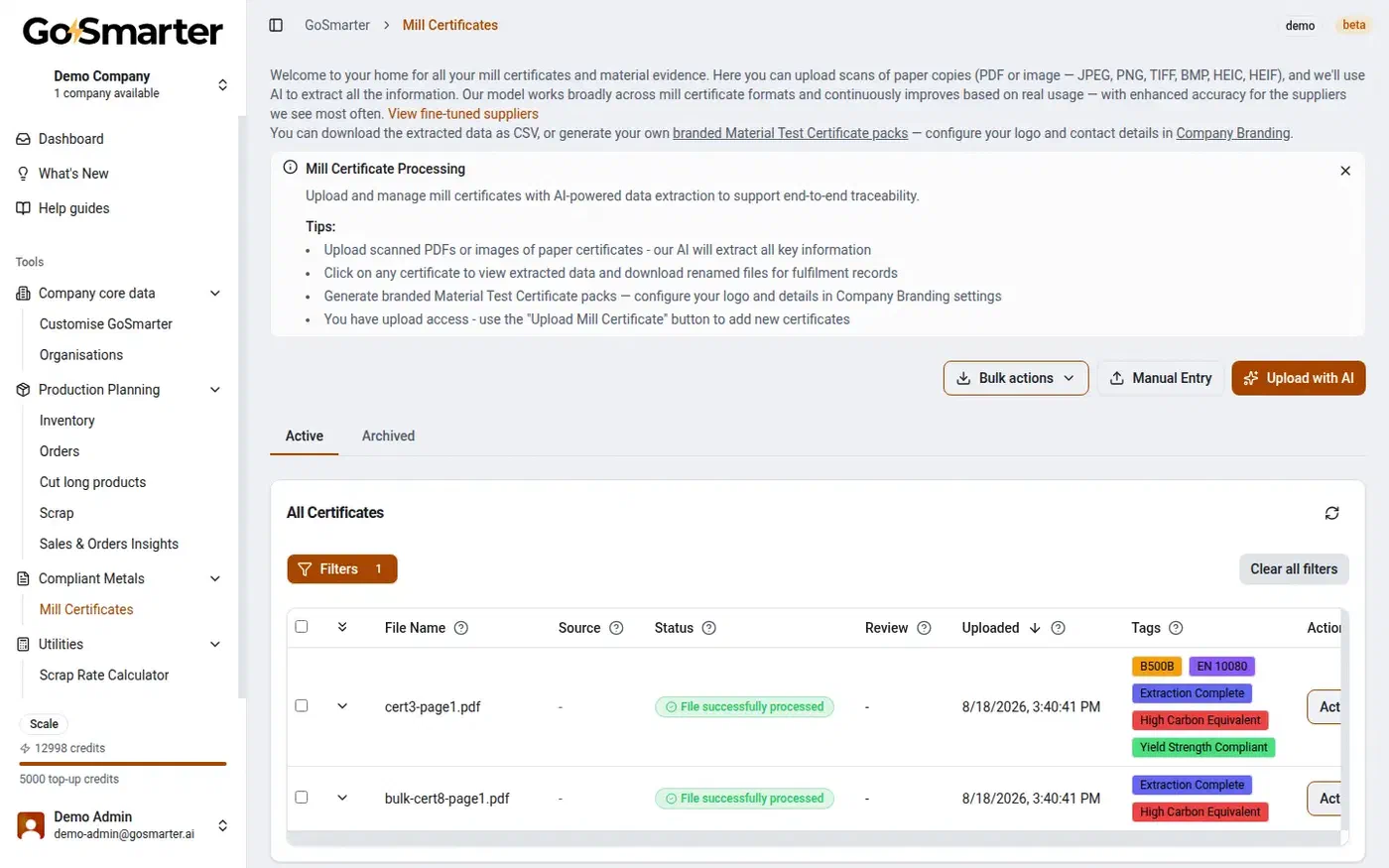
AI Certificate Reading
Extract heat numbers, grades, chemical composition, mechanical properties, and more from PDFs, scans, or photos.
Automatically Linked
Certificate data connects directly to the correct inventory record and ERP.
End-to-End Traceability
Every certificate, heat number, stock item, and order is digitally connected from goods-in to despatch.
Bulk PDF Renaming
Automatically rename certificates using heat numbers or your preferred naming convention, making documents easy to find and share.
Search & Find in Seconds
Search instantly by heat number, grade, supplier, certificate number, order, or customer to retrieve any certificate in seconds.
Anomaly Detection & Review
Flags certs that don't match the order, missing properties, or non-standard formats, so you review, edit, and approve extracted data with a complete audit history.
What our customers say
GoSmarter saves us hours every month — it pulls the key data out of mill certificates automatically and renames the files straight away. That whole process used to be painfully manual. Now it just happens.
— Padraig Bourke, Production Manager, Midland Steel UK
How it works
From PDF certificate to a linked inventory record.
The result is a complete, searchable digital record that's ready for production, compliance, and audits in seconds. Built and refined in partnership with metals manufacturers around the world.
Step 01 · Upload certs
Upload Mill Certs
Drag in a PDF or a scanned image, one at a time or in bulk. No formatting, no template setup, no per-mill configuration.
Step 02 · Review & edit
Edit & Review Your Data
Every heat number, grade, and mechanical property is extracted automatically. Check it against the source PDF side by side, and correct anything that needs it.
Step 03 · Export
CSV or Renamed PDFs
Download a CSV of the data, or renamed PDFs — by page or by heat code — ready for your fulfilment records.
Step 04 · Apply tags Optional
Apply Tags
Add tags like CARES Verified manually, or let rules apply them automatically based on grade and standard.
Step 05 · Link to stock Optional
Link Cert to Inventory
Jump straight from a stock item to its certificate. Full traceability from goods-in to despatch, one click away.
Your Audit Trail Starts at Goods-In
Every mill certificate that isn’t linked to inventory creates a gap in your audit trail. That’s not just an administrative issue—it’s a compliance risk.
A wrong heat number, a missing certificate, or an unlinked stock record can break traceability, delay audits, and trigger costly investigations.
Common causes of non-conformances include:
- Wrong material issued
- Missing heat traceability
- Lost or unlinked certificates
- Incorrect document revisions
- Manual data entry errors
Compliance starts the moment material arrives. Every piece of material is audit-ready before it reaches production.
MillCert Reader is the foundation of the GoSmarter platform — once your certs are read and linked, that data flows directly into your live inventory and Cutting Plans, so every material decision draws from accurate, traceable data.
APIs Available, No Extra Cost
Every paid plan includes a REST API at no extra cost, so you can connect GoSmarter to your Enterprise Resource Planning (ERP) system, Quality Management System (QMS), or other business systems.
API capabilities:
- Upload mill certificates automatically
- Retrieve extracted certificate data in real time
- Bulk import historical certificates
Prefer to start simple? Export data as CSV today and connect via the API whenever you’re ready — no reimplementation required. Full endpoint reference and integration patterns live in the integration strategy guide.
No complex IT project. Integrate when it suits your business.
The Full Journey—From Received Cert to Complete Digital Audit Trail
- 1
Cert Arrives
A PDF lands in your inbox or supplier portal. Drag it in, or upload a batch. No preparation required, even for a photo or a handwritten cert. - 2
AI Extracts in Seconds
Heat number, grade, chemistry, mechanical properties, mill name — pulled automatically. Spot a misread value? Make a tracked amendment. - 3
Review and Amend
Your team checks every field before approval. Every change is logged with who, what, and when. Low-confidence extractions get flagged for a closer look. - 4
Certificate Approved
QA signs off and values lock. No accidental edits to an approved cert. Unapproved certs carry a DRAFT watermark until then. - 5
Clean Data Lands in Stock
Confirmed values match to the stock item. Search by heat number, grade, or spec. Reserve stock so the cert travels with the material. - 6
Material Auto-Linked to Jobs
GoSmarter knows your grades. Job needs S355JR? The right certs link to the right stock automatically, ready for Cutting Plans. - 7
Cert Pack Ships with the Order
Generate a branded MTC or a full Certificate Pack in one click. Every step is recorded and retrievable — your EN 10204 audit trail is complete.
From PDF in the inbox to cert pack in the customer’s hands: one system, no gaps.
What the AI Actually Extracts
Heat & Traceability
Material Details
Chemical Composition
Mechanical Properties
Mill & Order Information
Origin & Compliance
Bulk PDF Renaming That Saves Hours
Why are skilled people wasting time searching for the right certificate?
GoSmarter automatically splits and renames bulk mill certificates using the heat number, so every PDF is easy to find and linked to the right material.
One production manager saved 120+ hours a year by eliminating manual certificate filing and search. No more “cert1.pdf” or “copy (3).pdf”—just the right certificate, ready to send with every order.
From Filing Cabinet to Searchable, Compliant Database — in a Day
Got a pile of PDFs? Still typing heat numbers by hand? The audit trail gap starts the moment a cert arrives unlinked. Fix that today. No IT project. No consultant fees.
Step 1 — Sign up and log in. Browser-based, nothing to install. New customers get 50% off their first month.
Step 2 — Upload your first batch of certificates. Drag and drop a folder of PDFs — scanned paper certs, digital certs from mills, anything you’ve got. The AI extracts your data and renames your PDFs within seconds.
Step 3 — Build your archive (optional). Upload your historical certificates to build a fully searchable archive. Search by heat number, grade, mill, or date — without opening a single PDF.
Step 4 — Connect to Metals Manager (optional). If you use Metals Manager, certificate data links to stock items automatically as material is received. Compliance by default — no manual entry.
Step 5 — Feed cert data into your ERP or Quality Management System (QMS) — optional. Export via CSV or use the REST API to push heat number data straight into your ERP or quality management system. See the integration strategy — from standalone use to full ERP sync.
From cert to cut plan in one system. GoSmarter extracts your cert data and links it to your stock records. It knows exactly what material you have, what grade it is, and which jobs it can fill. Feed that into Cutting Plans. Your cut list runs on verified material. Not a guess. See how Cutting Plans works →
The Business Case for GoSmarter
120 hrs
Saved a year
£32
Loaded cost / hour
£3,840
Saved every year
At a loaded labour cost of £32 per hour, saving 120 hours equates to £3,840 a year. The 120 hours is one customer’s logged saving, not an average: a Midland Steel production manager saves 10 hours a month (read the case study). The £32 an hour is illustrative. That is worth £320 a month, which recovers the upfront annual fee for the Workshop plan in about 11 months. It also covers the annual monthly price with £40 a month to spare. It does not cover the rolling monthly price at that volume: you need about 11 hours a month. Your figure depends on certificate volumes, labour costs, and existing workflows.
Faster cert turnaround also protects On-Time In Full (OTIF) performance. A shipment waiting on a chased certificate is a late shipment, no matter how good your production schedule is.
Not sure what the savings look like for your business? Use our Business Case Calculator to estimate your return—no account required.
Many customers start with MillCert Reader because it’s the quickest way to see value. Upload your first batch of certificates, extract the data in seconds, and demonstrate ROI from day one. As you grow, your certificate data connects seamlessly to inventory, traceability, and production workflows.
Why GoSmarter Beats Generic Compliance Systems
Metals-specific from day one — not a generic tool bent into shape.
| Capability | Generic compliance / QMS software | MillCert Reader |
|---|---|---|
| Certificate data capture | Manual upload into generic document fields — no cert-specific parsing | AI reads heat number, grade, chemistry, and mechanical properties automatically |
| Setup and configuration | Weeks to months of consultant-led configuration to model your workflows | Live the same day — no configuration required |
| Metals industry fit | Built for generic document control, with no concept of EN 10204 types, heat numbers, or grades | Purpose-built for metals — EN 10204, heat traceability, and chemistry built in |
| Pricing model | Per-user licensing that scales with headcount | Per site, one flat fee, unlimited users |
| Link to inventory and production | Standalone document control, disconnected from stock and orders | Certs link straight to inventory, orders, and cutting plans |
| Integration effort | Requires an IT project or consultant to connect to your ERP or production systems | REST API and CSV export included, no extra cost |
Why GoSmarter Beats Manual Cert Handling
The same six problems, solved automatically.
| Capability | Manual / spreadsheet process | MillCert Reader |
|---|---|---|
| Certificate data entry | 5-10 minutes of manual typing per certificate, copying heat numbers and chemistry off a photocopy | Seconds — AI extracts every field automatically, from a PDF or a scanned paper cert |
| Finding the right cert | Hunting through "cert1.pdf", "cert2.pdf", "cert (1) copy.pdf" in a shared folder | Every PDF renamed by heat number in bulk — the right cert, every time |
| Grade and property checking | Relies on someone remembering to check the cert against the order | Low-confidence extractions flagged automatically for review before they reach stock |
| Audit trail | Assembled in a rush from filing cabinets the week before an inspection | Built as you work — every cert linked to stock and orders from goods-in |
| Format coverage | Different templates from every mill mean re-keying by hand each time | Trained on real certificates from mills worldwide — no per-mill template setup |
| ERP / QMS integration | Re-typing the same data into a second system | REST API and CSV export included on every paid plan, no extra charge |
Every cert linked. Every trace complete.
GoSmarter reads each certificate, links it to the right stock, and builds the audit trail automatically. Compliance that holds up when it matters.
£350/month Rolling. £280/month Paid Annually.
Mill Certificate AI extraction is in the Workshop tier at £350/month (or £280/month billed annually). Workshop includes 500 AI credits per month. New customers get 50% off their first month.
One site subscription: your whole team, unlimited users, no per-seat surprises as your operation grows.
What you get on the Workshop tier:
- Compliance by default — every cert linked to every item automatically
- 500 AI credits per month included
- Audit trail starts at receipt — every incoming material traceable before it hits the floor
- Audit? You’re already ready
- Heat-code-named PDFs, bulk processed
After your first month:
- £350/month, billed monthly — cancel any time
- £280/month, billed annually — save £840 a year
- See the full pricing page for plan comparison and volume options
Upload a certificate and see what comes back. If a human can read it, the AI can read it faster.
Your data stays in Europe. GoSmarter runs on UK and EU servers only, complies with GDPR, and you can export everything as CSV at any time. No exit fees, no lock-in.
7-day free trial · then 50% off your first month (£175 on Workshop) · No card required
Get Up and Running Fast
50% off your first month. Workshop tier. No IT project. No consultant fees. See what implementation looks like →
Common Questions
Does GoSmarter keep an immutable audit trail of certificate changes?
Can GoSmarter generate a traceability pack for a customer order?
What types of mill certificates does it support?
Does it handle formats from different suppliers reliably?
What if the AI cannot read one of our certificates?
What data does it extract?
How does it handle values that look wrong or uncertain?
How quickly can I digitise a backlog of historical certificates?
Does GoSmarter MillCert Reader work alongside our existing ERP or Quality Management System (QMS)?
How long does it take to process a certificate?
How can we standardise mill cert data coming from different mills and formats globally?
Which solutions address the pain of missing or incomplete mill certs arriving from suppliers?
Is GoSmarter affordable for smaller metals companies?
Is MillCert Reader priced per user or per site?
Which software makes it easy to link mill certs to customer orders for audit trails?
Can GoSmarter help catch quality issues with incoming material?
How quickly can we get productive with GoSmarter MillCert Reader, and how much of our quality team’s time does it actually save?
What’s the best order to roll out mill cert automation, rather than trying to do everything at once?
Which platforms let us start with just mill cert automation and add scheduling or inventory features later?
Explore Other GoSmarter Features
Further Reading
- Mill Certificate Automation: The Complete Guide — everything about how GoSmarter reads, extracts, approves, and links mill cert data
- Integrated Cert Traceability & Auditability — how GoSmarter builds your EN 10204 audit trail automatically
- Midland Steel Manufacturing Case Study — how a leading rebar supplier automated certificate handling and removed audit prep pain
- End-to-End Mill Cert Traceability: From Upload to Customer — how the full workflow fits together, from AI extraction and approval locking to branded MTCs and order certificate packs
- Metals Manufacturing Glossary — plain-English definitions: mill certificates, EN 10204 types, heat numbers, and more
- ROI of AI in Metals Manufacturing — worked payback period example for mill cert automation: about 11 months on the annual plan at 120 hours saved per year
- GoSmarter vs Generic OCR/IDP Tools for Mill Certificates — why metals-specific AI outperforms generic document processing
Start with traceability. See the returns in week one.
a 7-day free trial. No setup fee.