Cutting Plans
AI planning for long product cutting that actually works
GoSmarter's Cutting Plans uses AI to generate optimal cut lists for long products like rebar. Proven to cut scrap rates by 50%. Get started in minutes.
Free trial · No time limit · No credit card required
What It Actually Does
50% Scrap Reduction
Proven in real-world trials at Midland Steel. Stop burning raw material because someone eyeballed it.
Minutes, Not Hours
Turn a morning's worth of planning into a five-minute review. Then get back to actually running your shop.
Adjust and Replan Instantly
Think you know better? Override any cut. Replan in seconds. We won't take it personally.
Export to PDF or CSV
Get your cut list in whatever format your shop floor needs. Print it, email it, or feed it to your CNC.
The problem with manual cut planning
Every morning, someone in your business is working out how to cut long products by hand. They’re looking at an orders list and a stock list, doing mental arithmetic, and trying to minimise waste. Sometimes they do it on paper. Sometimes in a spreadsheet. Either way, it takes hours and it’s never optimal.
The result: too much scrap, inconsistent cut sequences, and a plan that ignores stock your yard actually holds. The offcuts pile up. The profit margin leaks out slowly, bar by bar.
For a typical rebar stockholder cutting 100 tonnes a week, even a 3% improvement in scrap rate is tens of thousands of pounds a year. The planning is not the difficult part — the maths just needs to happen faster and more completely than any human can do it manually.
How it works
Stop guessing how to cut your long products. We take your orders and your stock, run the maths, and give you a cut list that minimises scrap.
Take the plan, adjust it if you know something we don’t, and send it to the saw. A tedious morning job becomes a five-minute review.
Cutting Plans works for all long products — rebar, structural sections, pipes, and bar stock. We tested with Midland Steel and reduced scrap rates by 50% in trials.
What you actually get
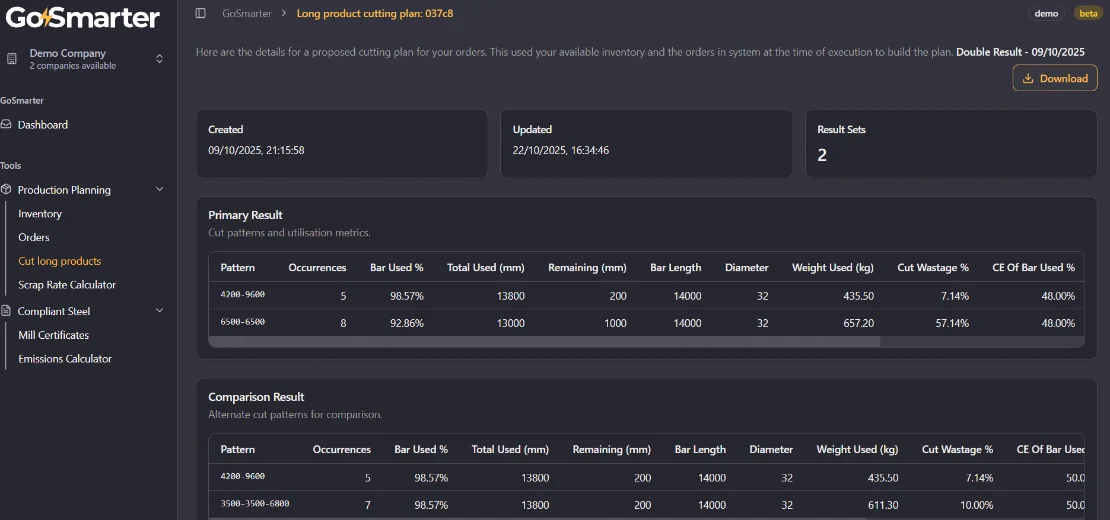
Upload your inventory and your orders. Hit Plan. A few minutes later you can download:
- A cut list showing exactly how to cut each bar
- Scrap and offcut projections so you know what’s left over
- A PDF or CSV ready to hand to the saw operator
No complex setup, no model training, no IT project. The plan accounts for all the stock you hold, including offcuts and remnants — not just fresh prime stock. So your cutting decisions reflect reality, not a guess.
You stay in control
The AI generates a first draft. You keep control. Override any cut, reorder sequences, lock specific bars, or exclude stock you know isn’t available. Replan in seconds with any change applied.
This matters on the shop floor. Stock moves. Jobs get added urgently. A good plan needs to flex without starting from scratch.
To trial today: upload an inventory spreadsheet and an orders spreadsheet, hit Plan, and you’ll have your first cut list in minutes.
Your spreadsheets end here. Your first cut plan runs today.
You don’t need an IT project to move from manual cutting plans to Cutting Plans. If you’ve got an inventory spreadsheet and an orders spreadsheet, you’re ready to run your first plan today.
Step 1 — Sign up and log in. No software to install. The platform runs in your browser. Your free trial starts immediately — no credit card needed.
Step 2 — Upload your data. Got your stock in Excel? Save it as CSV (File → Save As → CSV) and upload it directly. Most teams have their first inventory loaded within an hour. If your spreadsheet format is unusual, our onboarding guide covers the common variations and we’re on hand to help.
Step 3 — Add your open orders. Import the orders you need to cut.
Step 4 — Hit Plan. Get your first cut list in minutes. Compare it against what you’d have planned manually. The scrap savings are usually obvious immediately.
Step 5 — Push cut plans into your ERP (optional). Use the CSV export to feed cut plans into your ERP or production systems. Or hit the REST API if you want to automate it. See the integration strategy — from standalone use to full ERP sync.
£1,250/month rolling. £1,000/month paid annually.
Cutting Plans is free to trial — no credit card. Bring your own data and run a real cut plan before you spend a penny.
One workspace subscription — your whole team, no per-user fees.
What you get on the free trial:
- Full access to the cut planning engine
- Upload as many inventory and order files as you like
- Download cut lists in PDF and CSV formats
- No time limit — try it on a real job before you decide
When you’re ready to go live:
- £1,250/month, billed monthly — cancel any time
- £1,000/month, billed annually — save £3,000 a year (£250/mo × 12)
- See the full pricing page for plan comparison and bundle options
No contract lock-in. No enterprise sales theatre. Just a tool that works.
What our customers say
"Turned a morning of planning into a five-minute review. We cut scrap rates in half during trials."
— Operations Manager, Midland Steel
Give Your Team Better Tools
Your team wants to build things, not push paper. They hate the Excel sheets as much as you do. Give them software that works.
Get Up and Running Fast
Most teams are live in 1-2 days. No IT project. No consultant. No software to install. See how it works →
Common Questions
What types of products does Cutting Plans support?
It works for all long products — rebar, structural beams, pipes, tubes, bar stock, and sections. It's especially well-tested in the rebar space, making it a proven rebar cutting optimiser for fabricators generating more than 3% scrap.
What do I need to get started?
Just an inventory spreadsheet and an orders spreadsheet. Upload them, hit Plan, and you'll have your cut list in minutes.
Can I adjust the plan it generates?
Yes. The AI gives you a first-draft plan. You can override any cut, reorder sequences, or tweak parameters — then replan instantly.
How much does it cost?
There's a free trial to get started — no credit card required. When you're ready to go live, paid plans are £1,250/month rolling or £1,000/month paid annually. See our pricing page for full details.
What is cutting plan efficiency and how do I measure it?
Cutting plan efficiency is the percentage of material that ends up in a saleable product rather than the skip. Formula — (saleable output weight ÷ total material consumed) × 100. Industry best practice for rebar and long products is ≥97.5%. Cutting Plans tracks this automatically per job and per period so you can see the trend.
Does this work for structural steel as well as rebar?
Yes. The linear cutting optimisation algorithm works across all long products — rebar, structural sections, hollow sections, tube, and bar stock. If you need to optimise steel beam cutting alongside rebar fabrication, you can plan both in the same system.
Go deeper
- Cutting Optimiser: The Complete Guide — linear cutting optimisation, rebar cutting optimiser, cutting plan efficiency, and what to look for in cutting plan software
- Scrap, Waste & Yield Optimisation — the complete guide to reducing material waste with AI-powered cutting optimisation
- Production Planning Solutions — how GoSmarter fits into your broader production workflow
- Midland Steel Manufacturing Case Study — how a leading rebar supplier achieved 50% scrap reduction in production trials
- Metals Manufacturing Glossary — plain-English definitions: yield rate, off-cuts, long products, and more