Tags & Rules Engine
Flag It, Block It, or Track It. Automatically.
Configure tags and rules once and GoSmarter classifies every stock item, certificate, and order automatically, for commercial, quality, and compliance purposes.
a 7-day free trial · No card required
What It Does
Configurable Tags
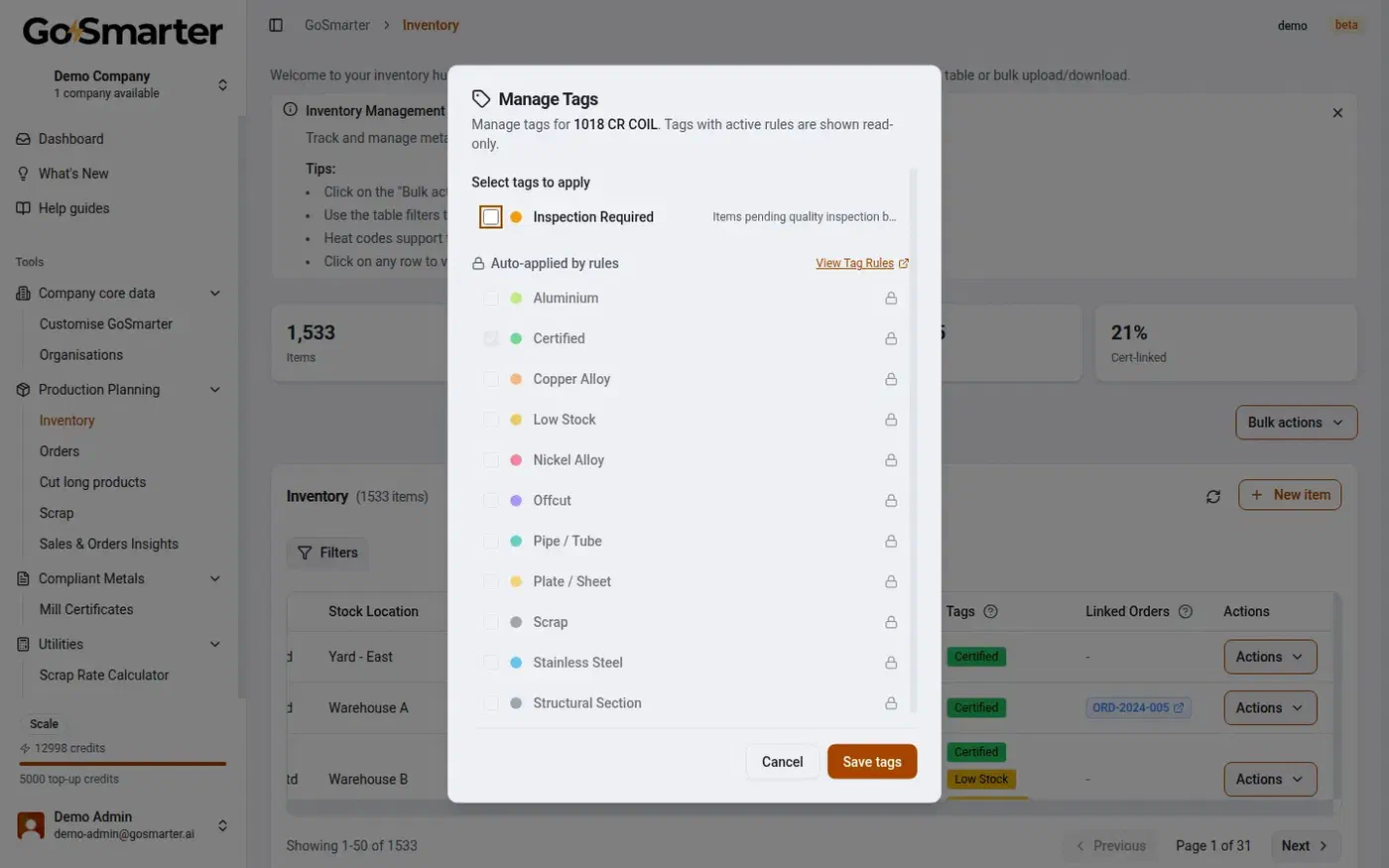
Create your own colour-coded tags for stock, certificates, and orders. Apply them by hand or let a rule apply them for you.
Build Rules Without Code
A visual rule builder. Pick a field, a condition, and a tag. No scripting, no IT ticket.
Describe a Rule, Get a Rule
Describe what you want in plain English (for example, "tag anything over 100 units as overstocked") and review the rule the AI drafts before it goes live.
Subscribable Rule Packs
Install a GoSmarter-authored rule pack for your grades and standards, and its tags and checks start working immediately.
Three Severity Levels
Block a non-conforming action outright, flag it for review, or audit it silently for reporting. You choose per rule.
One Engine, Three Objects
The same tags and rules work across inventory, mill certificates, and orders, covering commercial, quality, and compliance needs from one place.
Every Assignment Logged
Manual or automatic, every tag assignment and rule change is recorded with who, what, and when.
System Tags Stay Locked
Tags provisioned by a subscribed rule pack are read-only until you unsubscribe, so nobody can quietly edit a compliance check.
How it works
Four ways in. One automatic result.
Tag anything by hand, build a rule visually, describe a rule in plain English, or subscribe to a pre-built pack. Every route lands in the same place: tags applied automatically, exactly when your business needs them.
Step 01 · Create a tag
Create a Tag
Name it, pick a colour, add a description. Use it on inventory, mill certificates, or orders, whichever object it belongs to.
Step 02 · Build a rule
Build a Rule
Pick a field (grade, customer, order value, chemistry result), set a condition, and choose the tag it applies. Save it active or inactive.
Step 03 · Or describe it Optional
Describe a Rule With AI
Type what you want in a sentence. Review the rule it proposes, adjust anything, and only then save it.
Step 04 · Or subscribe Optional
Subscribe to a Rule Pack
Install a pack for your grades and standards. Its tags and rules start working immediately, and stay locked so nobody edits the check by accident.
Step 05 · It just runs
Automatic From Here
Every new stock item, certificate, and order is checked against your active rules the moment it's created or changed. No one has to remember to look.
What Is a Tags and Rules Engine For?
Most metals businesses run three kinds of checks on the same material, over and over: is this the right grade for the standard (compliance), does this look right before it ships (quality), and does this order need extra attention before it’s confirmed (commercial: credit, value, or customer).
Today, most of that happens in someone’s head. It works, until that person is on leave, or the business grows past what one person can remember.
Compliance, By Memory
Quality, By Memory
Commercial, By Memory
Commercial, Quality, and Compliance: One Engine
Handled By Memory Today
- A QA lead remembers to check chemistry against the standard before a certificate is approved.
- A stock controller remembers which grades need extra scrutiny, and which suppliers are reliable.
- A sales admin remembers which customers need a credit check before an order over a certain value is confirmed.
Handled By a Rule Instead
- Compliance: tag or block a certificate automatically when a chemistry or mechanical result falls outside the standard’s limits.
- Quality: flag low-confidence extractions, inspection-required stock, or a supplier format that needs a closer look.
- Commercial: flag a high-value order, tag a customer’s orders for priority handling, or audit which orders used a particular grade.
Three Ways to Build a Rule
Manual Tagging
Creatable Rules
AI-Drafted Rules
Subscribable Rule Packs
Severity: Block, Flag, or Audit
Block
Flag
Audit
Subscribable Rule Packs, By Grade and Standard
Rebar
Stainless Steel
Non-Ferrous Metals
Structural and Alloy Steel
Nickel Alloys
Subscribing to a pack provisions its tags and rules directly into your account, ready to run. Unsubscribe at any time, and the pack’s tags and rules are removed cleanly.
Rule packs and your own custom rules run on the exact same engine. There’s no separate “findings” system to learn, and no limit on mixing packs with rules you’ve built yourself.
Rules and Tags Are Audited Too
Every tag assignment, whether applied by hand or by a rule, is logged with who or what applied it, and when. Every rule change (created, edited, activated, deactivated) is recorded the same way.
If a rule is provisioned by a subscribed rule pack, it stays locked against edits so nobody can weaken a compliance check without first unsubscribing from the pack that owns it. That protects the audit trail from a well-meaning edit that quietly breaks a standard’s requirements.
Set the Rule Once. Stop Checking It By Hand.
- 1
Create Your First Tag
Pick a name and a colour. Apply it to a stock item, certificate, or order by hand to see how it looks. - 2
Build or Describe a Rule
Use the visual rule builder, or describe what you want in plain English and review what comes back. - 3
Or Subscribe to a Rule Pack
Install a pack for the grades and standards you actually work with, and its rules start running immediately. - 4
Set the Severity
Decide per rule whether it blocks, flags, or audits. Change it any time as your confidence in a rule grows. - 5
Let It Run
Every new stock item, certificate, and order is checked automatically from here. Review what gets flagged; stop doing the first pass by eye.
Why a Rules Engine Beats Institutional Memory
The same checks, minus the risk of a key person being on leave, or the business outgrowing what one person can track.
| Capability | Manual review / tribal knowledge | Tags & Rules Engine |
|---|---|---|
| Consistency | Depends on who's reviewing and how much they remember that day | The same rule runs the same way, every time, for everyone |
| Compliance checks | A QA lead manually checks chemistry and mechanical results against the standard | A subscribed rule pack blocks, flags, or audits automatically against the standard's limits |
| Coverage when someone's away | A key check gets missed if the person who does it is on leave | The rule runs regardless of who's in the building |
| New rule setup | Requires an IT ticket or a developer to add a new check | Build visually in minutes, or describe it in plain English and review before saving |
| Response to a match | All-or-nothing. Someone either catches it or they don't | Choose Block, Flag, or Audit per rule, matched to how serious it actually is |
| Editing a compliance rule | Anyone with access can change a spreadsheet formula without anyone noticing | Rule-pack-provisioned rules stay locked until you deliberately unsubscribe |
| Audit trail | No record of who decided what, or when | Every tag assignment and rule change logged with who, what, and when |
Every cert linked. Every trace complete.
GoSmarter reads each certificate, links it to the right stock, and builds the audit trail automatically. Compliance that holds up when it matters.
£350/month Rolling. £280/month billed annually.
The tags and rules engine is in the Workshop tier at £350/month rolling, or £280/month billed annually, alongside Mill Certificate AI extraction. New customers get a 7-day free trial.
One site subscription: your whole team, unlimited users, no per-seat surprises as your operation grows.
What you get on the Workshop tier:
- Configurable tags across inventory, mill certificates, and orders
- Build rules visually, describe them in plain English, or subscribe to a pre-built pack
- Block, Flag, or Audit severity on every rule
- Full audit trail of every tag assignment and rule change
After your first month:
- £350/month, billed monthly, cancel any time
- £280/month billed annually, billed annually, save £840 a year
- See the full pricing page for plan comparison and volume options
Set your first rule today. No IT project, no consultant fees.
a 7-day free trial · No card required
Get Up and Running Fast
a 7-day free trial. Workshop tier. No IT project. No consultant fees. See what implementation looks like →
Common Questions
What is a tags and rules engine in GoSmarter?
Can tags and rules cover commercial needs, not just compliance and quality?
How do I create a rule without writing any code?
Can I describe a rule in plain English instead of building it manually?
What is a Rule Pack, and how is it different from a rule I build myself?
What grades and standards do the built-in Rule Packs cover?
What’s the difference between Block, Flag, and Audit severity?
Does GoSmarter keep an audit trail of tag and rule changes?
Can I mix my own rules with subscribed Rule Packs?
Which tier includes the tags and rules engine?
Is the tags and rules engine priced per user?
Can I set a rule that enforces one customer’s specific material requirements automatically?
Explore Other GoSmarter Features
Further Reading
- Mill Certificate Automation: The Complete Guide — how AI-extracted certificate data feeds the same rules and tags engine covered here
- GoSmarter Metals Manager — how inventory tags and rules fit into live stock tracking and order allocation
- MillCert Reader — how certificate tags and rule packs catch non-conformances at goods-in
- Midland Steel Manufacturing Case Study — how a leading rebar supplier automated certificate and inventory checks that used to rely on one person remembering
- Metals Manufacturing Glossary: EN 10204 types, heat numbers, and the standards behind common Rule Pack checks
Start with traceability. See the returns in week one.
a 7-day free trial. No setup fee.