What is Dynamics 365 Field Service?
Table of Contents Show Hide
Field Service is a core customer engagement application on the Dynamics 365 platform and, like the CRM itself, is fully customisable and extensible. It is useful for teams who conduct services offsite where proactive time management is crucial to prevent bottlenecks. Field Service helps streamline business operations by offering smart scheduling capabilities such as the schedule assistant to configure recommended time slots and resources for bookings.
Broadly speaking, Field Service refers to the management of a range of tasks to be completed offsite. The standard service lifecycle begins with a work order. This specifies the work that needs to be done by a technician on the field. It may include customer details, service location, appointment time, and the customer asset being serviced. A customer asset is usually an appliance or a piece of equipment at the customer’s location.
Field services licenses may also include customer service functionality which provides self-service tools via virtual agents. These can be trained according to customer pain points to tackle frequently asked questions and offload strain on human customer service resources. Rich knowledgebase portals may also be consulted so field technicians can be automatically informed on which services need to be in their work order, reducing friction and time between a customer issue and your organisation’s fix, and helping improve customer retention.
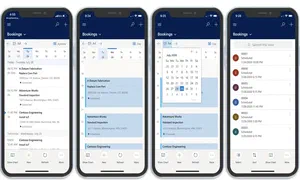
Field agents have access to relevant work order information via the mobile app.
From a mobile app, field agents can access information about what services are to be completed in the work order as well as information on required products. In the app they can get an overview of their scheduled work orders, obtain signatures from customers to sign-off work, and register any product orders they may have made to complete their work order.
Field Service can automatically assign the right resource to a task according to particular resource skills and a proficiency model scale which determines their familiarity with the issue and the level of security clearance to which they are entitled.
Moreover, resource substitutes can be arranged for any change of plans, such as a customer cancelling or a resource being off sick. The Resource Scheduling Optimisation (RSO) add-on uses AI to intelligently optimise technician efficiencies and reduce cost through lower fuel consumption and reduced vehicle maintenance. This helps ensure that a substitute resource is available at no change of plans for the customer, and that resources are given appropriate, timely work orders. Field Service therefore helps achieve scale and deliver an optimal distribution of work across your organisation’s field technicians.
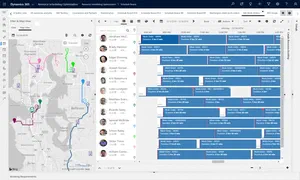
RSO dashboard featuring the schedule assistant on the Filter and Map view
Customers will receive updates on their preferred communication channel with details on when their technician will be arriving and when they are on the way.
Another key draw of Field Service is the ability to monitor assets to ensure uptimes and meet SLAs with your customers. For this, one may use Azure IoT and Connected Field Service, which allows organisations to monitor signals coming from a customer asset and, if desired, notify the customer (and other stakeholders) of system anomalies and perform a priority repair.
In the below example, the dashboard is helping an organisation monitor a vending machine along key metrics of temperature, humidity, and pressure. In addition we can set up workflows called rules which allow telemetry alerts. For example, if the pressure is too high an IoT alert will be automatically passed along to Dynamics 365 from Azure IoT.
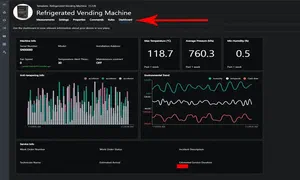
IoT central alerts sample dashboard
Inside the Dynamics 365 alert we are able to access basic information such as the exact pressure reading which triggered the alert, and the customer asset concerning the alert. Due to the urgency of IoT alerts, Dynamics 365 will automatically create a work order preloaded with recommended work order services based on the specific part which triggered the alert. The work order also gets automatically scheduled according to the best and most available resource that can do the job, with a colour flag on the item indicating high priority within the schedule assistant.
Dynamics 365 Field Service in Metals Manufacturing
Field service software isn’t just for HVAC engineers and vending machine technicians. Heavy industry runs a lot of equipment that lives offsite from the manufacturer that built or maintains it — and steel and metals manufacturers sit on both sides of that relationship.
As a manufacturer maintaining equipment at customer sites. Fabricators and service centres that install or maintain cutting, bending, or processing equipment at a customer’s premises can use Field Service to manage the technician dispatch, work orders, and parts logistics involved. Connected Field Service’s asset-monitoring pattern — watching telemetry from a piece of equipment and raising a work order automatically when a reading goes out of tolerance — maps directly onto condition monitoring for saws, presses, and rolling equipment: vibration, temperature, or hydraulic pressure sensors can trigger a maintenance visit before a breakdown stops production.
As a buyer of field-serviced equipment. Mills and fabricators are themselves customers of field service organisations for furnace maintenance, crane inspection, and calibration of weighing and testing equipment. Understanding how the Field Service model works — work orders, SLAs, resource scheduling — helps procurement and maintenance teams evaluate the service contracts they’re signing with equipment suppliers.
Where Field Service manages the offsite maintenance and service delivery side of a manufacturing business, GoSmarter focuses on the production and materials side — reading mill certificates, optimising cutting plans, and managing inventory traceability. The two problem spaces are complementary rather than overlapping: a fabricator might run Dynamics 365 Field Service to manage its site engineers while running GoSmarter to manage what happens on the factory floor.
Executive View
Dynamics 365 Field Service enables companies to analyse progress and make better offsite business decisions, where each movement is time-critical and customer-facing. For organisations requiring a smarter way of coordinating their professionals on the field, Field Service offers an automated approach for ensuring your resources are well-distributed and well-informed.
Field Service helps businesses:
- solve business problems
- enhance day-to-day operations
- advance the overall functioning of your field agents
- improve decision making
Business Function Leader View
Dynamics 365 Field Service ensures your team members on the field have access to a centralised way of obtaining work order information, schedules and much more for their daily tasks.
You may need this service if:
- your business uses field agents
- your business suffers from a lack of centralisation
- your business is looking to utilise AI to boost scheduling capabilities
- your business is looking to work with IoT to smartly monitor customer assets and receive proactive alerts before issues arise
Technical View
Technical teams should take the lead with the AI and IoT capabilities of Dynamics 365, as well as the limitless possibilities your technical team can arrange on a service built using Microsoft Power platform.
Dynamics 365 Field Service helps deliver:
- business intelligence and AI adoption.
- limitless personalisation through low-code app development made specifically for your organisation
- an IoT network to monitor customer assets and proactively inform them of issues
Get this service if you encounter:
- problems with a lack of a current decentralised system for managing field agents and work orders
- frustration with reactive scheduling issues and a lack of proactive problem solving