Why PDF Mill Certificates Break Data Workflows
- BlogSmarter AI
- Edited by Ruth Kearney
- Blog
- October 5, 2026
- Updated:
Table of Contents Show Hide
A stored PDF mill certificate proves the paperwork exists. It doesn’t link its fields to the metal on your racks. You end up typing the same numbers again, then checking whether your software put them in the wrong boxes.
At GoSmarter, built by Nightingale HQ, we use artificial intelligence (AI) and optical character recognition (OCR) to extract mill-certificate fields for metals manufacturers. It works alongside your existing ERP and spreadsheets, with CSV import and export and a REST API, so there is no rip-and-replace. We keep the source document alongside each record. Your team checks uncertain values before import.
This post shows you how to:
- Check identifiers, test results and units before they enter stock records.
- Keep heat and lot numbers separate.
- Maintain one traceable link from stock record through cutting.
Fix the data without losing the paperwork that proves it.
What Is a Mill Test Certificate (MTC)?
A mill test certificate (MTC), also called a mill cert or mill test report, is the mill’s document for a heat of metal, usually passed on by your supplier. It records the heat number, grade, chemistry and mechanical test results. It usually arrives as a PDF, so those fields stay locked in an evidence file rather than in your stock system. The EN 10204 standard (types 2.1, 2.2, 3.1 and 3.2) defines what a certificate contains, not its layout. See the mill test report overview for background. The glossary defines the other terms used here.
Watch: How to Read a Mill Test Certificate in 60 Seconds
Video by Grow Ever Group.
Why Do Changing Mill Formats Disrupt Data Extraction?
After you extract the text, layout drift can trip you up. Fixed templates break when mills move fields, rename headings or change page order.
Even one mill’s revision can move a heat number or chemistry column. Your extraction rules then pull the wrong value. That can mean wrong stock links, incorrect chemistry records and broken audit trails for metals.
Match values to headings, not page positions.
Which Format Changes Need Validation?
| Certificate variation | Workflow impact | Recommended check |
|---|---|---|
| Relocated heat numbers | Wrong identifier linked to stock | Check the field label and expected identifier pattern; review exceptions |
| Missing or changed units | Incorrect property values | Verify source units before normalisation; apply range checks |
| Different decimal separators | Parser misreads decimal commas or points, changing chemistry values | Confirm the source number format and validate the parsed value. ISO 80000-1 allows both |
| Shifted chemistry columns | Extraction rules assign results to the wrong elements | Verify element headers and check uncertain column mappings |
Text recognition alone won’t catch these problems. Your extraction rules need layout checks too, especially when you use AI tools for document operations.
As a general rule, send low-confidence fields to human review. Validate identifiers, units and headings before import. After a layout change, compare extracted records with the source certificate before they reach stock records or reports.
Why Is a Stored PDF Not Enough for an Audit?
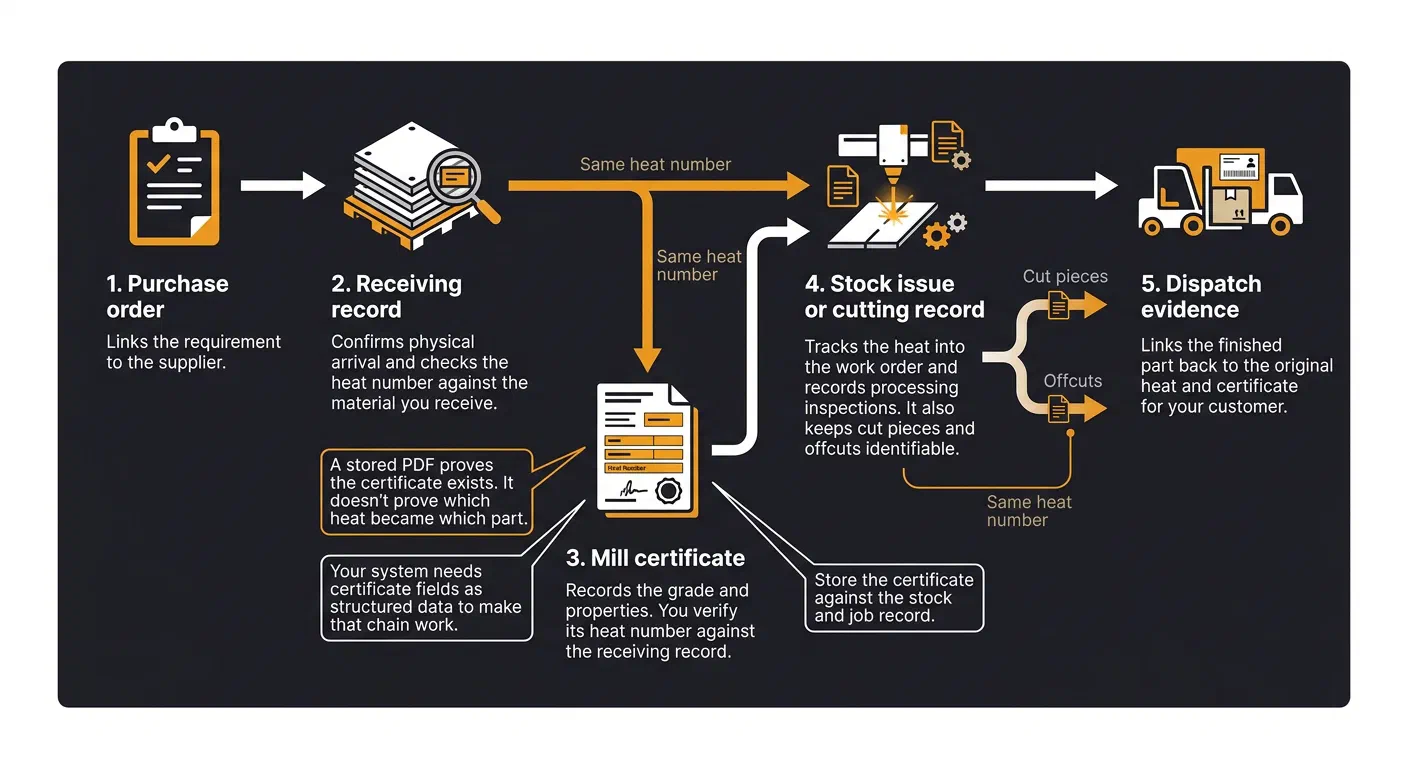
A stored PDF proves the certificate exists. It doesn’t prove which heat became which part. Your auditor needs a direct link between the certificate, stock and finished item.
The certificate records the grade and properties. The PDF alone stores evidence; it doesn’t give you usable traceability data.
When you keep the certificate outside the stock record, you rebuild that link by hand. You find the file, check it matches the material, then piece together the chain from receipt to dispatch. Store the certificate against the stock and job record.
Can You Trace Each Heat From Receiving to Dispatch?
Every step must point to the same heat. Check that nothing breaks the chain:
- Purchase order: Links the requirement to the supplier.
- Receiving record: Confirms physical arrival and checks the heat number against the material you receive.
- Mill certificate: Records the grade and properties. Verify its heat number against the receiving record.
- Stock issue or cutting record: Tracks the heat into the work order and keeps cut pieces and offcuts identifiable.
- Dispatch evidence: Links the finished part back to the original heat and certificate for your customer.
| Manual evidence workflow | Linked-record workflow |
|---|---|
| Piece together edits and material changes from email threads | Check recorded review and change history |
| Find missing data or broken traceability links during an audit | Spot missing fields or broken links before the auditor does |
| Rebuild each customer evidence pack from scratch | Retrieve linked evidence to answer customers faster |
Your system needs certificate fields as structured data to make that chain work. The next task: turn those links into data you can search, validate and report.
How Does Structured Certificate Data Help?
Structured certificate data keeps fields machine-readable and linked to the correct material record. The PDF stays as your evidence copy.
You can search by heat number, grade or specification, check records faster and standardise reporting. You also spot missing or conflicting values earlier.
But those gains need validated fields and digital traceability. Without both, you can’t rely on the data for searches, reports or audits.
Which Fields Must Stay Linked to the Certificate?
Keep the fields that establish identity, specification and traceability together: certificate ID, heat or lot number, grade, specification, purchase order, mill and supplier.
Include chemistry and mechanical results, with property names and units. Keep dimensions, extraction status and the review flag too. Take quantity and receiving details from the purchase order or goods-in record, not the certificate.
As a general rule, preserve original values and units alongside normalised values. Retain each field’s source so your reviewer can check it against the PDF.
Report in consistent formats, such as 1250.5 kg and 5 October 2026, while preserving the source text.
Send uncertain compliance-critical fields to a human reviewer before you use them.
How Can GoSmarter Reduce Manual Certificate Entry?
Automation helps only when extraction, review and approval rules agree. Otherwise, you just move the typing headache somewhere else.
Extraction does the typing. GoSmarter’s MillCert Reader uses AI and OCR to extract the mill-certificate fields it can read. That includes header details, heat numbers, chemistry and mechanical results. It keeps each record connected to the material it describes. The same heat-number link connects your certificates to stock in Metals Manager, which Cutting Plans then draws from.
You check and correct every value. MillCert Reader shows the source PDF beside the extracted data. You can edit any value, from header fields to chemistry and mechanical properties. The system records each change: who made it, when, and the old and new values.
Sign-off locks the record. When you finish checking, you approve the certificate or raise an issue with a comment. The record shows who decided and when. Approval locks the extracted data against further edits. To change an approved certificate, a reviewer must reopen it by raising an issue. The system records that too.
Rules flag what does not meet your expectations. Tag rules and rule packs check each certificate as MillCert Reader processes it. Each rule has a severity. A Flag warns the reviewer. A Block stops approval until someone overrides it with a written reason, and the system records that override. For example, a BS 4449 certificate with a minimum yield strength below 500 megapascals (MPa) gets a Block tag. So does a missing CARES (UK Certification Authority for Reinforcing Steels) QR code. You can also write your own rules and choose their severity.
The shipped packs are starter rules based on published minimum values. They are not a compliance guarantee, so check the limits against your own specification. Each pack checks every certificate, so subscribe only to the packs that match the grades you buy. Tag rules and rule packs come with the Workshop plan and above.
What you save. A person still checks everything important. You stop typing and retyping values. You no longer have to memorise each standard’s limits. You also cut the risk of misreading a value.
Agree which fields you need and how reviewers handle missing or conflicting values.
Agree your review and approval rules before you use the data for reporting or release.
For your IT team: GoSmarter stores your data on Microsoft Azure in UK data centres. You can export your data as CSV or through the REST API. The pricing page lists current plans and offers. Test it on one batch of certificates and compare the time against your current re-keying.
What Should You Check Before Using Extracted Data?
Once you’ve fixed your extraction and link rules, check the next certificate batch before import or use. That helps you meet your customer’s traceability requirements.
Test it with the MillCert Reader. Keep the source PDF open alongside the extracted record. Check these five points:
- Match identifiers: Compare every heat number and inspection reference with the PDF. Check letters, leading zeros and separators.
- Check test results: Compare chemistry and mechanical results with the source. Check property names and units too.
- Resolve uncertainty: Review every uncertain or mismatched field. Do not approve unresolved values.
- Test the links: Check that each extracted record links to the correct stock item and source certificate.
- Verify retrieval: Search by heat number. Check that the matching stock record and PDF return together, preserving traceability from stock to audit.
Conclusion: Keep the PDF and Validate the Linked Data
Keep the PDF as evidence. Link it to validated structured data, and revalidate that data whenever the mill changes its format.
Keep the original PDF linked to the metals inventory management record. Record the material, heat number and certificate data once when you add the stock. Carry that same link through cutting and offcuts.
Use the PDF for evidence and the linked data for reporting and audit. You keep the evidence intact without trapping usable data inside a PDF.
FAQs
Why can't searchable PDFs replace structured certificate data?
A searchable PDF still keeps heat numbers, chemistry and mechanical properties inside separate files. Layouts vary between mills and suppliers, so you cannot search or report across them reliably.
You also have to link PDF data to stock records, production jobs and compliance reports by hand. That makes audits slow and re-keying error-prone.
GoSmarter, built by Nightingale HQ, extracts key fields into structured, searchable records linked to the source PDF. You review uncertain values instead of typing every certificate again.
How can I catch extraction errors when mill formats change?
Use a system like GoSmarter’s MillCert Reader, built by Nightingale HQ, to check extracted values against your specification rules, such as minimum yield strength. It flags anything that fails before you approve the certificate.
Your team reviews each certificate against the source PDF shown alongside it. Certificates from an unrecognised mill are flagged as low confidence. Every edit is logged with who changed what, and when.
We use uploaded certificates, de-identified, to improve our own extraction models. We never share them with other customers or third-party AI providers. Microsoft does not train on your data.
How do I preserve heat traceability after cutting?
Keep a digital link between the original material record and every resulting piece. Manual processes and disconnected files can break that link.
GoSmarter, built by Nightingale HQ, links each stock item to its certificate by heat number. When you cut a length, the cut piece and the offcut keep the parent’s heat number, so they stay traceable.
Go deeper
Drill deeper
- Your ERP Calls It Traceability. It Isn't.
Go here for the other half of the problem: why ERP lot numbers cannot name the heat.
10 min read
- Audit Trails: Because 'I Think It Was Dave' Isn't a Defence
Go here for the standards clauses that make a stored PDF insufficient in an audit.
9 min read
Tags:
About the Author

Editor· Co-Founder & CEO
Ruth Kearney is Co-Founder and CEO of GoSmarter AI — driving commercial growth and strategic partnerships to help metals manufacturers adopt AI and digital tools that actually deliver on the shop floor.