How to use Azure Cognitive Services to make voiceovers for your videos
- Mia Hatton
- Archive
- March 10, 2020
- Updated:
Table of Contents Show Hide
In this post, we take you through how to use Microsoft's Cognitive Services to generate voiceovers for your videos. In practice, this technique for generating speech from text can be used in a wide range tasks but one of the ways we're using it at Nightingale HQ is to support our marketing team.
If you are unfamiliar with some of the words we've used, here's some background reading:
If you don't yet have an Azure account, you can get one for free and start using this technology free forever. It also offers you free access to different technology, including an API that uses reinforcement learning to optimise your content displays to customers, but more on that another day.
The process you will work through is:
- Create a private, authenticated Speech AI service that can be used for a variety of purposes including Text to Speech
- Create an account to run data science and AI code for free using Azure Notebooks
- Make a personal copy of our notebook
- Add your details and desired text to your notebook
- Hit Run a bunch of times
- Download the generated file
- Load the file into whatever video editing tool you're using
If this is your first delve into using cloud computing and working with code, don't rush through the process and since all of it is free, don't be afraid to delete and start again. Once you've done all the setup, you'll be able to use your notebook web page again and again to produce quick, AI-generated audio files!
Set up Azure Cognitive Services
- From your Azure Portal, go to the Marketplace and search for 'Speech'.
- Find the Speech cognitive service and create the
resource!
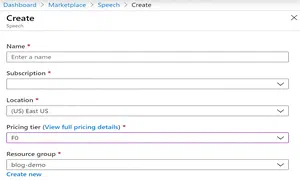
- Give your resource a name and select your subscription, location and
resource group. Choose 'F0' for your pricing tier as this gives
you free access to the resource, up to 5M characters per
month.
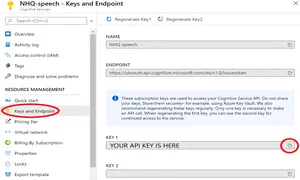
- Navigate to your new resource from your dashboard and copy the API
key. Do not share this key publicly.
Set up your Azure Notebook Project
- Follow this link to the Notebook Project and click 'Clone' to create your own copy. You may need to sign in to Azure again.
- In the dialogue, give your cloned project a name. Leave the 'Public' box unchecked as you do not want your API key to be publicly available.
Run the project
- Click on
voiceover-generator.ipynbto open the Jupyter Notebook. Wait for it to fully load. - You are now ready to generate audio from text! Follow the instructions in the README.md and voiceover-generator.ipynb files, or watch the video below to create an audio file from text of your choice. Note that in the video our API key is read from a text file, to keep it private.
Click below to hear the audio file that was created in this video:
About the Author

Budding data scientist with an entrepreneurial and science communication background.