Your Spreadsheets Are Not a Database (So Stop Pretending They Are).
- Steph Locke
- Blog
- February 24, 2026
- Updated:
Table of Contents
If your production schedule lives in a file called Master_Schedule_FINAL_v3.xlsx, we need to talk. Spreadsheets might feel like the easy fix, but they’re silently wrecking your margins. From misplaced decimals to version chaos, they’re an accident waiting to happen. And in metals manufacturing, one mistake can turn profits into scrap faster than you can say “audit failure.”
Here’s the blunt truth: Spreadsheets are not databases. They’re static, error-prone, and painfully slow. Meanwhile, your competitors are using modern tools to slash waste, boost productivity, and stay ahead. If you’re still clinging to Excel, you’re not just wasting time - you’re losing money.
The Old Way vs. The Smart Way
| The Old Way (Spreadsheets) | The Smart Way (Modern Systems) |
|---|---|
| Manual data entry = Typos galore | Automated capture = Zero errors |
| Static files = Outdated information | Real-time dashboards = Always current |
| Hidden errors = Missed opportunities | AI insights = Better decisions |
| One person owns it = Big risk | Centralised system = Team collaboration |
Let’s face it: spreadsheets were never built for the complexity of metals manufacturing. But the good news? You don’t have to keep running your factory like it’s stuck in the past. Modern tools can handle the heavy lifting - so you can focus on building, not firefighting.
Here’s how to fix the mess.
Stop Using Excel as a Database! Here’s Why 🚨
5 Ways Spreadsheets Fail in Metals Manufacturing
Spreadsheets might seem like a quick fix for managing data in metals manufacturing, but their limitations can lead to serious problems. Here’s why they fall short when compared to purpose-built systems.
Data Accuracy and Traceability Problems
Every time you manually enter data, you risk making mistakes. In metals manufacturing, even a small error - like a misplaced decimal - can turn profits into costly scrap. Spreadsheets offer no safeguards: you can put text where numbers should go or leave crucial fields blank. When something goes wrong, trying to trace a defective batch back to its source becomes a nightmare.
As John Vagenas, Managing Director of Metallurgical Systems, explains:
“When it comes to reporting a plant’s performance, one of the biggest problems with Excel is that there is absolutely no way of knowing at a glance whether the data you are seeing is accurate” [6].
These inaccuracies don’t just stop at the data - they ripple through your entire operation, as we’ll see in the next issue.
Error Detection and Control Gaps
Spreadsheets are blind to errors. Typos, incorrect formulas, and missing data can easily go unnoticed, undermining production plans and quality checks. Unlike proper databases, which enforce rules like mandatory fields and specific data types, spreadsheets accept anything. This makes it all too easy for mistakes to slip through.
Xavier Hill, a mining consultant, highlights the danger:
“Enormous spreadsheets with complex formulas spreading over a range of tabs become next to impossible to audit and it only takes one mistake for the rest of the data and the conclusions drawn from it to be wrong” [6].
Vartech Systems found this out the hard way. After switching from Excel to a proper BOM management system in 2020, they caught a £1,000 pricing error in the first month [3]. The issue wasn’t incompetence - it was that spreadsheets don’t flag when something’s off. Errors simply pile up across tabs and versions, quietly wreaking havoc.
And even if your data is error-free, spreadsheets can’t handle the sheer scale of modern manufacturing.
Scalability and Performance Limits
Excel can only handle 1,048,576 rows and 16,384 columns [7]. For a high-volume operation tracking every heat, coil, and quality check, you’ll quickly hit that limit. Long before that, though, performance slows to a crawl. Files become bloated, calculations lag, and opening large files can grind your workflow to a halt.
The UK government experienced this firsthand during the pandemic, losing over 15,000 COVID-19 infection records because their tracking system relied on an outdated XLS file format with a 65,000-row limit [7]. In metals manufacturing, where thousands of parts are tracked daily, spreadsheets simply can’t keep up. Poor data management can lead to over 30% operational inefficiency [3], not to mention the time wasted waiting for files to load or searching for the correct version.
Reliance on Individual Staff and Information Silos
Spreadsheets often live on one person’s computer, making operations vulnerable if that employee is unavailable. This “key person risk” is common in metals manufacturing, where different departments - maintenance, production, and quality - each maintain their own isolated spreadsheets. These disconnected files create information silos, leaving teams working with incomplete or outdated data.
The result? UK manufacturers lose an average of 20 hours a week to downtime, costing approximately £100,000 [2]. Spreadsheets might work for one person, but they fail when collaboration and cross-departmental communication are needed.
Compliance and Audit Trail Shortcomings
Spreadsheets can’t track who made changes or when. Data and formulas can be altered without leaving a trace, making them a compliance nightmare. Regulatory bodies like the FDA and EMA require electronic signatures and immutable audit trails - features spreadsheets simply don’t offer [6].
Take WG Bakery as an example. They used to spend three hours preparing for audits because their data was scattered across multiple spreadsheets. After adopting digital batch tracking in 2025, their audit prep time dropped to 30 minutes, and they had zero critical audit findings over the next year [5]. Similarly, General Finishes transitioned from Excel to an ERP system, achieving 100% lot traceability and cutting raw material inventory by 30% [5].
While spreadsheets might seem convenient, they’re a liability when it comes to audits or recalls. The risks far outweigh the benefits.
Armed with this understanding of spreadsheets’ limitations, it’s clear that modern systems designed for metals manufacturing are the way forward.
Why Spreadsheets Can’t Replace Databases
Spreadsheets are designed to store data for human reference, while databases are built to process, validate, and serve data in real time. In metals manufacturing, where even a tiny mistake - like a misplaced decimal - can turn profits into losses, this distinction is critical. Let’s break down how manual processes, static file storage, and unstructured data can hold back manufacturing operations.
Manual Work vs. Automated Systems
Spreadsheets depend heavily on manual data entry, which increases the risk of errors - especially in high-pressure environments. Tasks like routing steps, defining material specifications, or setting batch sizes all rely on human input. In contrast, databases automate these processes by pulling data directly from scales, sensors, and PLCs. This eliminates the need for manual transcription and ensures that only valid, structured data is entered, preventing unchecked errors entirely [5][7][4].
Jan Bliki, Head of the Data Management group at the European Environment Authority, captures this well:
“Excel is still the easiest input tool among non-database users. It’s hard to replace if users are that used to that format… [but] a single database helps preserve the integrity of your data” [8].
Consider Vartech Systems. When they swapped Excel for a relational database in 2020, they saved two hours of engineering time every day. Why? Because component changes automatically updated across all BOMs, catching a £1,000 pricing error that had been lurking in outdated spreadsheet tabs [3].
Static Files vs. Centralised Data Systems
Spreadsheets often lead to fragmented and inconsistent data. Different versions of the same file can create conflicts and outdated information. On the other hand, centralised databases ensure that everyone is working from the same real-time data. Sales, engineering, and shop floor teams can all access a single source of truth, with real-time dashboards replacing static reports [2][4].
A great example is General Finishes, which replaced their Excel-based inventory tracking with a centralised ERP system. The results? They achieved 100% lot traceability, reduced raw material inventory by 30%, and cut batch turnaround times by 20%. All of this was possible because every department was finally aligned, working from the same up-to-date data [5].
Lack of AI-Ready Data Structure
Spreadsheets don’t offer the structured foundation that AI systems need. As Roman Omelchuk, Head of AI R&D at Devox Software, explains:
“Intelligence is deployed before execution discipline exists. In real manufacturing, scalable AI… only really works when execution is rock solid, when orchestration is clear-cut, and when intelligence is layered on top” [10].
AI thrives on consistent, structured data and clear processes. Databases enable event-driven systems that respond in real time to triggers like SCADA alarms, sensor data, or quality control issues. Spreadsheets, with their static nature, simply can’t keep up [10].
For example, AI-driven maintenance models can reduce unplanned downtime by 30–50% and cut maintenance costs by 20–30% [10]. Similarly, quality classification systems can lower defects and scrap by 25–40% through early intervention [10]. Spreadsheets, designed for human use, lack the structure and flexibility needed for these advanced capabilities. As Simon Worthington of Register Dynamics aptly puts it:
“Spreadsheets are for humans or machines. Not both!” [9].
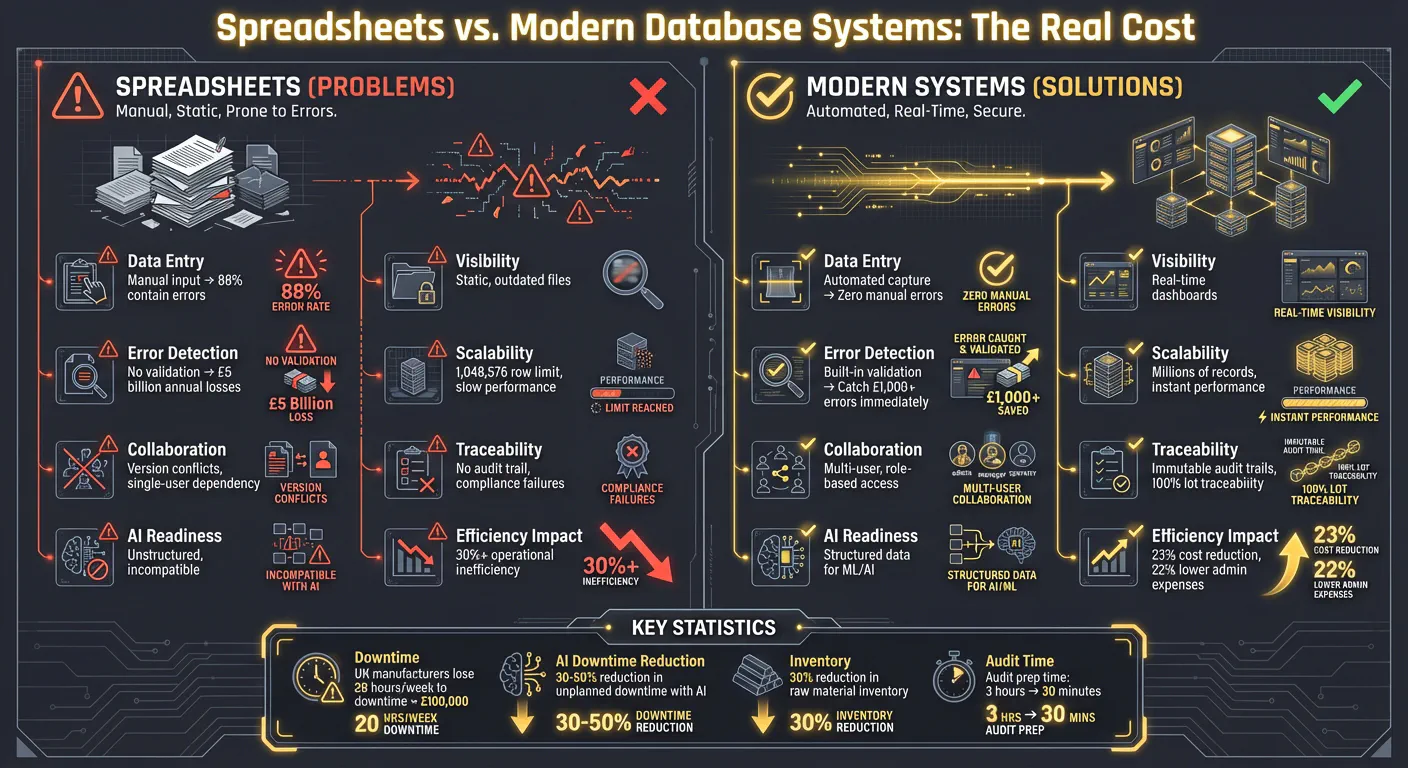
| Feature | Spreadsheet (Excel) | Database (ERP/SQL) |
|---|---|---|
| Data Entry | Manual; prone to typos | Automated capture & validation |
| Visibility | Static, point-in-time | Real-time dashboards |
| Traceability | Manual logs, hard to audit | Automated, immutable audit trails |
| Scalability | Slows with large datasets | Handles millions of records |
| Collaboration | Version conflicts | Multi-user, role-based access |
| AI Readiness | Lacks structure | Built for machine learning |
The contrast is clear: spreadsheets were never designed to support the demands of modern manufacturing. Databases not only ensure accurate data capture but also unlock real-time insights, paving the way for smarter, more efficient operations.
The Real Costs of Using Spreadsheets
Spreadsheets aren’t just a minor inconvenience - they’re a drain on your resources, productivity, and growth potential. Let’s break it down into what this outdated tool is really costing you: time, money, and missed opportunities.
Lost Time and Reduced Productivity
Manual data entry is a black hole for your team’s time. Studies reveal that 88% of spreadsheets with over 150 rows contain mistakes[1], and nearly half of professionals cite manual updates as their biggest headache[12]. Think about it: engineers chasing the “latest version”, planners double-checking formulas, and shop floor staff calling the office to confirm numbers. It’s chaos.
Take Vartech Systems as an example. Before 2020, their engineers spent hours updating Excel-based Bills of Materials (BOMs). Switching to a structured system saved them two hours every day - over 500 hours a year. That’s time they could finally spend on real engineering work. Max, their Engineering Manager, summed it up perfectly:
“What we love most… is the ability to change one thing in our BOM and it shows up everywhere the item or component is used!”[3]
Spreadsheets also create a “latency tax.” Since they’re static snapshots, they don’t reflect real-time shop floor conditions. Imagine scheduling jobs for a machine that broke down an hour ago - only to scramble at the end of the shift to fix the schedule. WG Bakery faced similar inefficiencies. Preparing for audits used to take them three hours due to scattered data. By adopting a digital batch tracking system, they cut that time to 30 minutes and avoided any critical audit findings over the next year[5].
These inefficiencies don’t just waste time - they multiply financial risks.
Financial Losses from Mistakes
Spreadsheet errors don’t just slow you down - they hit your bottom line. Mistakes like outdated prices or misplaced decimals cost businesses an estimated £5 billion annually[11]. In industries with razor-thin margins, like metals manufacturing, even a minor error can flip a profit into a loss.
Vartech Systems learned this the hard way. Within their first month of moving away from Excel, they caught a £1,000 pricing error caused by outdated material costs[3]. That’s just one error in one month. How many more are slipping through the cracks?
And then there’s inventory. Spreadsheets often lead to inflated “safety stock” levels to cover inaccuracies. Inventory carrying costs typically range from 20% to 30% of the total inventory value[11]. General Finishes tackled this by switching to a centralised ERP system, reducing their raw material inventory by 30% and freeing up capital tied up in excess stock[5].
Compliance is another financial minefield. Sending quotes based on outdated prices can obliterate your profit margins. Worse, failing to trace a batch back to its heat number during an audit could result in penalties that make a £1,000 error look trivial.
Missed Opportunities from Outdated Tools
Sticking with spreadsheets doesn’t just cost you time and money - it puts you at a competitive disadvantage. While you’re firefighting spreadsheet errors, your competitors are using AI to optimise cutting patterns, predict equipment maintenance, and schedule production in real time. Spreadsheets, with their disconnected cells, are “data dead-ends.” They lack the relational structure needed for modern analytics[3].
Poor data management can lead to over 30% operational inefficiency in manufacturing[3]. Companies that transition from spreadsheets to ERP systems report an average 23% reduction in operational costs and 22% lower administrative expenses[11]. That’s not just saving money - it’s gaining an edge. While you’re manually reconciling inventory counts, others are using real-time dashboards to make smarter, faster decisions.
Then there’s the risk of over-reliance on a single employee who understands the complex macros holding your operation together. If they leave, so does your planning process. Spreadsheets make your operation fragile, limiting scalability and innovation. Modern database solutions solve these issues while equipping you with the tools to thrive in today’s fast-paced manufacturing world.
Better Systems for Metals Manufacturing
Spreadsheets may have been the go-to tool for years, but they just can’t keep up with the demands of modern metals manufacturing. Today’s purpose-built systems are designed to tackle the very challenges that spreadsheets fail to address.
Tools Built for Metals Manufacturing
Modern tools are laser-focused on solving specific issues in metals operations - like the chaos of mill certificates, tricky scrap calculations, and ensuring compliance is traceable and reliable. Take GoSmarter’s MillCert Reader, for example. This AI-powered tool uses OCR to scan messy PDF mill certificates and automatically link them to inventory by heat code. The result? Production teams save over 10 hours of manual data entry each month[16]. When an auditor needs a certificate, it’s ready in seconds.
For cutting operations, AI planning tools can make a huge difference, cutting scrap rates by as much as 50%[16]. In 2024, Midland Steel transformed their tedious inventory and order planning process with GoSmarter’s optimisation tool. What used to take hours was reduced to a five-minute review. Tony Woods, CEO of Midland Steel, highlighted the broader impact:
“Smart technology choices can have a direct, measurable impact on reducing carbon emissions in steel manufacturing. The integration of AI and digital tracking has significantly improved our operational efficiency and sustainability performance.”[17]
These systems also simplify complex processes like compliance and production scheduling. They can auto-generate accurate Bills of Materials straight from engineering drawings, cutting out manual inefficiencies. On top of that, advanced analytics help fine-tune production processes even further.
AI-Driven Analysis and Optimisation
AI doesn’t just digitise your data - it works smarter. For example, computer vision systems can detect surface defects and material contamination in real time, achieving a detection accuracy of 95–99%[13]. Unlike human inspectors, these systems don’t get tired, ensuring consistent quality control around the clock. AI-based Poka-Yoke systems can slash manufacturing defects by up to 90%, while predictive maintenance reduces industrial waste by 10–20% and cuts equipment downtime by 30–50%[13].
Norfolk Iron & Metal provides a great case study. Between 2024 and 2025, they used DataRobot to predict the best machine settings for processing steel. By feeding these AI-derived settings directly into their machines, they eliminated much of the trial-and-error process that often leads to scrap - a big deal when steel costs £500–£1,000 per tonne. Ben Dubois, their Director of Data Analytics, shared:
“By giving operators a starting point, we shorten the trial-and-error period… Our model will keep getting better and better.”[14]
PETRONAS also saw huge savings with AI-driven predictive maintenance, saving £33 million by catching 51 early warnings of equipment failure. Even a small improvement - like increasing asset utilisation by just 0.1% per plant - had a massive impact across their operations[13]. This shift moves companies from reactive problem-solving to proactive, data-driven decision-making.
Easy Integration with Existing Systems
The beauty of these modern tools lies in their ability to work with what you already have. You don’t need to rip out your old ERP system to take advantage of them. Platforms like GoSmarter are designed to integrate seamlessly with existing solutions, such as MS Azure, Power BI, and most ERPs, delivering value right out of the gate[16].
A phased approach works best. Start with high-impact tools - like automated mill certificate processing or scrap calculators - that deliver immediate results. Then, expand to full-scale integration over time[17][18]. These systems are also optimised for ruggedised tablets, allowing shop floor data to be captured instantly, rather than relying on delayed manual entry[15]. By centralising data, automating workflows, and replacing outdated spreadsheets, these tools preserve institutional knowledge while boosting efficiency. It’s an evolution that enhances your operations without disrupting them.
How to Move from Spreadsheets to Modern Systems
Making the leap from spreadsheets to modern systems can feel daunting, but it’s a critical step towards smoother, more efficient operations. Here’s how to make the transition without disrupting production or creating friction with your team.
Start with Data Migration and Cleanup
The first step is identifying the one spreadsheet that’s absolutely essential to your operations - the one that, if lost, would bring everything to a halt. This could be your Production Schedule, Maintenance Log, or Inventory Tracker. Once you’ve pinpointed it, focus on cleaning up that data before migrating it to a new system. Fix broken formulas, correct misplaced decimals, and standardise part numbers. If you skip this step, any errors will simply follow you into the new system.
With clean and centralised data, you’ll have a solid foundation for your next move: getting your team on board.
Get Your Team Ready for Change
Your team’s buy-in is crucial, especially if they’re used to working in Excel. Resistance often comes from comfort with the familiar or uncertainty about how new tools will affect their workflow. Involve them early by asking what frustrates them most about the current system, then show them how the new tool addresses those pain points.
Training should focus on real-world benefits, not just technical features. For example, highlight how the new system cuts down on repetitive data entry instead of diving into how to use a dropdown menu. It’s also smart to appoint internal champions - staff members who understand both the shop floor and the new system - so they can troubleshoot issues and guide others. As Abacus Digital aptly puts it:
“A well-trained team using a mid-range ERP solution will consistently outperform an untrained team using the most sophisticated system available.” [19]
Equip your team with both the understanding and practical skills they need to succeed.
Roll Out Gradually and Keep Refining
Once your data is clean and your team is prepared, it’s time to implement the new system - but do it in phases. Start with areas where errors are most frequent, like mill certificate tracking, scrap calculations, or production scheduling. This approach allows you to demonstrate the system’s value early on while keeping operations stable.
Modern tools like GoSmarter integrate smoothly with your existing ERPs and ruggedised tablets, letting you automate processes without tearing down your current infrastructure. Run the new system alongside your spreadsheets initially, and aim for a complete rollout within three to six months. Use this time to fine-tune workflows and make adjustments as needed. Remember, moving away from spreadsheets isn’t a one-time project - it’s an ongoing process of improvement. [5]
Conclusion: Time to Upgrade Your Manufacturing Operations
Spreadsheets simply aren’t up to the task for the complex demands of modern manufacturing. Studies reveal that 88% of spreadsheets contain errors, and poor data management contributes to over 30% inefficiency in operations [3]. A stark example of this was Williams Racing in 2024. Their reliance on a single Excel file to track 20,000 parts left them unable to access critical details like lead times or costs. The result? After a crash at the Australian Grand Prix, they had no spare chassis and had to withdraw a driver [20].
The financial impact of such inefficiencies is staggering. In the UK, manufacturing downtime costs businesses hundreds of thousands of pounds annually [2]. But beyond the obvious monetary losses, there’s an even bigger penalty: the missed opportunities that come from data being locked in outdated, static files instead of working dynamically for your business.
Switching from spreadsheets isn’t about following trends - it’s about staying competitive and meeting the ever-evolving demands of your industry. Modern systems provide real-time visibility, ensure data accuracy, and offer automated traceability - essential for sectors like aerospace, automotive, and medical. These tools don’t just reduce errors; they help uncover untapped potential within your operations.
Whether it’s adopting AI-powered analytics, enabling mobile access on the shop floor, or creating a single source of truth for your data, today’s tools can transform your operations into something faster, more efficient, and more profitable. If your team is already prepared, your data cleaned, and your processes phased in, now is the perfect time to see what’s possible without being held back by outdated methods.
GoSmarter is designed specifically for metals manufacturers ready to ditch tedious, manual tasks. From automating mill certificate processing to streamlining cutting schedules, it integrates seamlessly with your existing systems - without drawn-out implementation headaches. Stop treating spreadsheets like databases. Upgrade to tools made for the demands of metals manufacturing and unlock the full potential of your operations.
FAQs
When is Excel still good enough for manufacturing data?
What system should replace spreadsheets in a metals factory?
Spreadsheets might have their place, but running a metals factory isn’t one of them. The complexity of production planning, inventory management, and compliance demands a tool that can handle real-time data and adapt to the fast-paced nature of the industry.
Enter Manufacturing ERP (Enterprise Resource Planning) systems. These purpose-built platforms integrate everything you need - production schedules, inventory tracking, and compliance checks - all in one place. Unlike spreadsheets, which are prone to errors and outdated information, ERP systems ensure data accuracy and give you a clear view of your operations.
The result? Fewer mistakes, smoother workflows, and decisions based on real-time insights. Plus, staying on top of industry regulations becomes a breeze when compliance is baked into the system. It’s not just about upgrading your tools; it’s about transforming how your factory runs. Outdated spreadsheets simply can’t compete.