Secure AF: How to Stop Hackers from Messing with Your Factory’s AI
- BlogSmarter AI
- Edited by Steph Locke
- Blog
- June 9, 2026
- Updated:
Table of Contents Show Hide
Factory AI security fails in the boring ways. You spend money on models, dashboards and shiny kit, then get knocked flat by a phishing email, a stale vendor account or a sensor feed nobody checks.
The fix is straightforward: lock down network zones, remote access, model changes, device data and backups. This matters for production managers, engineers and IT teams running tools like GoSmarter Metals Manager and Cutting Plans across metals manufacturing.
What you get from this guide:
- The main risks, without the sci-fi nonsense
- Where plants usually get caught out, from IT-to-OT movement to poisoned data
- What to fix first, so you don’t waste time on theatre
- How to keep the line moving if systems go down
Here’s how to fix it.
Industrial Controls Are a Hacker’s Dream
Before we dive in, take a look at this video:
Lock Down the Network Before Attackers Walk In
Seventy-five per cent of operational technology (OT) attacks start on the IT side. Usually it’s something boring and avoidable, like a phishing email or a compromised enterprise resource planning (ERP) server [3]. Once attackers get a foothold, a badly segmented plant network does the rest of the work for them.
1. Split OT, IT and AI into Separate Zones
Keep business systems, plant systems and AI systems in separate zones. Put a broker or demilitarised zone (DMZ) between them. If ransomware hits your email server, it should stop there, not drift into the AI model running your production schedule.
Build layered zones that split business systems, plant systems and physical controls. Keep AI servers in their own plant zone. Don’t let them share a network segment with your ERP or anything internet-facing. A controlled broker between ERP and plant-floor AI gives you a defined conduit for data, not a wide-open pipe [2][3].
For one-way data flows, such as sensor readings, camera feeds and historian data leaving the shop floor for a cloud AI model, use data diodes. They physically block any return traffic from reaching the production floor [7].
It’s a hardware guarantee, not a firewall rule someone can misconfigure.
2. Tighten Remote Access and Cloud Connections
Zones help, but remote access can still punch straight through them. Every remote session is a risk. That includes a maintenance engineer checking an AI dashboard from home or a supplier looking at a quality inspection feed.
- Require multi-factor authentication (MFA) on every remote connection. It cuts 91% of credential-based breaches in industrial settings [4].
- Use on-demand virtual private networks (VPNs) and approved jump hosts so external parties never connect straight to plant systems.
- Block direct vendor access to OT and AI systems.
- Rotate all service-account credentials and application programming interface (API) keys used for SCADA (Supervisory Control and Data Acquisition), historian and AI links every 90 days [2].
You also need a fast kill switch for outside access. If you can’t isolate a vendor session within minutes, you’re not containing anything. You’re just watching the breach move.
3. Sort Out Patching and Basic Hardening on Every Device That Touches AI
Every device that feeds data into, or takes instructions from, an AI system belongs on your patching register. That means edge gateways, vision system servers, historian boxes, the lot.
Legacy programmable logic controllers (PLCs) are often the awkward bit. If they can’t support encryption natively, use secure gateways as encryption proxies. They can talk Modbus locally, then tunnel data over TLS (Transport Layer Security) 1.3 to the rest of the network [4]. Set firewall allowlist rules so AI nodes can talk only to named historian or management plane IP addresses [2]. Not the whole plant subnet.
Disable unused ports and services on every edge box and camera. If a device touches your AI pipeline, give it an owner and patch it.
Once the network is segmented and patched, the next job is stopping the wrong people from changing the model, the data and the dashboards.
Control Who Can Change Models, Data and Dashboards
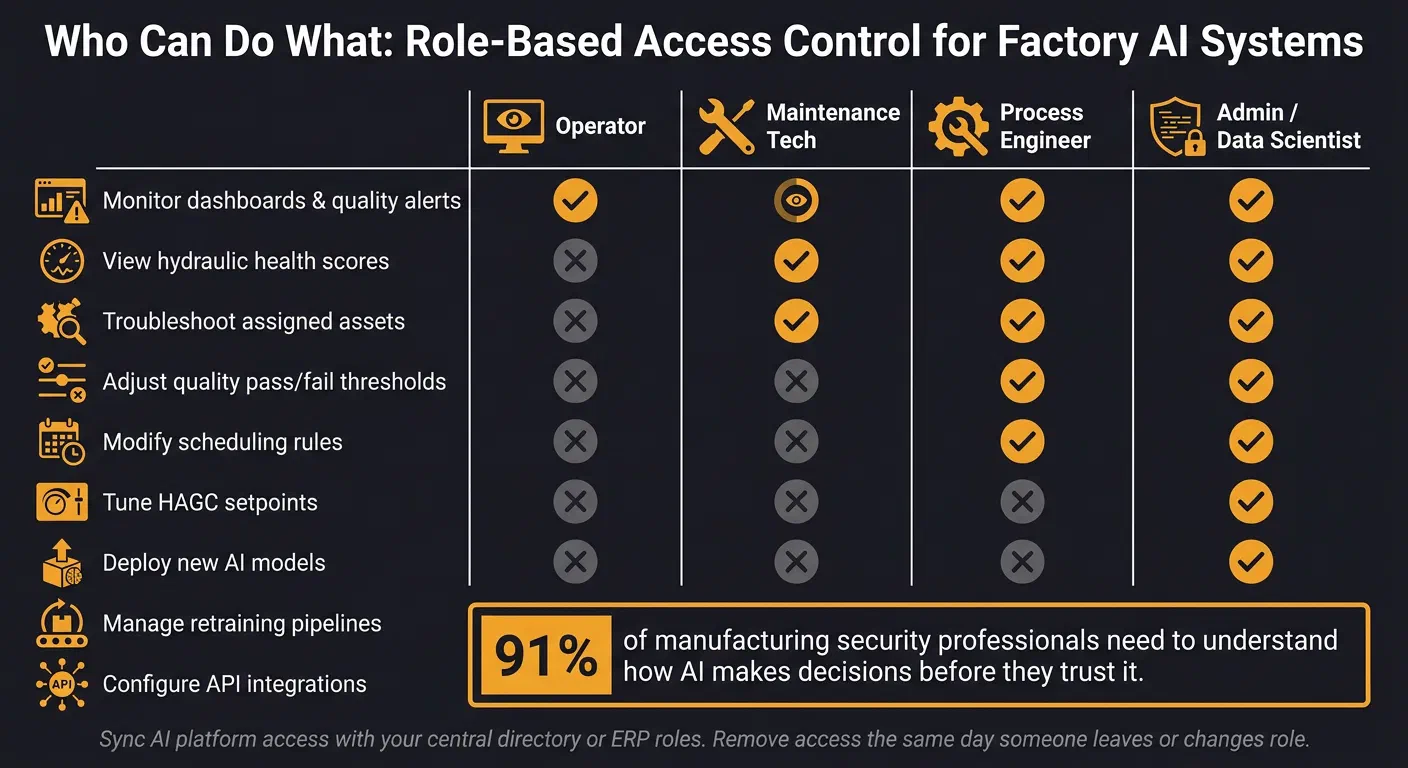
A bad login can do as much damage as malware. If someone can quietly move a quality pass/fail threshold, edit scrap records or change scheduling rules, your network segmentation will not save you. Access control is where you stop that kind of damage.
4. Give People Only the Access They Need
Least privilege means each person and device gets only the access needed for the job.
The rule is simple: give every person and every device the minimum access needed for the task, and no more. Set up role-based access control, with clear tiers and clear limits.
“Role-Based Access Control (RBAC) ensures that a maintenance technician can view hydraulic health scores, but only a senior process engineer can authorize setpoint adjustments to the HAGC system.” - Alex Jordan, iFactory [4]
| Role | Access Level | Typical Actions |
|---|---|---|
| Operator | Read-only / View | Monitor dashboards, view quality alerts, check scrap records |
| Maintenance Tech | Functional / Limited | View hydraulic health, troubleshoot specific assigned assets |
| Process Engineer | Authorise / Tune | Adjust quality pass/fail thresholds, modify scheduling rules, tune HAGC (Hydraulic Automatic Gauge Control) |
| Admin / Data Scientist | Deploy / Configure | Deploy new models, manage retraining pipelines, configure API integrations |
Use MFA for AI dashboards and admin consoles. For on-site access, use badge tap or biometrics as the second factor only. When someone leaves or changes role, remove access that same day. Better yet, automate it. Sync the AI platform with your central directory or ERP roles, so if an ERP account is revoked, AI access dies with it too [3].
Access is only part of the job. The records feeding the models need the same discipline.
5. Protect Training Data, Mill Certificates and Scrap Records
Training data matters as much as the model. Poisoned scrap records, altered mill certificates, or manipulated production parameters can skew AI outputs and burn cash fast.
Sensitive records need access rules, not just passwords. Lock down who can read, edit, or export training data, quality images, mill certificates, and scrap logs. Store them in encrypted, access-controlled systems. Restrict exports. Use named accounts. Log every read, edit, and download.
If your data is clean, the next problem is the model itself changing behind your back.
6. Treat Model Changes Like Tooling Changes, Not Casual Tweaks
Treat AI changes like tooling changes. That means formal approval, version control, and a rollback path.
Undocumented model changes can quietly push up scrap and rework before anyone notices the drift. That is the danger. Not some sci-fi machine takeover. Just small, sloppy changes that hit your margins.
Require dual sign-off for any retraining event or threshold change that affects safety, quality, or margin [2]. Keep a versioned model registry so you can roll back fast [2]. Use signed model files and hash checks for all model artefacts, so a tampered or poisoned model gets rejected before it reaches production [2][3]. Log every change, approval, and deployment in an immutable audit trail [4][3].
The goal is simple: no silent sabotage. If a model changes, someone approved it, it is logged, and you can prove it.
Even locked-down models will fail if the shop-floor data feeding them is spoofed or poisoned.
Stop Bad Device Data from Turning Your AI Against You
Locked-down models and tight access controls do nothing if the data coming off the shop floor is already rotten. A spoofed vibration sensor, a tampered camera feed, or a gateway set up wrong can shove your AI into bad decisions with no warning.
7. Know Every Camera, Sensor and Edge Box Feeding Your AI
If you haven’t counted the devices feeding your AI, you don’t control them. Start with a full device register. That means every defect-detection camera on the inspection line, every vibration sensor on a rolling mill bearing, and every edge box exporting SCADA tags to a scheduling or maintenance model. In one industrial site, asset mapping found 139 unknown entry points [7]. That’s 139 attack paths nobody even knew were there.
For each device, write down:
- what data it sends
- which system receives it
- who owns that connection
- whether the flow is one-way or two-way
Then deal with the obvious bit people skip. If data only needs to move outwards, such as sensor telemetry feeding an AI inference node, use hardware-enforced data diodes.
“Firewalls are bidirectional. Data diodes are not… A diode lets production data reach AI tools while physically preventing traffic from moving back into OT through the same path.” - OPSWAT Team [7]
Use automated discovery and passive monitoring. Standard scans miss rogue devices and config drift [12]. Lock control cabinets and access rooms so people can’t just wander up to edge devices and sensors [11]. Log every device enrolment, replacement and rekeying. Then block any telemetry that turns up without a verified device identity. If the endpoint isn’t verified and the telemetry isn’t signed, stop it before it gets anywhere near the AI pipeline [2][6].
Once the network is sorted, the next problem is the data itself.
8. Watch for Poisoned Data, Spoofed Signals and Odd AI Output
After you’ve counted every device, watch what it sends. Look for drift, spoofing and sudden change.
A clean device register helps, but it won’t save you from poisoned inputs. Attackers can alter sensor readings, corrupt quality images or, in metals manufacturing, stick physical adversarial patches on products to fool computer vision inspection systems into passing defective parts without touching the network at all [6].
So watch the data, not just the network. Set up real-time drift checks on model inputs. If vibration signatures, bearing temperatures or defect rates suddenly shift, that should fire an alert instead of quietly nudging the model off course [2][6]. A second model checking incoming sensor values before they hit the main AI gives you another layer of defence [11]. For computer vision, checking early vision-layer signals can catch odd patterns before they turn into a bad classification [6].
Use:
- drift detection for poisoned images
- TLS 1.3 and certificate checks for spoofed sensor data
- hash checks for tampered model files
Manual checks won’t cover this. Automated monitoring won’t catch every trick either, but it cuts the time between attack and detection by a lot.
9. Keep a Human in the Loop When the Call Could Cost Real Money
Data can look clean and still be wrong. That’s why automation should handle routine calls only. If an AI recommendation could trigger a maintenance shutdown, change a production schedule, or pass a batch of metal that may be out of spec, a person needs to sign it off.
This isn’t about slowing the plant down for the sake of it. It stops one bad output from a spoofed sensor or poisoned feed turning into missed deliveries, excess scrap or unsafe product.
Ninety-one per cent of manufacturing security professionals said they need to understand how AI makes decisions before they trust it [5].
The rule is simple. Any AI action that touches safety interlocks, a critical quality pass/fail decision, or a scheduling change tied to a committed delivery date needs explicit human confirmation [6]. Put that approval step in a system the AI cannot touch. If the AI can approve its own recommendations, your human-in-the-loop setup is just theatre. If bad input still slips through, the next line of control is recovery: backups, restore steps and a fallback way to run the line.
Plan for the Day It All Goes Wrong
Once access and data controls are in place, recovery is your last line of defence. When ransomware hits a plant, average downtime reaches 21 days [8]. That’s not a rough week. That’s lost orders, missed delivery dates, and compliance mess that keeps biting long after the screens light back up.
10. Back Up Models, Configs and Integrations So You Can Rebuild Fast
Back up everything you need to rebuild fast and clean. That means a signed, hashed model registry, so you can check the restored version hasn’t been tampered with [2]. It also means backing up PLC programmes, human-machine interface (HMI) images, process recipes, and the integration mappings between your manufacturing execution system (MES), ERP, and shop-floor systems. Store them offline or in immutable storage [10].
For GoSmarter users, this is pretty plain:
- Your Metals Manager setup links inventory to heat codes, holds customer, supplier, and order data, and lets you pull mill certificate PDFs by heat code.
- Your Cutting Plans setup, along with the current order backlog, should sit in the backup set too.
Aim to roll back to a verified AI model state within 15 minutes [2]. Then test it every quarter.
Backups are just theory until you can prove the restore works.
11. Write the Fallback Plan Before Ransomware Writes It for You
In August 2025, Jaguar Land Rover suffered a total production halt across three UK plants after attackers used stolen Jira credentials to move from corporate IT into production networks. The forensic investigation took five weeks to verify every system before restart, and the incident cost the UK economy an estimated £1.9 billion and required a £1.5 billion government-backed loan to keep the supply chain solvent [1].
If recovery takes hours, you still bleed cash. The bigger risk isn’t AI failure. It’s not knowing your fallback when the main system falls over.
Your fallback plan needs named owners and plain decisions:
- Who calls the halt to production
- How scheduling drops back to a manual board or offline spreadsheet
- How quality inspection carries on with trained operators and manual gauge control
Keep the last clean Metals Manager export. Keep paper processes for scrap records, heat code tracking, and product lineage too. Run a tabletop drill once or twice a year [10][9]. Walk the night shift through a false 0% vibration reading or a vision system that misses known defects [9]. Better to find the gaps now than in the middle of a plant shutdown.
Run a GoSmarter Access and Backup Check This Week
Do this this week. Give one person an hour and check three things.
First, who has access to your GoSmarter account, and does each person still need it? Remove anyone who has left or changed role.
Second, are Metals Manager and Cutting Plans reachable only from the zones they should be in?
Third, are your configurations backed up offline, and have you tested the restore?
If the answer to any of those is “not sure,” start there. One hour this week is a lot cheaper than five weeks offline.
FAQs
Where should we start first?
Start with a risk assessment. List and classify every AI-linked asset, including sensors, models, and edge devices.
Then map how those systems connect corporate IT to the production floor. That’s how you spot routes into operational technology before they turn into a problem. At the same time, apply zero-trust network segmentation, so AI systems sit inside a dedicated industrial DMZ with tight control over how data moves.
How do we secure legacy OT devices?
Stop leaning on old air-gap thinking. It sounds safe on paper. On a live shop floor, it often falls apart the moment someone needs data, remote access, or a quick workaround.
Start with a full asset inventory and a risk assessment. You need to know what you’ve got, where it sits, and which devices matter most when things go wrong.
Then split systems properly with network segmentation and strict IT/OT separation. Don’t let office traffic wander into production because it’s easier for the software team.
For the data that does need to move, use one-way data diodes. That gives you a controlled path out without leaving the door open both ways.
Lock access down with zero-trust authentication and X.509 certificates. No blind trust. No “it’s on the inside, so it must be fine”.
Handle patching during planned maintenance windows. That way, you fix the weak spots without causing the unplanned downtime everyone ends up paying for.
What should our AI fallback plan include?
Your AI fallback plan should keep production moving when systems are compromised, offline, or start making bad calls. If the model goes sideways, you need documented runbooks that tell your team exactly what to do: isolate the model, stop it touching live decisions, and roll back to the last known good version. Aim to do that inside 15 minutes. Not “as soon as possible”. 15 minutes.
You also need proper model versioning. If you can’t tell which model is live, what changed, and when it changed, you’re flying blind. Keep a clear record of:
- model versions
- training data changes
- config changes
- deployment dates
- who approved the release
That needs to sit alongside continuous validation against ground-truth outcomes, so you can spot drift before it starts burning cash or wrecking schedules. If the AI’s output no longer matches what’s happening on the shop floor, the system should flag it fast.
Then there’s recovery. If ransomware hits, you need air-gapped, immutable backups of critical systems. Not just backups that exist on paper. Backups you can restore from when the worst happens, so production systems can come back without dragging infected files back in with them.
About the Author

Editor· Co-founder & Head of Product
Steph Locke is Co-founder and Head of Product at GoSmarter AI — former Microsoft Data & AI MVP building practical tools to cut paperwork and automate compliance for metals manufacturers.