Real-Time Inventory Tracking: Best Practices for Enterprise Resource Planning (ERP)
- BlogSmarter AI
- Edited by Steph Locke
- Blog
- June 2, 2026
- Updated:
Table of Contents Show Hide
Most metal service centres are managing millions in stock using tools that wouldn’t cut it in a corner shop. Whiteboards, weighbridge slips, and frantic phone calls to the warehouse are the norm. The result: production halts, waste, and costly stock errors that eat into margins.
Manual inventory processes might feel familiar, but they’re costing you. Real-time tracking changes the game: every material movement logged instantly, no delays, no guesswork. It’s about stopping the chaos. Tools like GoSmarter automate the grunt work, from reading mill certs to tracking offcuts, so you can get back to what matters: keeping production moving and customers happy.
Here’s what you’ll get:
- Accurate inventory: No more ghost stock or missing materials.
- Better traceability: Every coil, plate, or bar linked to its heat number and certs.
- Less waste: Use remnants before buying new stock.
Let’s fix the mess.
Enterprise Resource Planning (ERP) Inventory Management Systems: Real-Time Control Without Guesswork
Why Real-Time Inventory Tracking Matters for Metals Manufacturing
In metals manufacturing, precision isn’t optional. It’s a necessity. Materials are heavy, expensive, and must meet exact specifications. Every time a piece of metal is handled it cost money. When inventory data doesn’t match what’s actually on the shop floor, the fallout can be severe: stalled production, panicked supplier calls, and missed customer deadlines. Real-time inventory tracking eliminates these mismatches, closing the gap between what your ERP thinks you have and what’s physically available. The costs of outdated methods add up fast.
The Hidden Costs of Manual and Batch Inventory Updates
Relying on manual or batch inventory updates is like trying to steer a ship with yesterday’s weather report. The hidden costs creep in everywhere:
- Usable offcuts mistakenly written off as scrap because they weren’t logged properly.
- Sales teams promising materials already earmarked for another order.
- Planners scrambling to issue emergency purchase orders for steel that’s sitting in the yard, untracked.
In fact, up to 40% of procured items can be tied to inaccurate Bills of Materials (BOMs) [3]. Without live tracking, remnants and drops often go unrecorded, leading to unnecessary raw material purchases. This not only wastes resources but also ties up working capital. Real-time inventory commitments, on the other hand, can slash emergency procurement by 30% to 40% [1]. Stop the chaos before it starts and protect your bottom line.
What ‘Real-Time’ Means in an ERP Context
“Real-time” means every material movement is logged as it happens, using barcode scanners, mobile entries, or machine signals. This immediate recording eliminates delays and errors from batch updates, which might only happen at shift-end or month-end.
In metals manufacturing, hours matter. A coil can be partially processed, generate multiple remnants, and change locations several times within a shift. By the time a manual update catches up, the data is already outdated. Real-time systems keep pace, ensuring inventory records reflect the shop floor’s reality.
These systems also clarify the difference between physical stock (what’s on the rack) and free stock (what’s available to allocate). Without this distinction, over-commitment becomes inevitable. Metals-specific ERPs go even further, tracking not just quantities but critical attributes like thickness, width, grade, heat number, and chemical composition. After all, two coils weighing the same aren’t necessarily interchangeable.
The Benefits of Real-Time Tracking for Metals Operations
Real-time tracking transforms operations. Metals-specific ERP systems improve manufacturing efficiency by up to 30%, with 90% of businesses reporting higher productivity after implementation [3]. For metals, the impact is sharper: real-time cutting plans and inventory tracking can reduce scrap by 30% to 50% using a scrap calculator [5].
Traceability is another major win. Every coil, plate, or bar stays linked to its mill certificate, heat number, and test results, ensuring compliance and quality standards are met. Tools like GoSmarter take this further by using artificial intelligence (AI) to read and digitise mill certificates from PDFs instantly. This eliminates manual cross-referencing and saves production teams over 10 hours a month.
The result: accurate quotes, on-time deliveries, and smooth audits — without the constant firefighting that manual processes demand.
Core Principles of Real-Time Inventory Tracking
Real-time inventory tracking is about making smart decisions on how you handle data, integrate shop-floor systems, and tie everything to quality control. Get these basics wrong, and even the priciest ERP system churns out garbage data.
Designing Data Structures for Metals Inventory
Most manufacturing ERPs are built on a straightforward idea: one part number equals one item. Metals? They laugh at that simplicity. A master coil isn’t just “one thing.” It’s defined by a mix of thickness, width, length, coating weight, temper, and chemical composition. Basically it’s not a static SKU [4]. Christina Morrison from Top10ERP sums it up:
“The issue isn’t that you need better software. The issue is that standard manufacturing ERP systems are fundamentally incompatible with how the metals industry operates. It’s an architecture problem.” [4]
To work for metals, your ERP needs to handle attribute-based inventory. It should record every physical, dimensional, and chemical property, treating the heat number as a core data point. As the team at FlowSense points out:
“Heat number tracking is the backbone of traceability in steel manufacturing and metals processing.” [7]
Assign heat numbers as early as possible, ideally at the furnace tap and keep that link intact through every processing step.
Two other must-haves for your ERP setup:
- Dual units of measure: Metals are bought and sold by weight but used by dimension. Your system has to reconcile actual weight with theoretical calculations.
- Remnant tracking: Offcuts from cutting operations shouldn’t just vanish into the “scrap” category. They need to be recorded as searchable inventory, complete with heat number history. Ignoring remnants is a fast way to waste money on unnecessary raw material orders.
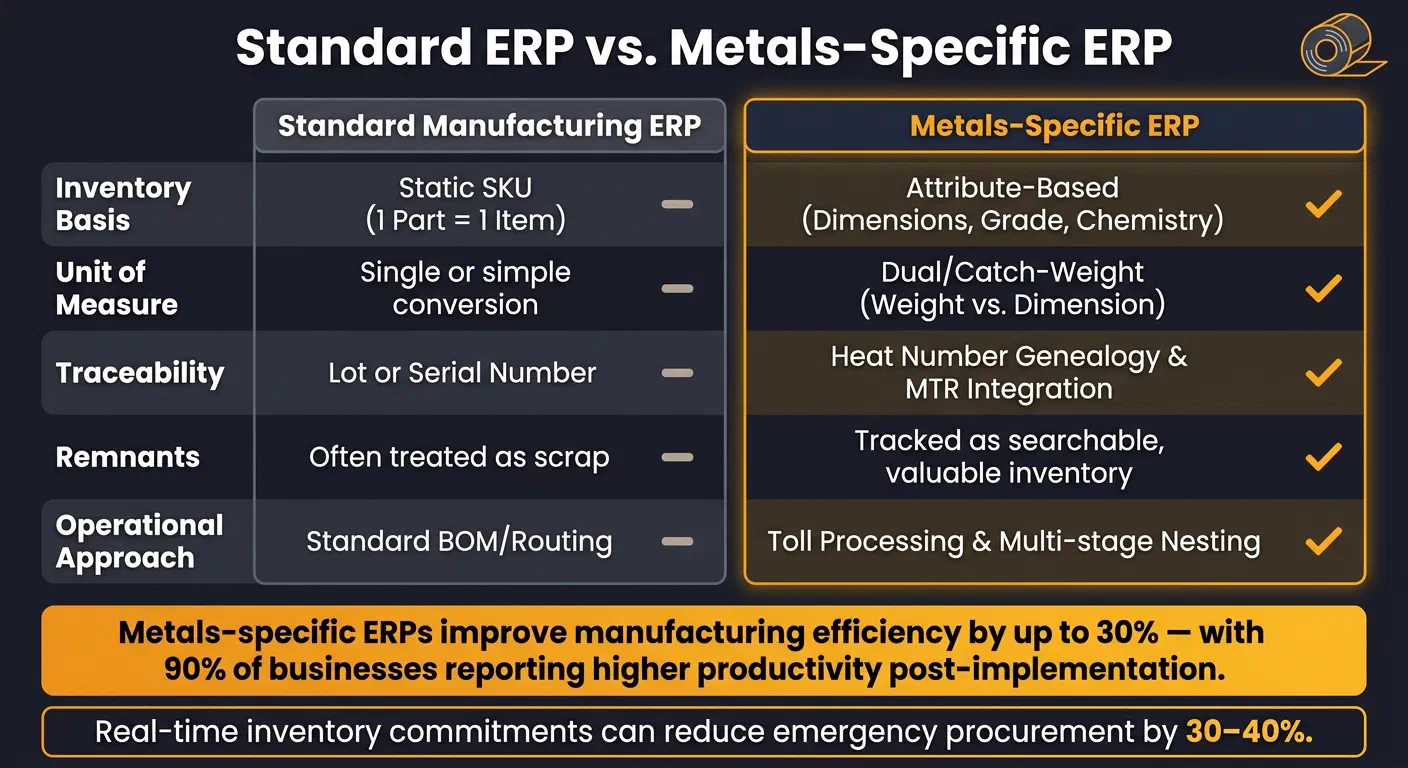
Here’s how a metals-specific ERP stacks up against a standard one:
| Feature | Standard Manufacturing ERP | Metals-Specific ERP |
|---|---|---|
| Inventory Basis | Static SKU (1 Part = 1 Item) | Attribute-Based (Dimensions, Grade, Chemistry) |
| Unit of Measure | Single or simple conversion | Dual/Catch-Weight (Weight vs. Dimension) |
| Traceability | Lot or Serial Number | Heat Number Genealogy & Mill Test Report (MTR) Integration |
| Remnants | Often treated as scrap | Tracked as searchable, valuable inventory |
| Operational Approach | Standard Bill of Materials (BOM)/Routing | Toll Processing & Multi-stage Nesting |
Connecting ERP with Shop-Floor Systems
A well-structured data setup is useless if your ERP isn’t fed accurate, real-time data from the shop floor. Relying on operators to log movements at the end of their shift? That’s asking for trouble.
The fix is point-of-activity capture. Equip your team with barcode scanners or mobile devices to record every material movement as it happens whether it’s goods-in, racks to saws, or finished goods heading to despatch [8]. For automated setups, machines with IP connectivity can directly update the system, logging everything from scrap write-offs to finished goods entries [9]. This kind of integration can boost plant productivity by anywhere from 10% to 50% [9].
Even older equipment can join the party. Interface devices can connect legacy machines to your ERP, ensuring they’re part of the data flow [9].
Weighbridges and scales are particularly important in metals processing. Hook these directly into the ERP to avoid transcription errors and ensure accurate catch-weight data.
Linking Quality and Traceability to Inventory Flows
Tracking physical movements is only half the story. To nail traceability and compliance, you’ve got to integrate quality data right at goods-in. Every stock record should carry its quality details including mill certificates, heat numbers, mechanical properties, and test results that are directly linked to the inventory. No more rummaging through filing cabinets when a customer asks for documentation [1].
“When a customer asks for the cert for a specific delivery, your team accesses it instantly.” GoSmarter [1]
Manually typing data from mill certificates into the ERP? That’s slow, error-prone, and frankly unnecessary. GoSmarter has a MillCert Reader that uses AI to digitise mill certificates instantly. It links chemical composition, mechanical properties, and heat numbers directly to the stock record, cutting out the manual data entry bottleneck at goods-in. This ensures traceability is sorted from the start, not cobbled together before an audit.
“If you don’t know what metal you have, you’re losing money. It’s that simple.” GoSmarter [1]
Best Practices for Real-Time Inventory Processes
Building on solid data structures and shop-floor connections, these practices help fine-tune daily operations to maintain accurate, real-time inventory data. The goal is straightforward: ensure your ERP system reflects the actual state of your inventory at all times. Without consistent, clear procedures, even the best ERP system will falter. Human error in manual data entry, typically between 1% and 3% [10], might not sound like much. Try explaining that to a customer chasing a missing heat number on a critical aerospace order.
Standardising Inventory Identification and Movement
In metals operations, inconsistent labelling is a recipe for chaos. When one operator logs a coil as “S355 HR 3mm x 1250” and another lists it as “S355 3.0 x 1250 HR”, you’re left with phantom stock, duplicate records, and a planning team that has no idea what’s real.
The solution? A standardised SKU structure that includes grade, form, gauge, width, and surface condition, aligned with BS EN standards where applicable (e.g., EN 10025 for structural steel or EN 10111 for hot-rolled strip). Every item whether it’s a bundle, coil, or plate needs a barcode label generated at goods-in. No masking tape, no handwriting. Barcode scanning alone can slash physical stock count times by up to 80% [10].
Granular location codes, such as “Bay 3 / Rack B / Level 2”, are equally essential. Stock allocated to live orders must be clearly flagged to avoid misallocation. This level of detail lets your ERP guide store personnel directly to the material, eliminates manual searches, and ensures committed stock stays separate from free stock. Without it, your sales team risks over-promising lead times, and poor status management will drag down your On-Time In Full (OTIF) performance.
Once your inventory is properly labelled and located, capturing every movement as it happens becomes the next step.
Recording Inventory Events at the Point of Activity
Inventory accuracy crumbles when there’s a delay between a movement and when it’s recorded. Shift-end data entry, paper travellers, and verbal handovers all introduce lag and errors. The gold standard is point-of-activity capture: logging every goods receipt, production issue, scrap write-off, and despatch as they occur.
Mobile devices and handheld scanners are your best allies here. For example, when an operator pulls material from a rack to a saw, they scan the bundle label and confirm the quantity on a handheld device. No paperwork, no batch uploads [3].For goods-in, linking scanned items directly to their mill certificates at the point of receipt ensures the traceability chain is intact from the start.
Midland Steel, a leading supplier of rebar, adopted GoSmarter’s inventory tools to achieve this real-time visibility. The system automatically linked every stock item to its mill certificate during receipt, enabling the team to retrieve compliance documents in seconds and eliminate manual cross-referencing [2].
With real-time event recording in place, the focus shifts to accurate measurement and unit conversions.
Handling Units of Measure and Conversions Accurately
Metals inventory comes with its own quirks. Steel is priced and sold by weight but processed by dimension. Your ERP must handle both simultaneously and keep them in sync.
Dual unit of measure tracking is essential. Stock should be recorded in both pieces (or bundles) and kilograms, with the system calculating theoretical weight based on density factors for each grade. Accurate density factors in your master data are critical. For instance, a mild steel flat bar and a stainless steel 316 bar of the same dimensions will weigh differently. If your system uses the wrong density, every weight-based calculation that follows will be incorrect.
When weighbridge readings differ from theoretical weight, your ERP should flag the discrepancy rather than overwriting data. Such variances could indicate a short delivery, a measurement error, or a material substitution — all of which need investigation.
Remnants often trip up even the most disciplined systems. For example, if a cut-to-length operation leaves a 1.4- metre offcut from a 6-metre bar, that offcut requires its own inventory record. This means a new label with its actual dimensions, weight, and most importantly, its original heat number.
“GoSmarter tracks remnants from previous cuts as live stock, so your planners use them before reaching for new material.” [1]
Automating remnant tracking can reduce scrap by 30–50% for long-products manufacturers [5]. With mild steel priced at £600 per tonne, saving just one tonne per week translates to over £30,000 annually [5]. That’s a far more compelling argument for proper remnant tracking than any software pitch.
Using Real-Time Data to Make Better Decisions
Data is only useful when it leads to smarter decisions. Real-time information lets you act quickly and decisively but only if you know what to track and how to use it.
Planning and Replenishment Using Real-Time Data
One immediate advantage of real-time inventory data is separating committed stock already tied to orders from free stock that’s actually available for new jobs. Without this clarity, planners often over-promise, leading to last-minute shortages, emergency purchases, and missed delivery targets. Real-time visibility eliminates these headaches.
Replenishment decisions also become far more precise. Instead of relying on rigid reorder schedules or waiting until someone notices an empty rack, your ERP can automatically trigger purchase orders when stock dips below the calculated minimum:
Minimum inventory level = Reorder point (Normal consumption × Normal delivery time).
With live consumption data feeding into this formula, the results are more reliable than anything a spreadsheet can manage.
AI-driven cut planning slashes material waste from 5–8% down to 2.5% or less. For a 100-tonne-per-week operation, this can mean saving £1,200–£2,400 weekly. During a two-week trial with 734 tonnes of material, Midland Steel cut its scrap rate by half — from 5% to 2.5%. [12]
“A typical manual cut plan leaves 5–8% of material in the skip. The mathematical optimum is ≤2.5%. At 100 tonnes a week, that gap is worth tens of thousands of pounds a year.”
- Ruth Kearney, CEO, GoSmarter AI [12]
Once replenishment is under control, the next step is tracking performance effectively.
Key Metrics to Track Inventory Performance
Real-time data only works if you’re monitoring the right metrics. For metals operations, four key measures stand out:
- Inventory Accuracy: Does your ERP reflect what’s physically in the yard? Barcode scanning and point-of-activity updates should keep accuracy above 98%. Any discrepancies signal a process issue, not just a counting mistake.
- Scrap Rate: This metric, tracked in tonnes and as a percentage of throughput, highlights planning efficiency. For example, a mild steel operation cutting at £600 per tonne could save over £30,000 annually by eliminating just one tonne of avoidable scrap per week. [5]
- Remnant Utilisation: This tracks how well planners use offcuts before ordering new material. Logging remnants with details like grade, dimensions, and heat number improves usage as planning becomes more disciplined.
- OTIF: The metric customers care about most. Poor inventory accuracy, mismanaged committed stock, and reactive replenishment all drag OTIF down.
Reducing scrap saves money and cuts emissions. Every tonne of primary steel you stop wasting avoids roughly 1.8 tonnes of CO₂e embedded in its production which is a direct win for Scope 3 reporting under most ESG frameworks. [5]
Visualising these metrics in a way that drives action is just as important as tracking them.
Dashboards and Alerts for Inventory Visibility
A one-size-fits-all dashboard is useless. Tailored views are essential: warehouse staff need rack locations and incoming goods; planners need live data on free stock, committed stock, and material availability by grade; supervisors need to monitor machine performance and task progress; finance needs insights into inventory costs. Cramming all this into a single screen creates confusion, not clarity.
Instead of relying on manual checks, automated alerts flag issues like low stock levels or discrepancies between weighbridge readings and theoretical weights. This ensures problems are caught before they disrupt operations.
GoSmarter keeps its data on UK-based Azure servers with OAuth 2.0 role-based access controls, so team members only see what’s relevant to their role. Data stays within UK borders. Floor staff using handheld scanners update the same dashboards planners rely on no delays from batch uploads.
“Spreadsheets break. ERPs take months to implement and cost a fortune. GoSmarter’s inventory tool was running in a day.”
- Stock Controller, Metals Distributor [11]
The result? Decisions based on real-time data, not yesterday’s assumptions.
How to Roll Out Real-Time Tracking in Your Factory
Getting real-time tracking running without grinding production to a halt requires discipline. Tackle it step by step, not all at once.
Assessing Your Current Inventory Systems
Before diving into new tools, take a hard look at what you’re working with now. Pull together a team from the shop floor, planning, and finance to map out how inventory currently moves. Then, ask yourself these three questions:
- Does your system handle replenishment planning accurately?
- Can it provide the insights you need to grow?
- Is live stock availability something your sales team can check when a customer calls?
If any of these get a “not really”, you’ve found your weak spots [6].
For metals manufacturers, the bar is higher. Your system needs to track more than just stock levels. It should handle dimensional inventory like sheet, plate, or coil. It also needs to log heat numbers and key chemical or mechanical properties [3][4]. For instance, if a sales rep can’t find stock that matches specific dimensions and grade requirements in under a minute, that’s a problem worth fixing [4].
A Phased Rollout Plan with Early Wins
Don’t try to change everything at once. Start by cleaning up your data: tidy up your parts lists, get rid of duplicates, and sort out messy supplier records. Good data is the foundation. Build on a mess and you’ll just get a bigger mess.
Begin with the basics: import master data like customers and suppliers, then move to inventory, and finally tackle orders and production workflows. To avoid chaos, run the new tracking tool alongside your current ERP. Let the ERP handle invoicing and procurement while the new system focuses on tracking shop-floor movements [1].
Quick wins are possible if you focus on the right areas first. For example, use AI to read mill certificates as materials arrive. Automatically pulling out grade, heat number, and mechanical properties ensures traceability from day one. Tools like GoSmarter’s MillCert Reader let you do this quickly. Most teams are up and running in a day by importing existing stock via CSV [1].
“Spreadsheets break. ERPs take months to implement and cost a fortune. GoSmarter’s inventory tool was running in a day.”
Another fast win is setting low-stock alerts for critical grades and dimensions. These alerts can prevent production delays and show immediate value to doubters. Many manufacturers find they recover their subscription costs within the first quarter, thanks to less scrap and fewer admin headaches [1].
Once you’ve nailed these early wins, you can roll out the system to more lines or sites.
Scaling and Maintaining Real-Time Practices Long-Term
After proving the system works in one department or product line, it’s time to scale up. Stick with the same approach: standardise the process first, then digitise it. If you skip the standardising step, all you’re doing is speeding up a broken process.
For multi-site rollouts, appoint a system champion at each location. Provide two to four hours of operator training, and follow up with spot-checks during the first 90 days. This helps catch issues like missed scans before they become bad habits.
Cloud-based tools make scaling easier. Adding a new site is as simple as adding licences. No new servers required. Just keep in mind that multi-site deployments can increase costs by 30–50%, so plan for it upfront. Automated checks, like flagging mismatched heat numbers or unusually high quantities, help keep your data clean as your operation grows.
FAQs
What counts as “real-time” in an ERP?
How do you track heat numbers through cutting and offcuts?
Heat number tracking through cutting and offcut management is essential for maintaining traceability. You need real-time inventory systems that integrate directly with your ERP. Every stage — cutting, handling, storing — must capture heat numbers accurately.
Use systems that automatically link heat numbers to inventory items. Even offcuts keep their original heat numbers intact, so there’s no confusion when an auditor asks. Tools like GoSmarter handle this automatically, keeping compliance and quality control accurate at every stage.
What’s the fastest way to roll this out without stopping production?
Tags:
About the Author

Editor· Co-founder & Head of Product
Steph Locke is Co-founder and Head of Product at GoSmarter AI — former Microsoft Data & AI MVP building practical tools to cut paperwork and automate compliance for metals manufacturers.