Stop Firefighting: A No-BS Guide to Maintenance That Actually Keeps Machines Running
- BlogSmarter AI
- Edited by Steph Locke
- Blog
- June 24, 2026
- Updated:
Table of Contents Show Hide
How much of your maintenance week gets burned fixing the same machine twice? If you want to stop firefighting, you need three things: clean downtime data, PMs built around repeat failures, and a grip on spares before the job starts.
The mess is familiar. Breakdowns shout louder than prevention, stock is missing when you need it, and half the plant history lives in someone’s head until they leave.
I’d fix it by starting small and keeping it blunt. Use GoSmarter to pull production, stock and job data into one view, then use that view to plan work on the assets that keep hurting output. This is for production managers, maintenance managers and engineers who are tired of chasing faults instead of stopping them.
You’ll get:
- a plain way to spot the Top 5 assets draining labour and uptime
- a tighter PM routine based on repeat failure data, not old paperwork
- a way to stop stockouts, repeat call-outs and patch jobs
- a simple path to use condition checks and AI only where they stop line losses
Here’s how to fix it.
AI in Manufacturing: Predictive Maintenance for ROI & Uptime
Find out where your breakdowns are actually coming from
Turn gut feel into proof. Without clean, structured data, your priorities get set by memory. Then the same faults keep coming back.
Start with the machines that cost you the most when they stop
Go after the worst offenders first. In most plants, a small group of assets causes most of the downtime and repair spend [6][7].
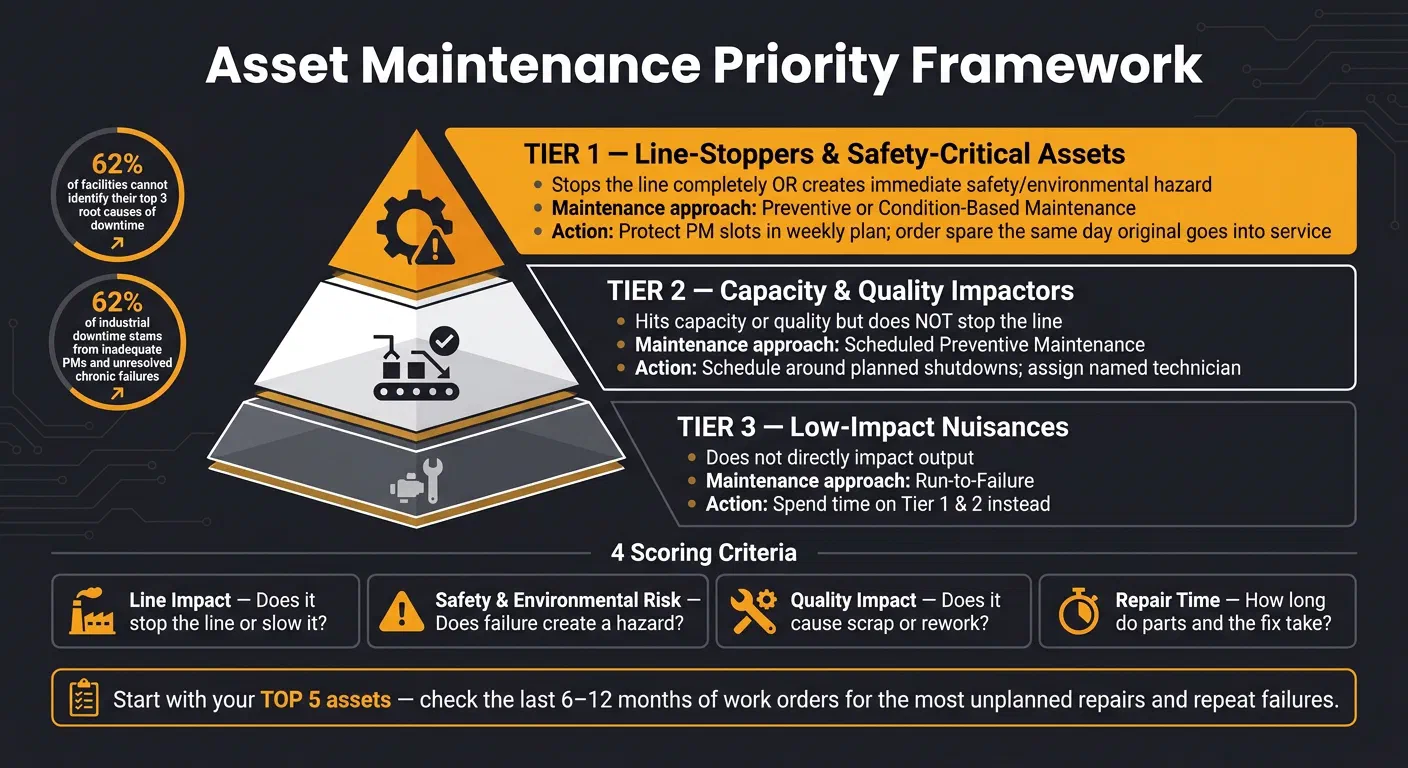
Score each asset against four simple checks:
- Line impact: does it stop the line dead, or just slow things down?
- Safety and environmental risk: does a failure create an immediate hazard?
- Quality impact: does it create scrap or rework?
- Repair time: how long do parts and the fix take?
That gives you a plain three-tier ranking. Tier 1 assets are line-stoppers or safety-critical machines. These need preventive or condition-based maintenance. Tier 2 assets hit capacity or quality but do not stop the line. Tier 3 assets are a nuisance, but they do not hit output directly. Let those run to failure and spend your time where it counts [3][6].
Start with your Top 5. You already know the machines. They’re the ones that keep dragging your team into emergency call-outs. Check the last 6 to 12 months of work orders and find the assets with the most unplanned repairs and repeat failures [6].
Track downtime without creating more admin work
Once you know which assets matter, you need steady data on what is stopping them. The tool matters less than the habit. Use whatever the shift will actually log in. Just make sure every Tier 1 stoppage gets logged.
For each event, capture six fields:
- start time
- stop time
- duration
- machine ID
- cause
- whether production stopped
Keep the cause codes simple: Mechanical, Electrical, Operator Error, Material Shortage. Write them how people on the shop floor speak. “Bearing noise” beats some bloated office label every time, because each shift will log it the same way [9].
If you can’t see the repeat fault, you can’t stop the repeat call-out.
Set a minimum threshold of five minutes for manual logging so you don’t drown in micro-stop clutter. Start with one critical line for 30 days. Find the stoppages. Then roll it out further [7][3]. That gives you enough to build PMs around actual failures, not guesswork.
The difference between guessing and knowing
Without structured tracking, maintenance priorities get decided by memory, habit, and whoever had the worst week. Proper logging shows which machine burns the most time, which fault keeps coming back, and which fix pays back fastest.
62% of small to mid-size facilities cannot accurately identify their top three root causes of downtime [7]. Inadequate preventive maintenance and unresolved chronic failures together account for 62% of all industrial downtime [8]. You cannot fix what you cannot see.
After four weeks on one line, the pattern is usually plain enough to act on. The next section shows how to turn that into PMs and operator checks your team will stick with.
Build PMs and operator checks that people will actually follow
Use the failure patterns you’ve already logged to cut the PM list down to the work that stops repeat breakdowns. That gives you a preventive maintenance schedule based on what failed in the real world, not on guesswork or old habits [6][3].
Write PMs around real failure modes, not low-value tasks
Most PM programmes end up bloated. Tasks pile up. People keep doing them because they’ve always been there, even when they catch nothing. Meanwhile, the checks that stop the same fault happening again get missed.
Don’t add strip-down work unless it stops a known failure. If a critical asset keeps dropping out because of bearing seizure, the PM should cover the lubrication check and the right interval. Not some vague “inspect motor” line that tells nobody what to look for. Set PM frequency inside the P-F interval. If the check happens after that point, you’re not preventing anything. You’re just reacting later [11][4].
Then adjust the interval based on what you find:
- If deterioration shows up at every inspection, shorten the interval.
- If six months go by with no findings, extend it [10][12].
Give operators a one-page check they can complete on shift
The same failure data should shape operator checks. That’s common sense. Operators usually spot the early signs first: odd noises, heat, leaks, frayed belts, warning lights. Autonomous maintenance turns that from “someone noticed something last Tuesday” into a simple routine people can do on shift [11][13].
Keep the checklist short. One page. Use pass/fail limits that leave no room for debate. For example, don’t write “check belt condition”. Write “acceptable belt deflection: 10–15 mm” so every shift checks against the same line. Use °C for temperature readings and mm for clearances [3][10].
Tick each item off on its own. Give people a way to attach a photo if something looks off. And if a check fails, the system should open a corrective work order automatically. Otherwise it sits in someone’s head, on a scrap of paper, or in that black hole called “I told someone about it” [10][3].
Schedule PMs for times when the work can actually get done
A PM plan on paper means nothing if the machine’s never free. Checks only work when the asset is available, the parts are there, and someone has the time to do the job properly. So schedule PMs into planned shutdowns or weekly planning blocks, with production in the loop.
Start with Tier 1 assets and protect those PM slots in the weekly plan [3][10]. Assign each task to a named technician, not a team or department. If everybody owns it, nobody owns it.
If PM compliance drops below 85%, don’t jump straight to blaming discipline. First check the plan, the labour, and the timing. Bad scheduling creates bad compliance far more often than bad intent [10][3]. A short 15-minute weekly review of completed versus overdue tasks is usually enough to spot drift before it turns into a mess [3].
Fix the parts problem and stop repairing the same fault twice
The two biggest drains on your day are missing parts and the same fault coming back again. Once your PMs are sorted, that’s usually where the next batch of pain sits.
Stock the spares that save you the most downtime
Not every part needs to sit on a shelf gathering dust. Start with the parts that create the most maintenance wait time: the top 20% of part numbers, spares linked to Tier 1 assets, and anything with a lead time of several weeks [1][3].
A £12 sensor stuck in a supplier’s warehouse can stop a £4 million production line for two days. That’s the sort of nonsense that wrecks a week. Panic buying makes it worse. Emergency procurement adds £215–£540 per order before you even count the part itself [5]. Do that often enough and the carrying cost of a few extra bearings starts to look tiny. For Tier 1 assets, the rule is blunt: order a spare the same day the original goes into service [1][2].
For high-use items and common failure points like bearings, belts and seals, set min and max stock levels with an automatic reorder trigger [1]. The point is simple: don’t delay a PM because a seal or filter isn’t there [3]. Standardise part specs across assets where you can. Fewer variants means fewer SKUs and fewer ordering mistakes [1].
Stocking the right parts saves hours. Standard job plans save minutes on every repair.
Standardise the jobs your team does most often
Every time a technician has to stop and work out the right torque setting, the correct oil grade, or which tool fits a job they’ve already done ten times, you’re burning time for no good reason. A one-page job plan fixes that fast.
For a motor bearing change or a hydraulic hose replacement, the plan should show:
- the exact parts needed
- the tools required
- the safety isolation steps
- the expected duration
- the critical settings, like torque values, clearances in mm, and oil grade
No guesswork. No half-memory from the last shift. A technician doing the job at 02:00 should finish it to the same standard as the senior engineer who wrote the plan.
Get the technicians who do the work to help write these plans. They know which steps get skipped when the pressure is on. They know which tools are never where they should be. Plans built with their input get used [3]. Plans dropped on them from an office usually end up ignored.
Fix the root cause instead of applying another temporary patch
If the same failure keeps coming back, you didn’t fix it the first time [1]. You just bought yourself a short pause. Patch-and-close feels fast. Root-cause fixes stop the repeat call-outs.
Set a hard trigger: if the same asset fails more than twice within 30 days, root-cause analysis has to happen before the work order closes [6]. Use 5 Whys for mechanical failures. Use a Fishbone when the cause might sit across maintenance practice, operator setup, design or training [6][1]. Log the finding with failure codes that split out mode, cause and effect [6].
Then do the bit many teams skip. Close the loop.
- If the root cause is a missing PM, add the check
- If it’s a training gap, update the procedure
- If it’s a design issue, make the modification
- If it’s a repeat failure, require supervisor or reliability sign-off before closure [6]
That one control stops band-aid repairs being passed off as fixed. It also feeds the result back into PM updates and operator checks, so the loop stays tight: log, fix, prevent, fail less often.
That cleaner failure data is what makes condition checks and AI alerts worth using. Once spares and repeat failures are under control, target condition monitoring where it prevents the most stoppages.
Where condition monitoring and AI actually earn their place
Use condition monitoring where an early warning gives you time to act. That’s it. The earlier sections covered PMs, operator checks, spares and root-cause fixes. Monitoring and AI sit on top of that groundwork. They do not replace it.
Use condition checks to catch problems before they stop the line
Rotating assets like motors, gearboxes, hydraulic pumps, fans and compressors usually fail in ways you can measure. That makes them a good fit for condition signals. If vibration starts climbing or pressure starts drifting, you get a window to step in before the line stops. But that only works if someone already owns the alert, knows what to do, and has a set response time.
Condition monitoring falls apart when alerts go nowhere. No owner. No action. No deadline. Just another flashing warning on a screen no one trusts.
Before you fit a sensor, pin down:
- the signal
- the owner
- the action
- the response window
That leaves AI for the assets where a simple threshold won’t cut it.
Apply AI to the assets that can really hurt the plant
Predictive maintenance can cut unplanned downtime. It works best on high-consequence assets with a known failure pattern. If one signal tells you enough, stick with rule-based monitoring. If failure shows up across several signals at once, AI starts to earn its keep.
Start small. Pick one or two critical assets. Run shadow mode for six weeks so you can tune thresholds before any live alerts go out. [2][14]
Once the thresholds are tuned, link alerts to live production and stock data.
Use GoSmarter to connect production data to maintenance decisions
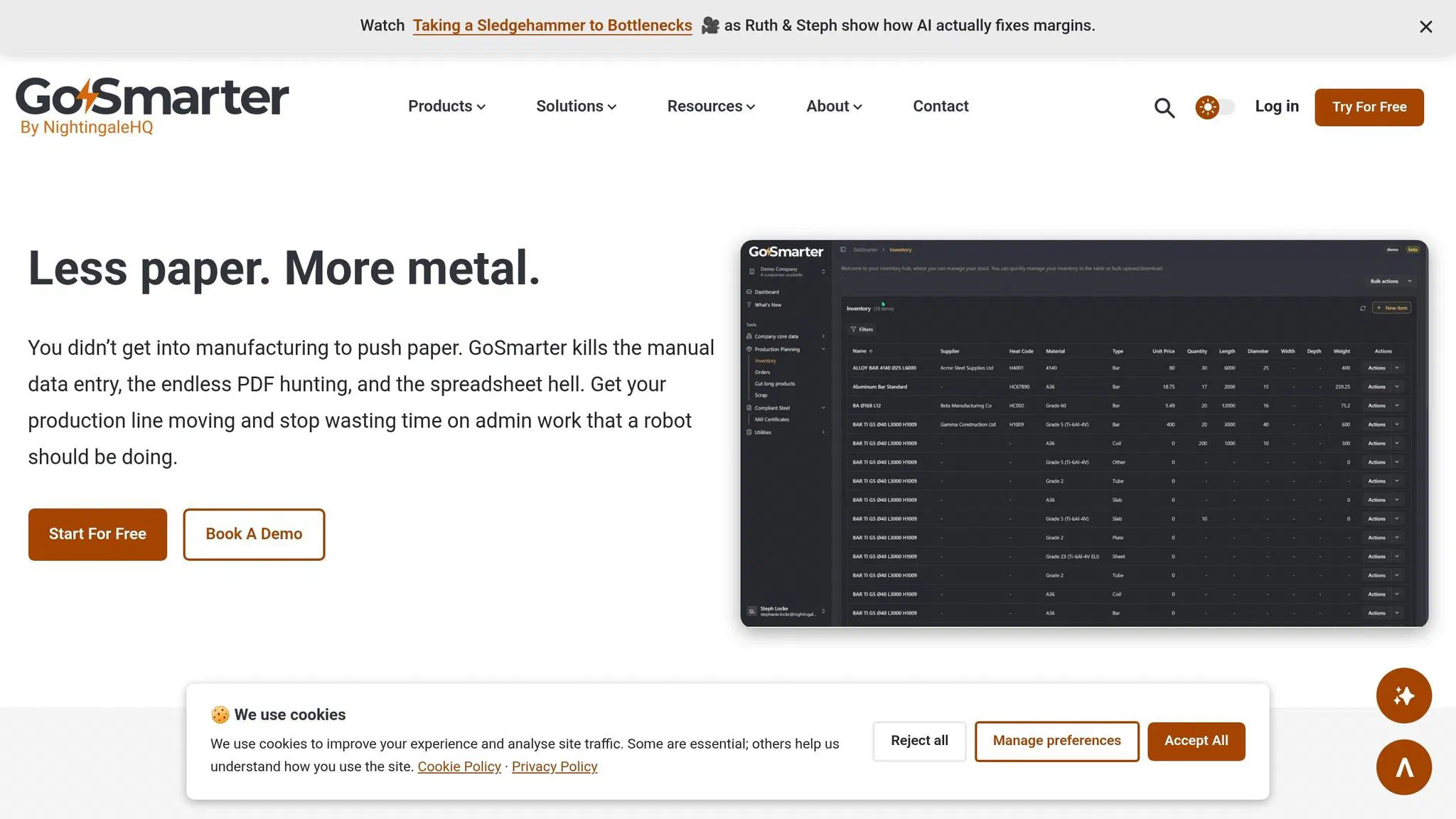
Most maintenance teams don’t have a sensor problem. They have a data trust problem. Work orders, fault codes and stock records don’t line up. One system says the part is in stores. Another says it was used last month. The spreadsheet says something else again.
GoSmarter’s comprehensive inventory and order management capabilities along with our APIs keep your data lined up with your ERP. The production planning for long products shows where planned work fits around live production. Clean production data and clean maintenance data are part of the same mess. Connect them, and your calls get sharper
Use that joined-up view to pick the line for a 30-day pilot. That gives you a clean starting point for the 30-day pilot in the next section.
Your next step: run a 30-day pilot on one line and feed the data into GoSmarter
Now do this on one line only. Not the whole plant. Pick the line that causes the most grief. Start with the one sitting at the top of your downtime log or the one with the most breakdowns. Then sanity-check it with six to twelve months of work order history before you commit.
Track these four metrics every week:
- PM compliance above 90%
- MTBF on Tier 1 assets
- Planned work at 70–80%
- Any PM delayed by a stockout[3][6]
Each Friday, review:
Use that weekly review to tighten the operator checklist. If a task adds no value, cut it. Keep the checklist to one page. Use clear pass/fail limits, such as “belt deflection 10–15 mm”[3]. And don’t let this turn into another office-made form nobody trusts. Get the technicians who actually do the work to help write it.
Once the checklist is live, connect it to stock and production data so jobs only go ahead when parts and time are there in the first place. That’s where GoSmarter comes in. Use our intelligent inventory and order management capabilities along with our APIs keep your data lined up with your ERP. You can pull production, scrap and inventory data into one view. Then you can check stock and scheduling before you release maintenance work, instead of finding out too late that the job was dead on arrival.
FAQs
How do I choose the first line for a pilot?
Don’t roll this out across the whole factory on day one. That’s how good plans get buried in chaos.
Start with one production line. Pick the one with the highest concentration of Tier 1 critical assets.
Use an Asset Criticality Ranking to find the top 20% of equipment driving 80% of your downtime costs. Then run the maintenance programme on that line for at least two weeks. That gives you time to:
- spot friction points
- test maintenance frequencies
- gather proof for leadership buy-in
It’s a much cleaner way to sort out the process before you dump it on the rest of the site.
What should I do if my team won’t log downtime consistently?
They often see downtime logging as more paperwork for the pile, with nothing in it for them. So make it dead simple. Bin the end-of-shift scribbling and give them mobile-friendly ways to log issues fast: quick voice notes, photos, or tick-box checklists.
Also close the loop. Show people that the issues they logged led to fixes, fewer repeat stoppages, or just less day-to-day hassle. Then review progress briefly each week, so the team can see their data is pushing real change instead of vanishing into a spreadsheet no one reads.
When is AI monitoring actually worth using?
AI monitoring makes sense for high-value, production-critical assets where an unplanned failure would burn serious cash. It is not for every machine on the shop floor.
Put it on assets where downtime hurts, like a line that costs £40,000 an hour when it stops, or a furnace that brings the whole plant to a halt. It also fits equipment where wear shows up in vibration, pressure, or temperature before the failure hits.
A cheap motor you can swap out in no time? Leave that on a run-to-failure plan. No point throwing software at a problem a spanner can sort.
About the Author

Editor· Co-founder & Head of Product
Steph Locke is Co-founder and Head of Product at GoSmarter AI — former Microsoft Data & AI MVP building practical tools to cut paperwork and automate compliance for metals manufacturers.