How to Trace a Heat Number Back to Its Mill Certificate
- BlogSmarter AI
- Edited by Steph Locke
- Blog
- October 23, 2026
- Updated:
Table of Contents Show Hide
To trace a heat number, follow it from the marked material through goods-in and stock records. End at the matching mill certificate, and check the producer too. A heat number alone won’t prove the link.
This guide covers one job: the check you run on one delivery at goods-in. For a tool comparison, read AI assistants that understand heat numbers. For the programme-level view, read digital traceability best practices.
Hunting through Portable Document Format (PDF) folders burns time and leaves your quality team chasing paperwork.
MillCert Reader helps you find linked mill certificates. It is part of GoSmarter, built by Nightingale HQ. Its AI Optical Character Recognition (OCR) extracts certificate fields for review. It sits on top of your existing Enterprise Resource Planning (ERP) system, spreadsheets and email, so there is no rip-and-replace. Your quality team still checks the match and approves release.
We’ll show you how to:
- Link physical markings, receipt records and certificates.
- Check the required document, including EN 10204 Type 3.1 where specified.
- Keep stock on hold when the records don’t match.
A heat number is the identifier a mill gives to one melt of steel. It links a piece of metal to the mill certificate that records that melt’s chemistry and test results. Our glossary defines the other terms used here.
Let’s follow the trail from the metal.
Watch How Heat Numbers, Test Reports and Positive Material Identification Fit Together
Trace Receiving Records to the Mill Certificate
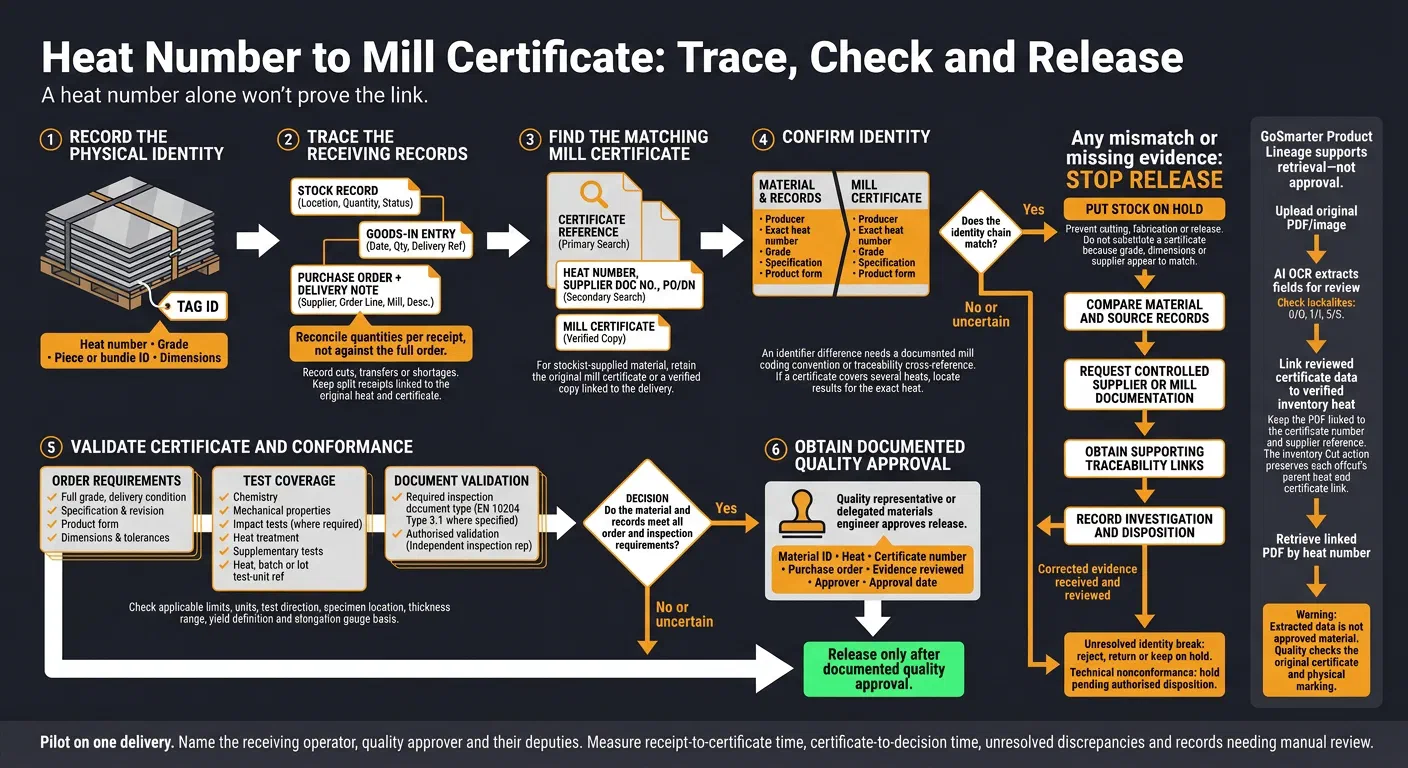
Record the marking first. Then follow the receipt trail from the heat number to the exact receipt and its certificate. Full traceability means you can name the heat number, mill, certificate and purchase order for any stock item.[1]
- Open the stock record and linked goods-in entry for the heat number.
- Confirm the purchase order and supplier. Check the order line, mill, description and certificate type.
- Check the delivery note and receiving date. Reconcile the quantity received, including partial deliveries.
- Find the certificate. Search by certificate reference first. Then try the heat number, supplier document number, purchase order or delivery note.
- Compare the identifiers with the stock. Match the producer, heat number, grade, specification and product form.
If any field breaks the chain, stop. Correct the record before you release the material.
Match Stock, Delivery and Certificate Records
Use this checklist to spot missing links.
| Record | Identifiers to compare | Match evidence |
|---|---|---|
| Physical marking or tag | Heat number, grade, piece or bundle ID, dimensions | Markings agree with receiving and certificate records |
| Inventory record | Heat number, supplier, location, quantity, status, certificate reference | Stock location, quantity and status are correct |
| Purchase order | Supplier, grade, specification, dimensions, certificate requirement | Received product meets ordered requirements |
| Delivery note | Delivery-note number, delivery date, heat number, description, quantity, certificate reference | Delivery details agree with the stock and receipt |
| Receiving record | Purchase order number, delivery-note number, receiving date, certificate reference, receiver | Receipt links the stock to its source documents |
| Mill certificate | Certificate number, producer, heat number, grade, specification, product form, test results | Identifiers match the stock and order |
| Split-delivery record | Delivery-note number, receipt date, quantity, parent stock reference | Each receipt line remains linked to the original heat and certificate |
Reconcile quantities per receipt, not against the full order. Explain any cuts, transfers or shortages in the record.
If a stockist or intermediary supplied the material, keep the manufacturer’s original certificate or an unaltered copy. Link it to the delivery with a reference.[2] One certificate can list several heats. In that case, you need a clear mapping between each heat and the quantity shipped.[3]
If the certificate details don’t match, hold the material for quality review. Once the receipt chain matches, check the certificate details before you release the material.
Validate the Certificate Before Releasing Material
Once the receipt chain checks out, compare the certificate with the order. Identity links the certificate to the material. Conformance confirms the material meets the order, drawing and standard.[4][5]
Check Material Identity and Test Results
Check which inspection document the order requires. Use EN 10204 Type 3.1 when the order needs test results for the supplied heat, batch or lot. The manufacturer’s representative signs it. That representative must work independently of the manufacturing department.[4][5]
Use this checklist to check identity and conformance in one pass.
| Check category | Certificate field | Source record | Acceptance check |
|---|---|---|---|
| Producer | Mill or manufacturer name and location | Purchase order, approved supplier list and delivery documentation | Confirm the approved producer and retain the link to the original mill. |
| Heat identity | Exact heat, cast, batch or lot number | Physical marking, tag, packing list, delivery note and receiving record | Require an exact match unless a documented mill coding convention explains the difference. |
| Grade | Full material grade, including suffix or delivery condition | Purchase order, drawing and applicable material standard | Reject generic grade descriptions. Query 316 against an order for 316L.[5] |
| Product form | Plate, bar, tube, coil, forging or other form | Packing list, stock record and physical inspection | Check that the certificate covers the supplied form. |
| Specification and revision | Standard, grade designation and revision or edition | Purchase order and technical specification | Check that the required edition and supplementary clauses apply. |
| Chemistry | Reported elements and values, including carbon equivalent where required | Certificate and applicable grade limits | Check each required element against the applicable limits. |
| Mechanical properties | Yield strength (ReH or Rp0.2), tensile strength and elongation with gauge basis | Certificate test results, test direction, specimen location, thickness range, delivery condition and applicable standard limits | Check units and results against the limits. Confirm that test coverage, yield definition and elongation gauge basis meet requirements. |
| Impact results | Test temperature, absorbed energy, specimen orientation and test-unit references | Purchase order, standard and certificate | Confirm that the mill completed the required impact tests. |
| Heat treatment | Normalised, quenched and tempered, thermo-mechanically rolled or other condition | Certificate, production route and order requirements | Check that the stated condition matches the supplied product. |
| Dimensions | Thickness, width, length, diameter and wall thickness | Receiving inspection, packing list and stock record | Check that measured material meets the ordered tolerances. |
| Supplementary tests | Hardness, ultrasonic examination, corrosion, pressure or other project-specific results | Purchase order, inspection and test plan and certificate attachments | Check for required tests and acceptance criteria. |
| Test-unit reference | Heat, batch or lot used for testing | Mill traceability records | Confirm that results relate to the supplied heat, batch or lot. |
| Document type and validation | EN 10204 Type 3.1 or other required document | Purchase order and certificate | Check for the required inspection document type and authorised validation. |
Read the mechanical results with the test basis in mind. Yield strength is reported as ReH where the steel shows a distinct yield point. Otherwise the certificate gives Rp0.2, the stress at 0.2% plastic deformation.[6][7] One producer’s data sheet states elongation as A80 for thicknesses under 3 mm and A5 for 3 mm and over. The same sheet states the tensile test direction as transverse to rolling.[6] Gauge length rules vary by country and specimen type, so compare like with like.[8] Guaranteed values also depend on plate thickness. For thick plate, one producer gives separate yield values at quarter and half thickness.[9]
Hold Material When Records Do Not Match
If any field fails, stop release and investigate. A near match isn’t enough.
- Stop release: Put the material on hold in your inventory or quality system. Prevent cutting, fabrication or release.
- Compare the evidence: Check heat, bundle, plate, batch and delivery identifiers. Compare the material, packing list, delivery note, receiving record and stock system.
- Request controlled documentation: Ask the supplier or mill for the missing or corrected certificate. Failing that, ask for written clarification.
- Get the supporting link: Request bundle lists, mill production records, dispatch records or a documented cross-reference where identifiers differ.
- Record the investigation: Keep the discrepancy, correspondence, corrections and final disposition. Don’t substitute a certificate just because the grade, dimensions or supplier name appear to match.
Get Quality Approval for Release
| Situation | Evidence needed | Responsible approver | Release status |
|---|---|---|---|
| Confirmed match | Exact physical-to-certificate heat match, producer confirmation, correct grade and specification, acceptable chemistry and mechanical results, and required certificate type | Quality representative or delegated materials engineer | Release only when the material and records meet all order and inspection requirements. |
| Correctable documentation error | Supplier or mill correction, signed clarification, traceability cross-reference and confirmation that the corrected document relates to the supplied material | Quality manager or authorised quality approver | Hold until you receive, review and record the correction. |
| Unresolved identity break | No reliable link between physical material and certificate, conflicting heat numbers, unexplained relabelling or missing production records | Quality manager, with engineering or client involvement where required | Reject, return or keep on hold. Do not release to production. |
| Technical nonconformance | Applicable limits, failed results and authorised disposition | Quality manager and technical authority | Hold pending disposition. |
Record the material ID, heat, certificate number, purchase order, evidence reviewed, approver and approval date.
Find Mill Certificates with MillCert Reader
If your traceability record is already digital, use MillCert Reader to find certificates faster. This post stops at the goods-in check. For approval locking, stock reservation and customer certificate packs, read the end-to-end certificate workflow.
Upload the original PDF or image to GoSmarter’s Mill Certificates workspace. It extracts structured certificate data for you to review next to the source file.[10] Check the heat number, producer, grade, specification and test results first.[5][11] Keep the PDF linked to the certificate number and supplier reference.
GoSmarter links certificates to inventory automatically when the heat codes match. The match ignores letter case, so keep the heat code format consistent. You can then retrieve the linked PDF by heat code.[10]
When you cut stock, record each offcut as a new inventory item of the same material. Link it to the original heat’s certificate.[12]
Keep Certificate Checks and Approval with Quality
Before release, your quality team must compare extracted fields with the mill test certificate and physical marking. Extracted data is not approved material.
Smudged scans, handwritten entries and poor page condition can cause extraction errors.[10][13] Image quality, such as blur and glare, also affects OCR accuracy.[14] Watch for lookalike characters such as ‘0’ and ‘O’, or ‘5’ and ‘S’. Resolve doubts using physical markings and supplier records. Don’t just accept a suggested match.
The certificate must match the marked heat. If the heat number on the material doesn’t match, quarantine the material and raise a non-conformance.[5][15] If several certificates match, or none matches reliably, keep the stock on hold. Wait until the supplier or mill provides a corrected certificate or written clarification.
Trial MillCert Reader on Your Next Delivery
Once you have the receipt chain and certificate match in place, test the process on one delivery. Before receipt, name the receiving operator, quality approver and a deputy for each.
Upload the delivery’s mill test certificate to MillCert Reader and link it to the inventory record. A 7-day free trial, then 50% off your first month: £90 on Starter.
Release items only after documented quality approval. Hold unresolved items. Attach the mismatched identifiers and supplier correspondence to the record so you keep the details together.
Measure the trial’s speed and exception rate. Record both receipt-to-certificate time and certificate-to-decision time. Compare them with your current search time for the same delivery. At trial close, count unresolved discrepancies and records needing manual review. Use those results to refine the next delivery’s checks.
MillCert Reader sits in the Workshop plan at £350/month rolling, or £280/month billed annually. Using the Midland Steel figures, the saved admin time recovers the upfront annual fee in about 11 months. See the pricing page and the ROI worked example for the inputs.
For your IT team, GoSmarter exports certificate and stock records as CSV. You can also use the REST API (Representational State Transfer Application Programming Interface). GoSmarter stores your data on Microsoft Azure in UK data centres. We use uploaded certificates, de-identified, to improve our own extraction models. We never share them with other customers or third-party AI providers. Microsoft does not train on your data.
FAQs
How do I trace a heat number back to its mill certificate?
What software links mill certificates to heat numbers without manual typing?
Are heat numbers unique across different mills?
A heat number identifies a specific melt. Each mill assigns its own numbers, so check the producer name as well as the number.
A mill can cast and roll one heat into bars of different diameters, angles or channels. Several finished products can therefore share the same heat number.[16]
How can I verify a mill certificate's authenticity?
Cross-check the certificate’s heat number, grade and dimensions against your receiving records, material markings and packaging.[5]
Check that the certificate carries the manufacturer’s signature and the applicable standard, such as BS EN 10025. Check that chemical and mechanical test results are complete and legible, and meet the required grade. If you still have doubts, contact the manufacturer directly.
Can retesting restore traceability if the heat marking is lost?
No. A new test cannot restore the original traceability. If you can’t find the heat number or recover the supplier documents, quarantine the material and raise a non-conformance.[5][15]
A laboratory test describes the piece you tested. It doesn’t show which melt the piece came from, so it can’t replace the original mill certificate.
References
- GoSmarter Documentation, What is Steel Traceability? From Mill to Customer
- PITECH Industrial Solution, Metal Part Traceability: EN 10204 Certificates and PMI
- NTIA, Heat Numbers, Traceability and Certificate Matching: How to Keep Materials Linked to Their MTCs
- British Stainless Steel Association, BS EN 10204 test certificates for stainless steel products
- Forgepoint, Understanding Mill Certificates: What to Check and Why They Matter
- voestalpine Grobblech, alform normalized rolled steels data sheet (archived copy)
- Wikipedia, Yield (engineering)
- Wikipedia, Tensile testing
- voestalpine Grobblech, alform thermomechanically rolled fine-grained steels brochure, 01/2024 (archived copy)
- GoSmarter Documentation, Digitise your mill certificates / MTRs
- MetalNow, How to Read a Mill Certificate: A Line-by-Line Guide
- GoSmarter Documentation, Managing Inventory and Daily Operations with GoSmarter
- GoSmarter Documentation, Digitising Mill Certificates and Ensuring Compliance
- Google Cloud, Enterprise Document OCR
- testcert.co, How to Prove Material Traceability in an Audit
- GoSmarter Documentation, What is a Heat Number in Steel? Traceability From the Mill
Drill deeper
- Material Test Report (MTR) vs Mill Test Certificate (MTC): What's the Difference?
Go here if you first need to know which certificate type your order requires.
8 min read
- From Mill to Customer: End-to-End Mill Cert Traceability
Go here for the wider process from goods-in to the customer certificate pack.
14 min read
About the Author

Editor· Co-founder & Head of Product
Steph Locke is Co-founder and Head of Product at GoSmarter AI — former Microsoft Data & AI MVP building practical tools to cut paperwork and automate compliance for metals manufacturers.