How to Read a Mill Test Certificate: A Field Guide for Quality Managers
- BlogSmarter AI
- Edited by Steph Locke
- Blog
- October 19, 2026
- Updated:
Table of Contents Show Hide
A passing test result means nothing if the certificate belongs to the wrong steel. Start with identity. Then check traceability, chemistry and mechanical results against the order.
Clumsy PDFs turn that review into typing and cross-checking. Manual material tracking then delays goods-in.
This guide shows what to check before you release material. GoSmarter MillCert Reader, built by Nightingale HQ, uses AI optical character recognition (OCR) to extract certificate data. It sits on top of your existing Enterprise Resource Planning (ERP) system, spreadsheets and email. You still make the release decision.
You will learn how to:
- Match the certificate to your order and physical markings.
- Spot decimal errors: 0.003% and 0.03% differ tenfold.
- Check test limits, conditions and approval requirements.
- Keep unresolved material blocked until your quality team approves release.
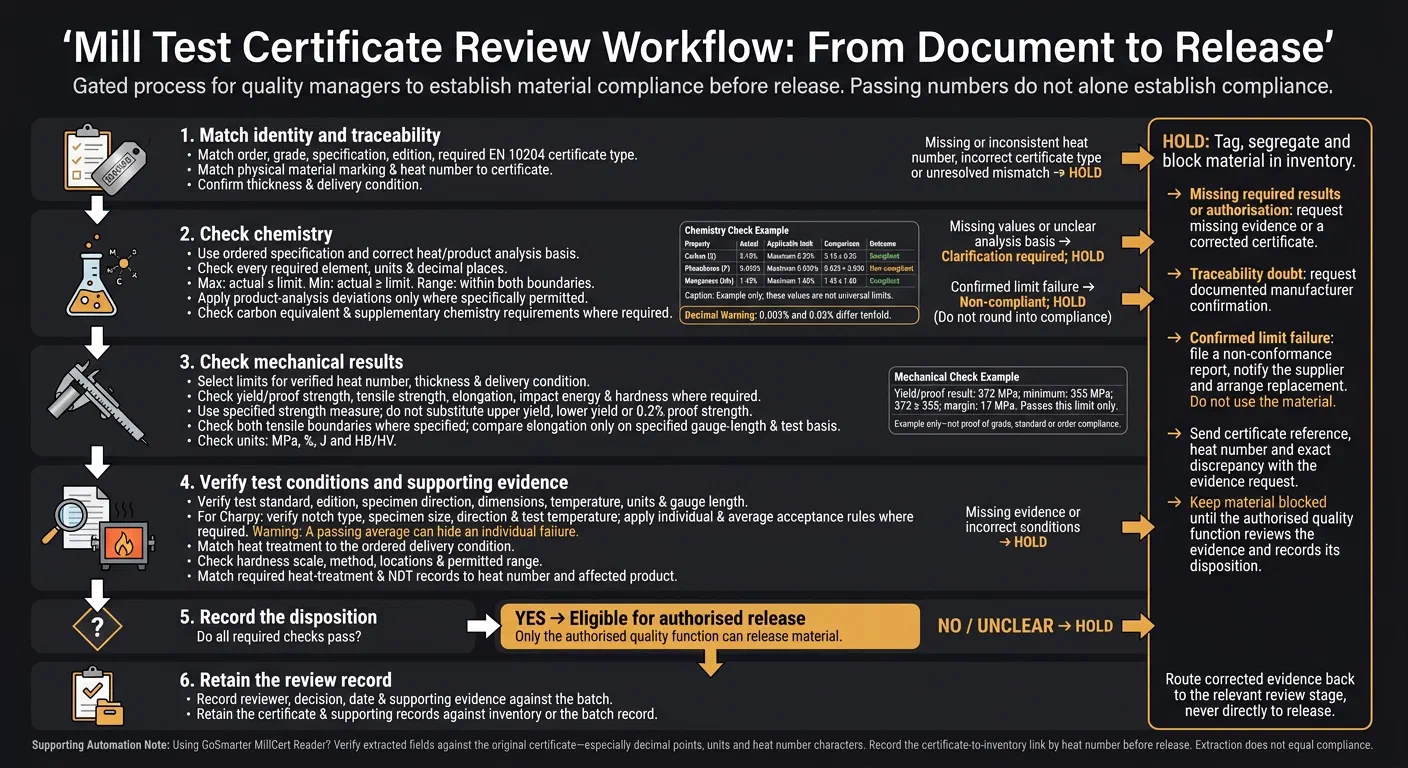
Here is the order of checks.
What Is a Mill Test Certificate and How Do You Read One?
A mill test certificate (MTC), also called a mill test report (MTR), is the mill’s record of one heat of steel. It states the heat number, chemistry and mechanical test results. It shows the steel met the ordered specification. A usual certificate has four parts: identification, chemical composition, mechanical properties and a signed certification statement.[1]
The video below walks through a typical layout.
Match the Certificate to Your Order and Material
Before you read any values, confirm the certificate belongs to the steel on your bay. Compare the specification, grade and edition with the purchase order (PO). Check the product form and dimensions too.
Then find the heat number on the certificate and on the material. Confirm they match character for character. A single wrong digit means a wrong certificate, mis-marked steel or an altered document.[2] If a delivery holds several heat numbers, check each one against its own certificate.
Check Chemistry Against the Ordered Specification
Use chemistry limits from the ordered specification, not a familiar grade. Record the exact standard and edition. Find the chemistry table for your product.
Check whether each limit covers heat analysis or product analysis. Heat analysis (also called ladle analysis) samples the molten steel. Product analysis samples the finished product. The certificate should state which one it reports.[1] Keep the table or clause reference beside your review record. If you cannot confirm the basis, hold the material before checking values.
Check Each Chemical Limit
Check carbon, manganese, silicon, phosphorus and sulphur. Add every required alloying or residual element.
Compare each actual value against its limit:
- Maximum: at or below the limit.
- Minimum: at or above the limit.
- Range: within both boundaries.
Pay close attention to phosphorus and sulphur. Both embrittle steel, so their maxima are strict.[2] Check units and decimal places. 0.003% sulphur is not 0.03%.
Property Actual value Applicable limit Comparison rule Outcome Carbon (C) 0.18% Maximum 0.25% 0.18 ≤ 0.25 Compliant Phosphorus (P) 0.035% Maximum 0.030% 0.035 > 0.030 Non-compliant Manganese (Mn) 1.45% Maximum 1.60% 1.45 ≤ 1.60 Compliant Example only; these values are not universal limits.
Mark missing values, unexplained units or an unclear analysis basis as Clarification required. Hold the material. Mark any confirmed limit failure as Non-compliant. Do not round it into compliance.
Check Additional Chemistry Requirements
Do not swap heat analysis for product analysis. Your standard says which one applies and whether it allows a deviation for that element and product. Structural steel standards set heat-analysis limits, product-analysis limits or permitted deviations, and carbon equivalent maxima.[3] Record the base limit and any permitted deviation. It is not a blanket allowance to exceed limits.
Check carbon equivalent when the order, material standard or welding documentation requires it. Use the specified formula and analysis basis, not your preferred formula. The International Institute of Welding (IIW) formula, with values in mass per cent, is:[2]
CEV = C + Mn/6 + (Cr + Mo + V)/5 + (Ni + Cu)/15
A passing carbon equivalent does not cancel a failed element limit. A value near the limit also affects welding preheat.
Check any ordered hydrogen limit, residual restriction or supplementary product-analysis requirement. Hold the material if evidence is missing or a value fails a limit. Once chemistry is clear, move to mechanical results.
Check Mechanical Test Results Against the Limits
Use the same heat number, thickness and delivery condition you verified earlier. Choose limits for that thickness and delivery condition, not just the grade. Standards set lower yield strength for thicker material.[4]
Compare every required property, including impact energy and hardness where applicable. Hold the material if any result misses its limit. Results may use megapascals (MPa), per cent, joules (J) and hardness scales such as Brinell (HB) or Vickers (HV). Check each result against its stated test method and unit.[1]
| Property | Certificate result | Applicable requirement | Comparison rule | Outcome |
|---|---|---|---|---|
| Yield or proof strength | 372 MPa | Minimum 355 MPa | 372 ≥ 355; margin 17 MPa | Passes this limit only |
| Tensile strength | Record the reported value | Use the stated minimum and maximum | Check both boundaries where specified | Hold if outside either limit |
| Elongation | Record percentage and gauge length | Record minimum and required gauge length | Compare only on the specified test basis | Hold if the test basis is unclear |
The yield figures are an example only. They do not show compliance for any grade, product standard or order.
Use only the specified measure: upper yield strength, lower yield strength or 0.2% proof strength. Do not substitute one for another.
Once the results meet the numerical limits, check the test setup behind them.
Verify the Test Conditions
Check the test standard and edition, specimen direction, specimen dimensions, test temperature and units. Use the specified gauge length, elongation designation and specimen type. A higher percentage does not rescue the wrong test basis.
Charpy impact testing measures the energy needed to break a small notched specimen with one pendulum blow at a specified temperature.[4] Product standards set minimum impact energy by sub-grade and test temperature, so the test must match the specified condition. Verify the notch type, specimen size, direction and test temperature.[1]
Apply both individual and average acceptance rules where required. The average of three specimens must meet the average minimum. Each single value must meet the single-value minimum.[1] A passing average can hide an individual failure. Hold the material if individual results are missing or the test temperature is wrong.
Then confirm the certificate reflects the real heat treatment and any required inspection evidence.
Check Treatment and Inspection Records
Confirm the heat-treatment condition matches the ordered delivery condition. Check the hardness scale, method, test locations and permitted range. A hardness value without its scale is invalid.
Where required, obtain heat-treatment records and non-destructive testing (NDT) reports. They should show test coverage and acceptance criteria. Match each record to the heat number and affected product.[1]
If evidence is missing, mark Clarification required and hold the material.
Decide Whether to Accept or Hold the Material
Complete the traceability, chemistry and mechanical checks before you apply the release decision below.
Record your decision against the affected batch. For any hold, tag, segregate and block the material in inventory. Clarification alone does not release material. Only your authorised quality function can release it.
| Finding | Decision | Required action |
|---|---|---|
| All required checks pass | Accept | Get authorised release and keep the certificate with the inventory or batch record. |
| Heat number missing or inconsistent | Hold | Quarantine the material and confirm traceability. |
| Required test results missing | Hold pending clarification | Request the missing data or a corrected certificate. |
| Result outside an applicable limit | Hold | File a non-conformance report, notify the supplier and arrange replacement. Do not use the material. |
| Incorrect EN 10204 certificate type | Hold | Request the correct certificate type. |
| Required authorisation missing | Hold pending clarification | Request a certificate with the proper signature and stamp. |
Complete the Release Checklist
Close your review with these checks:
- Confirm that the order, grade, specification and certificate type match the purchase order.
- Confirm that the heat number on the material matches the certificate.
- Confirm that chemistry, mechanical results, test conditions and signatures all pass.
Accept only when all required checks pass. Keep the certificate and supporting evidence with the inventory or batch record.
Request Evidence to Resolve a Hold
Send the mill the certificate reference, heat number and exact discrepancy. State which evidence or correction you need.
Request a corrected certificate for wrong details or missing test data. If you doubt traceability, ask for documented manufacturer confirmation. Escalate suspected alterations or unauthorised substitutions through your non-conformance process.
Keep material blocked until your authorised quality function reviews the evidence and records its decision.
Process Your Next Certificate Batch With GoSmarter
After your manual checks, use GoSmarter, built by Nightingale HQ, to speed up batch review.
Upload your next batch of PDFs, scans or photos to GoSmarter MillCert Reader. It extracts grade, heat number, chemistry and mechanical results for you to review.
Check the extracted fields against the original certificate. Pay close attention to decimal points, units and heat number characters. Extraction does not equal compliance.
Use Product Lineage to link certificates to inventory by heat number. At goods-in, record the exact marking and match it to the certificate before you link it to stock. Record that link before any release decision. The guide to digitising certificates explains the steps.
Keep unresolved material blocked. Before release, record the reviewer, decision, date and supporting evidence against the batch in your quality system.
MillCert Reader comes with the Workshop plan at £350/month rolling, or £280/month billed annually. Using the Midland Steel figures, the saved admin time covers the upfront annual fee in about 11 months. See the pricing page for the inputs. The same heat-number record also feeds Metals Manager and Cutting Plans, so one record serves every tool.
For your IT team, every paid plan includes a REST API and CSV export. GoSmarter hosts your data on UK Azure servers. When we receive a new mill certificate format, we train our AI on it so extraction is faster and more accurate from that point on. We do not use your personal or commercial data to train AI models.
FAQs
How do I choose between EN 10204 type 3.1 and 3.2 certificates?
Put the purchase order specification first. Check regulatory requirements and customer demands.
The manufacturer’s authorised inspector validates Type 3.1. It is the standard for most structural and engineering steel.
Type 3.2 adds an independent third-party inspector’s co-signature. Use it only for highly regulated, safety-critical work, such as nuclear energy, pressure vessels or offshore projects. It adds cost and lead time.
How can I verify a mill test certificate's authenticity?
At goods-in, match the certificate’s heat number to the material markings. Check for an authorised quality control representative’s signature and stamp.
Check chemical composition and mechanical properties against purchase order requirements and relevant standards. Confirm the certificate type meets project requirements.
If you have concerns, contact the manufacturer to confirm batch details or arrange independent laboratory testing. Do not use material with a missing, altered or non-compliant certificate.
How do I maintain traceability when steel is cut?
Keep the heat number linked to the steel throughout production. It connects the material to its original mill test certificate.
Before you add offcuts or smaller pieces to inventory, mark each piece with its heat number. Link each piece to the original certificate data in your tracking system. Keep that digital audit trail intact from the source batch to the final product.
References
- testcert.co, Mill Test Certificate Fields Explained. Used for certificate sections, analysis type, units, Charpy average and individual rules, and heat-treatment and NDT records. Checked 23 October 2026.
- testcert.co, How to Read a Mill Test Certificate. Used for the heat-number marking check, phosphorus and sulphur maxima, and the IIW carbon equivalent formula. Checked 23 October 2026.
- ISO/FDIS 630-2:2020, Structural steels, Part 2: Technical delivery conditions for structural steels for general purposes, final draft preview, clause 6.3. Checked 23 October 2026.
- Steel Construction Institute, Steel material properties, steelconstruction.info. Checked 23 October 2026.
Drill deeper
- Material Test Report (MTR) vs Mill Test Certificate (MTC): What's the Difference?
Go here if you first need to know whether a material test report and a mill test certificate are the same document.
8 min read
- EN 10204 vs ASTM and ASME: How the Standards Fit Together
Go here for how certificate types and material standards fit together, not the line-by-line checks.
7 min read
About the Author

Editor· Co-founder & Head of Product
Steph Locke is Co-founder and Head of Product at GoSmarter AI — former Microsoft Data & AI MVP building practical tools to cut paperwork and automate compliance for metals manufacturers.