How Role-Based Access Control Works in Factories
- BlogSmarter AI
- Edited by Steph Locke
- Blog
- June 1, 2026
- Updated:
Table of Contents Show Hide
Role-based access control (RBAC) is the fastest way to stop unauthorised changes, enforce separation of duties, and keep audit trails clean in factory operations. GoSmarter applies RBAC to production scheduling, mill certificate workflows, and approvals so each action is tied to a named user, role, and timestamp.
Factories run on precision. Access control in most plants is chaos. Shared logins and sloppy permissions create scrap, audit pain, and expensive mistakes on the shop floor.
Studies show people ignore around 96% of the permissions they are granted [4]. That’s exactly where hidden risk builds up.
Who this guide is for and what you get in 20 seconds
- If you run production, quality, or operations in metals manufacturing.
- If you need cleaner audits without slowing the shop floor.
- If you want tighter controls on scheduling, mill certificates, and approvals.
Here’s what you get with RBAC:
- Clear boundaries: Operators can’t approve their own changes. Engineers can’t delete critical records.
- Audit-ready systems: Every action is tied to a unique login, meeting ISO 9001 and AS9100 demands.
- Less waste, more control: Stop unapproved tweaks that send scrap rates soaring.
Let’s get into how it works. Here’s how GoSmarter makes it straightforward.
Smart Factory Security 🔐 | 100% Access Control with RBAC Case Study
How To Design RBAC for Your Factory
RBAC is not a box-ticking exercise. Build it around how your factory actually runs, or it fails on day one.
Assess Your Current Systems and Risks
Start by listing every system that holds sensitive data or controls critical processes:
- your enterprise resource planning (ERP) system
- production scheduling software
- quality management tools
- mill certificate databases
- Supervisory Control and Data Acquisition (SCADA) systems
- operational technology (OT) network interfaces
For each system, list the actions users can perform: view, edit, approve, or delete. Then note exactly who has access today.
Look for weak spots like shared logins, contractors with overly broad access, or operators who can both initiate and approve actions. Make sure no role allows one person to both create and authorise tasks. Before implementing RBAC, clean out outdated permissions and fix existing issues. Carrying over old problems into a new system just keeps the vulnerabilities alive [1][6].
“RBAC isn’t just about adding rules - it’s about achieving clarity and precision in your access strategy.” - Hoop.dev [5]
This review process ensures that user roles align precisely with their actual responsibilities.
Map Roles to Tasks in Manufacturing
Once you’ve mapped out your systems, connect them to your workforce. Review access from both sides. Managers define responsibilities, and IT checks real usage to catch permission gaps [2].
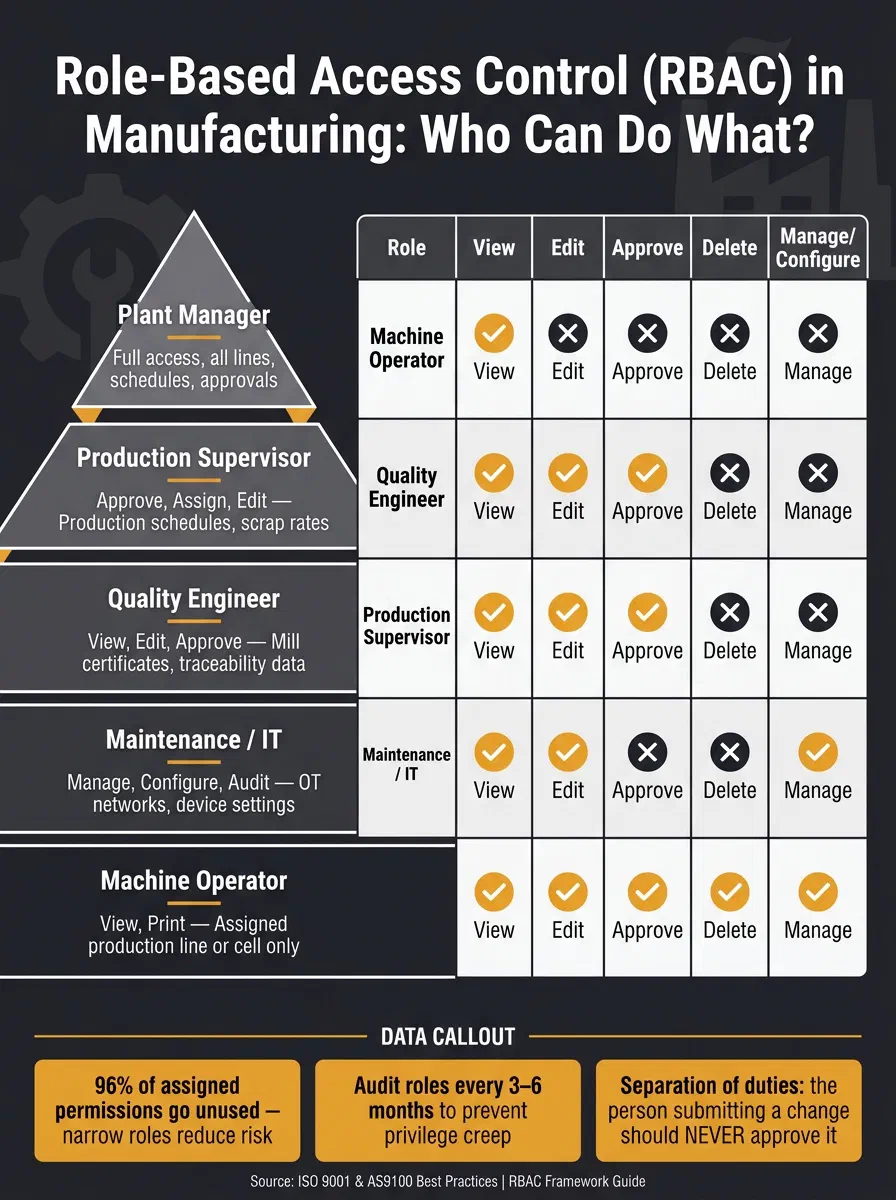
Define roles with precision, focusing on specific resource-action pairs like “Production Schedule: Edit” or “Mill Certificate: Approve.” Avoid granting permissions based solely on job titles. The table below provides examples of how manufacturing roles can translate into access permissions and data scope:
| Manufacturing Role | Permissions | Data Scope / Resource |
|---|---|---|
| Machine Operator | View, Print | Assigned production line or cell |
| Quality Engineer | View, Edit, Approve | Mill certificates, traceability data |
| Production Supervisor | Approve, Assign, Edit | Production schedules, scrap rates |
| Maintenance / IT | Manage, Configure, Audit | OT networks, device settings |
| Plant Manager | Full access within plant scope | All lines, schedules, approvals |
Studies show that employees ignore about 96% of the permissions they’re assigned [4]. This highlights how overly broad access rights are not just inefficient but risky. Narrow, role-based permissions reduce waste and limit the damage if a single account is compromised.
Factor In Location and Data Scope
After defining roles by tasks, fine-tune access based on location and specific data boundaries. For instance, a Production Supervisor in Sheffield doesn’t need access to cutting plans or heat code records from Birmingham. This is where scope comes into play: restricting permissions to the resources relevant to a user’s specific role and location [7].
Think of access as a hierarchy: enterprise-wide at the top, then individual plants, then production lines, then specific machines or devices. Permissions can cascade down but should also be confined where necessary. For example, a team operating a specific rolling line should have full access to that line’s data but no visibility into research and development files stored elsewhere [3].
This structured approach not only improves security but also simplifies compliance. Every action is tied to a unique login and a clearly defined scope. That creates an audit trail ISO 9001 and AS9100 auditors expect to see.
Applying RBAC to Real Factory Situations
Once you’ve designed your role-based access control (RBAC) framework, its true strength shows up where it counts: on the factory floor. This isn’t about ticking theoretical boxes. It’s about stopping costly mistakes, keeping data intact, and locking down your systems.
Securing Production Scheduling and Scrap Optimisation
One wrong tweak to a cutting plan can cause offcuts and scrap. RBAC steps in here, enforcing clear boundaries. The engineer drafting a cutting plan? They’re not the one who approves it. This isn’t red tape. It’s a safety net that stops expensive errors before they happen.
Here’s how it works in practice:
- Machine operators can view schedules and print instructions but have no access to cutting parameters or scrap settings.
- Production Engineers can edit cutting plans but can’t approve them for live runs.
- Supervisors or quality leads hold the final say, ensuring only verified files make it to production.
This layered structure keeps unapproved changes out of the workflow, cutting down material waste and protecting your margins.
And with GoSmarter, it’s even simpler. Cutting Plans churns out optimised cutting plans and scrap calculations, but nothing goes live without role-based sign-off. The AI handles the grunt work; the right person signs off.
Now, let’s talk about safeguarding the crown jewels of your operation: traceability data.
Protecting Mill Certificate and Traceability Data
Mill certificates are the backbone of traceability in steel and metals production. They link every material to its heat code, chemical composition, and mechanical properties. If someone tampers with that data, or if it’s accessed by the wrong person, your compliance is toast.
Shared logins are a disaster waiting to happen. As Markforged put it, “The keys to your factory are too important to leave on a sticky note.” [3] When five people share one account, accountability vanishes. RBAC fixes this by tying every action to an individual.
- Quality Engineers can view and approve mill certificates.
- Interns might only get view permissions.
- Quality Managers or higher-level staff are the only ones who can modify or delete master records.
GoSmarter’s Mill Certificate Reader tackles this head-on. It uses AI to scan mill certificates, link inventory to heat codes, and retrieve PDFs by heat code. It also links certificate records to order references so teams can retrieve an order-level audit trail fast. Combined with RBAC, this keeps traceability data accessible and tightly controlled. For UK manufacturers facing ISO 9001 or AS9100 audits, this setup turns a nerve-wracking process into a smoother one.
But RBAC doesn’t stop at data. It also secures your operational technology (OT) systems, where the stakes are even higher.
Restricting Access to OT Networks and Devices
In the world of operational technology, mistakes don’t just cost money. They can cause physical damage or safety risks. A poorly configured SCADA system or an unauthorised firmware update can bring everything to a halt. That’s why RBAC in OT environments runs on a strict least-privilege basis.
Here’s how it’s structured:
| OT Role | Permissions |
|---|---|
| Machine Operator | Run assigned tasks, view device status, log production data |
| Maintenance Engineer | Update configurations, perform calibrations, log repairs |
| Plant Manager | Approve high-value work orders, view cross-department reports |
| System Administrator | Manage roles, oversee network integrations, access audit logs |
| Contractor | Limited access to specific assets with automatic expiry |
Contractor access is a particular weak spot in many factories. Too often, third-party technicians are handed the same broad access as full-time staff. With RBAC, you can issue credentials that are asset-specific and time-limited, expiring automatically once their job is done. No more chasing down forgotten accounts.
A good example of this in action is the Litmus Edge platform. From version 3.3.1 onwards, it allowed Active Directory groups to map to specific industrial data permissions. This meant viewers could only see what they needed, while administrators controlled the underlying system connectors. [8]
Keeping Your RBAC System Up to Date
RBAC isn’t a “set it and forget it” kind of system. As shop floor workflows shift, roles change, and new equipment arrives, your RBAC controls need to keep pace. If they don’t, even the best-designed setup can quickly become a liability. Mathew Pregasen, Technical Writer at Oso, sums it up perfectly:
“Without maintenance, even well-designed RBAC systems decay into security liabilities. Your RBAC system should evolve with your company, or else it may eventually constrain it.” [9]
Updating your RBAC system isn’t just about keeping things tidy. It’s about ensuring security and compliance don’t fall through the cracks.
Review and Refine Roles Regularly
Roles should reflect the actual tasks people perform, not just their job titles. But here’s the thing: roles aren’t static. Over time, employees shift responsibilities, and access rights can pile up. This is known as privilege creep. If left unchecked, you’ll end up with outdated permissions sitting around like forgotten leftovers in the fridge.
To avoid this, schedule regular access reviews. A good rule of thumb is to audit roles every three to six months [11]. Automating these reviews saves significant time. For instance, you could set up a quarterly email to line managers listing their team’s access. They’d then confirm if the roles are accurate or flag changes.
When defining roles, focus on stable business functions. A role like “Quality Control” will stay relevant even if job titles change. Here’s a useful benchmark: if 80% of users in a role actively use 80% of its permissions, the role is well-designed. If not, it might be time to split or refine it [9]. Tying your RBAC system to HR software also helps. Automating access changes for new hires, internal transfers, and leavers reduces the risk of human error [9][10].
Measuring Whether RBAC Is Working
How do you know if your RBAC setup is pulling its weight? You measure it. Here’s a quick breakdown of key metrics and how often to review them:
| Metric Category | What to Track | Recommended Frequency |
|---|---|---|
| Access Control | Over-privileged accounts, unused permissions, role explosion | Every 3 months [11] |
| Temporary Access | Duration of temporary grants, expiration compliance | Monthly [11] |
| Security Incidents | Unauthorised access attempts, mean time to recovery | Ongoing / real-time [11][12] |
| Operational | Onboarding speed, time to process access requests | Quarterly [13] |
Here’s a sobering stat: employees ignore 96% of the permissions they’re granted [9]. That’s a lot of unused access rights just waiting to become a problem. Track unused permissions and set up alerts for unusual behaviour, such as someone accessing sensitive records after hours, to catch issues before they escalate.
If you’re using GoSmarter, the platform’s AI-driven data layer does some of the heavy lifting for you. It centralises production data, from scrap calculations to mill certificate records, and creates a clear audit trail. This makes it easier for quality managers and IT leads to notice when something doesn’t look right.
Governance and Documentation
RBAC dies without ownership. Assign owners, review access, and keep evidence clean for ISO 27001 and AS9100 audits [14]. Treat RBAC as an ongoing programme, not a one-time IT project.
One smart move is to assign role owners from departments like production or quality. These are the people who know what access their teams actually need. Pair this with a formal Joiner-Mover-Leaver process so permissions update automatically as employees join, change roles, or leave [15]. Don’t leave it all to IT. They’re not on the shop floor and won’t have the same insights.
For UK metals manufacturers, maintaining a digital audit trail is non-negotiable when it comes to compliance. And don’t overlook separation of duties. The person submitting a production change order should never be the one approving it. This simple control can prevent both accidental mistakes and deliberate fraud.
What gets logged in the GoSmarter audit trail
When you combine RBAC with GoSmarter, your team can track who did what and when:
- user identity and role at the time of action
- timestamp and source system
- linked source data such as mill certificate, heat code, and order reference
- requested change and any AI recommendation attached to it
- approver identity and final action taken
Start Using RBAC and GoSmarter in Your Factory
RBAC (Role-Based Access Control) is the backbone of secure and efficient factory operations. It ensures that only the right people can make critical changes, like adjusting schedules, signing off on quality checks, or accessing sensitive mill data. No more unauthorised meddling. Just controlled, accountable access.
Getting started with RBAC doesn’t have to be a headache. Start by mapping out who currently has access to what, and then define roles based on actual workflows [2]. For example, a “Quality Control Inspector” role can remain relevant no matter how your organisation evolves. This practical approach lays the groundwork for integrating AI tools like GoSmarter.
“The keys to your factory are too important to leave on a sticky note.” [3]
Once you’ve got your roles sorted, GoSmarter adds a second layer of control. Using RBAC as a foundation, GoSmarter locks down key processes like managing mill certificates, scrap calculations, and production schedules. Its AI helps your team work faster without dropping control. Teams save over 10 hours a month by digitising PDF mill certificates. Cutting Plans cuts scrap waste too. Everything stays in one central, auditable system.
Pair your RBAC setup with GoSmarter’s Workshop tier to unlock even more. It includes AI-powered certificate scanning and automatic inventory-to-heat code linking, creating a digital audit trail that ISO and AS9100 auditors look for. Start by defining your roles, and let your governance layer grow naturally as your factory evolves.
How GoSmarter handles GDPR, IP protection, and vendor lock-in risk
GoSmarter keeps customer data on UK and EU servers and aligns with General Data Protection Regulation (GDPR) requirements. Your team controls access with role-based permissions and approval boundaries, and every key action can be traced in audit logs. Customer production data and certificate records stay yours and are not used to train shared provider models. If you need to leave, you can export records as CSV and there are no exit fees.
UK/EU data hosting controls for industrial audits
GoSmarter keeps customer data in UK and EU regions so teams can satisfy residency checks during procurement and compliance reviews. This gives quality, operations, and IT teams a clear answer when auditors ask where records live and who can access them.
How RBAC audit logs support ISO 9001 and AS9100 evidence packs
RBAC logs make evidence packs easier to build. You can show who approved each change, when it happened, and which records were touched. That traceability reduces audit friction for ISO 9001 and AS9100 reviews.
Treat this as part of procurement, not an afterthought. Confirm your exact data-handling terms in writing before go-live.
FAQs
What’s the quickest way to define roles and permissions without disrupting production?
How do you enforce separation of duties on the shop floor in practice?
How often should you review RBAC to prevent “privilege creep”?
How safe is our mill certificate and production data with GoSmarter in terms of GDPR, IP protection, and vendor lock-in risks?
Does GoSmarter support UK/EU data hosting and enterprise access controls?
About the Author

Editor· Co-founder & Head of Product
Steph Locke is Co-founder and Head of Product at GoSmarter AI — former Microsoft Data & AI MVP building practical tools to cut paperwork and automate compliance for metals manufacturers.