
Why an ERP Audit Log Isn't Enough for Metals Traceability
- BlogSmarter AI
- Edited by Steph Locke
- Blog
- November 4, 2026
- Updated:
Table of Contents Show Hide
An Enterprise Resource Planning (ERP) audit log records who edited which field. On its own, it does not prove which heat went into which shipment. Some ERPs add lot tracking, but check that it follows a heat through every split.
When a customer queries a child coil, spreadsheet detective work burns time and leaves you guessing what to hold.
GoSmarter, built by Nightingale HQ, sits alongside your existing ERP and spreadsheets. It links mill certs to heat codes with no rip-and-replace. Its AI-assisted certificate reading cuts typing. Your ERP and production records must still maintain steel traceability to prove which material went where.
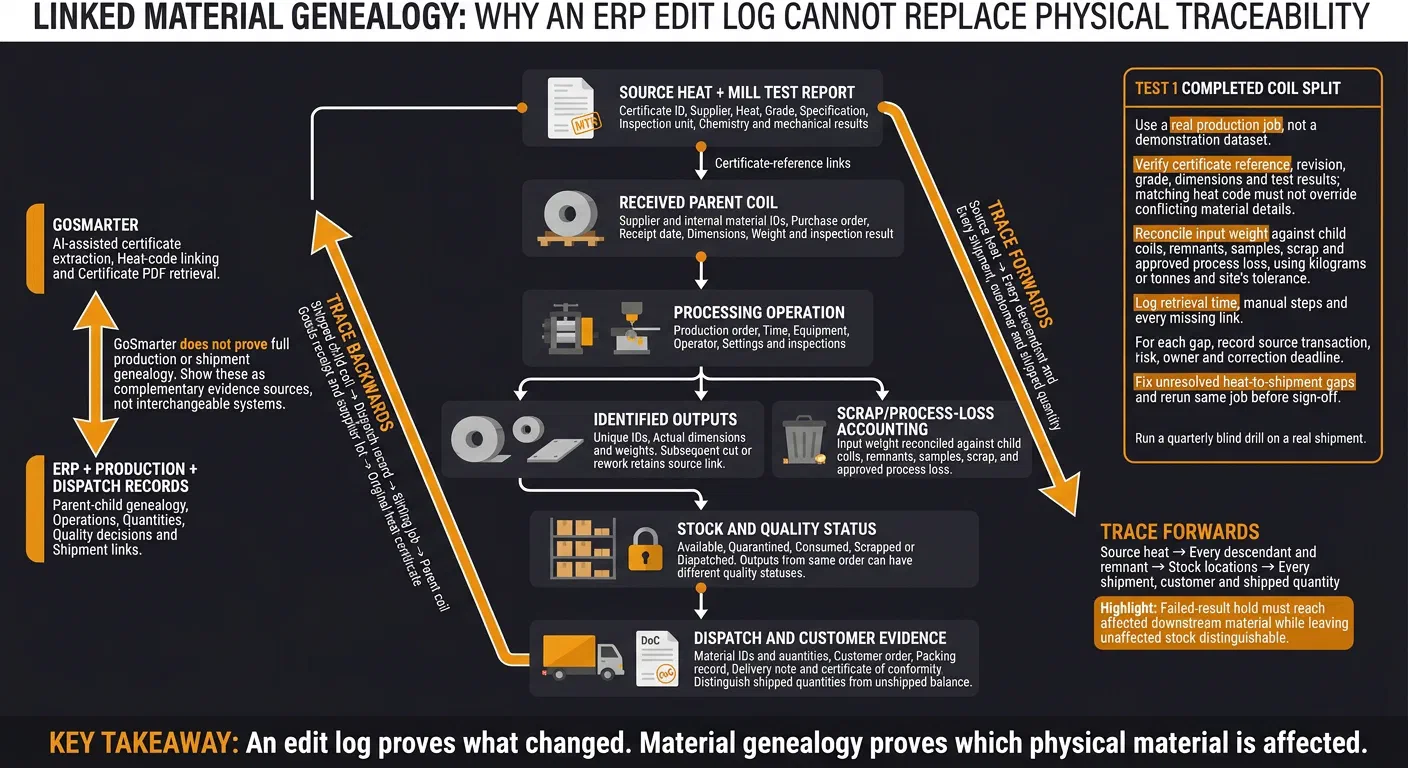
What is parent-child genealogy? It is a record that links every output (a child coil, sheet bundle or remnant) to the input material, the operation and the source heat that made it. An edit log shows that a field changed. Genealogy shows which physical material the change affects.
This post shows you how to:
- Keep parent links through splits, rework and dispatch.
- Check certificate matches without trusting a heat code alone.
- Test 1 completed coil split backwards to its heat and forwards to every shipment.
The test is simple: can you trace the metal, not just the edits? Let’s check.
Slit Coil Traceability 101: From Strapping to Labelled, Stacked Pallets
This process supports integrated cert traceability. It links physical coil processing directly to digital mill records.
Connect Each Heat, Certificate and Child Coil
Give every output an ID, then keep its source link intact through receipt, processing and dispatch.
At receipt, link these details to the received coil:
- Supplier material ID, heat, purchase order and date
- Grade, specification, dimensions and weight
- Inspection result and mill test report
Keep supplier and internal coil IDs together. This record starts the parent chain for every later split.
Give Every Output an ID and a Source Link
Editing a field does not prove lineage. The parent-child record does. Require parent selection whenever processing creates a child coil, sheet bundle or remnant.
Give each output its own ID. Link it to the input material and the operation that created it. Record actual dimensions and weights, remaining stock, trim and scrap. Keep the parent link through every later cut. Match physical labels to those IDs.
For every stock movement, record material ID, quantity, source, destination, timestamp and responsible user.
Attach the production order, time, equipment, operator, settings and inspections to the parent or child record. Keep non-conformances, rework, quarantine status and release decisions there too. Outputs from the same order can have different quality statuses.
Retain parent records after you consume the material. Reconcile input weight against children, remnants, scrap and process loss within tolerance.
Keep Certificates Linked Through Dispatch
Traceability fails when the certificate loses its link to the physical material.
Store the mill test report with its certificate ID, supplier, heat, grade, specification and inspection unit. Include chemistry and mechanical results. Check that the heat matches the material identification. Use the parent-child link to show which outputs the certificate covers.
Keep that certificate link through cutting, relabelling, stock transfers and partial shipments. Each dispatch line should show:
- Material IDs and quantities
- Customer order and packing record
- Delivery note and certificate of conformity
Keep shipped quantities and the unshipped balance identifiable. You can then answer customer requests and isolate affected material quickly. A product code alone cannot prove which material you shipped.
Use receipt, genealogy, stock and dispatch records to preserve material identity, history and recall scope.
Test Your Material Traceability
Once you have the material chain in place, test it with a blind trace request.
We suggest a quarterly blind drill on a real shipment. Record retrieval time and missing evidence. Treat the system as passing only if it answers a customer trace request and isolates affected material without spreadsheets.
Trace a Shipment Backwards and a Heat Forwards
Choose a shipped coil, part or dispatch line. Retrieve its unique ID and dispatch record.
Follow its parent links through processing and receiving records to the source heat, using digital traceability best practices. Open the mill test report. Verify its certificate reference, revision, grade, dimensions and test results.
Check that you can still access work orders, inspections, non-conformances and release decisions after cutting, picking and repacking.
Search forwards from that heat. Retrieve every descendant, remnant, stock location and shipment. Check quantities against each status: available, quarantined, consumed, scrapped or dispatched.
Export the evidence. Match it to labels, dispatch paperwork and the customer certificate.
The forward trace must identify customers and shipped quantities, not just material still on site. Treat missing links as failures, even when staff can dig out the paperwork manually. ISO 9001 clause 8.5.2 covers identification and traceability (summary of clause 8.5.2).
Use the table below to check each trace for completeness, weight balance and audit evidence.
Check Splits, Corrections and Weight Balance
Choose a completed slitting transaction. Check that the system links each child coil to its exact parent, operation, source heat and certificate.
Repeat the check through cutting, rework and repacking. Reconcile input weight against child coils, remnants, samples, scrap and approved process loss. Use kilograms or tonnes and apply your site’s tolerance.
Investigate unexplained differences. Don’t accept a balancing adjustment just because it makes the numbers match.
| Test | Evidence of a satisfactory result | Warning sign |
|---|---|---|
| Split and remnant links | Each output’s unique ID retains links to its parent, operation, source heat and certificate | Staff must re-enter heat numbers |
| Weight balance | Scale records support all outputs, remaining stock and losses | Negative stock, duplicated weight or unexplained variance |
| Blended material | The system retains links to every contributing heat, quantity and certificate | One heat overwrites the other contributors |
| Controlled correction | The system shows original and revised values, reason, user, approval and timestamp | The system allows silent changes to released data |
| Containment | The system identifies affected descendants and blocks on-site stock from picking and dispatch | The hold applies only to the original coil |
| Customer export | A dated report includes genealogy, quantities, inspections, release status and supporting certificates | The export lacks certificate files or processing history |
Create a test correction: change a heat reference, weight or inspection result. Check whether the system flags affected stock and shipments for review. If it does not, you have found a gap to close before the next audit.
Then test a failed-result hold. It must reach downstream material while keeping unaffected stock distinguishable.
An edit log can prove that a heat number changed. The acceptance test must prove which physical material that change affects.
Link Mill Certificates to Heat Codes with GoSmarter
GoSmarter, built by Nightingale HQ, closes the certificate gap that ERP leaves behind: it keeps the heat, certificate and file together. Metals Manager links each stock item to its mill certificate by heat number. You can then retrieve the certificate PDF by heat code. Use it alongside ERP records. It does not prove full production or shipment genealogy on its own. See the mill certificates guide and the inventory operations guide.
Read Certificate Data with AI Assistance
Upload the original PDF, scan or photo. MillCert Reader extracts heat numbers, grades, dimensions, chemistry and mechanical-test results. Check uncertain characters, such as 0/O and 1/I, before you accept the match. The digitising mill certificates guide covers the steps.
Extraction saves typing. The bigger gain comes from checking those fields against your stock record quickly. On the Workshop annual plan, the upfront fee for MillCert Reader pays back in about 11 months. That assumes it saves 10 hours a month, one customer’s logged saving, not an average.
| The Manual Way | The Automated Way |
|---|---|
| Retype heat codes from mill certificates | Extract certificate fields with AI assistance, then check uncertain readings |
| Match inventory and certificates by hand | Use automatic matching of heat numbers to stock records |
| Search folders for the certificate file | Retrieve the linked certificate PDF by heat code |
Automatic matching links the certificate to the stock record when both carry the same heat number. At goods-in, match the label to your stock record. Then check the reference, source mill, grade, dimensions, weight, test values, certificate type and issue date.
Keep the source unit visible. Normalise reporting using the metals manufacturing glossary and use consistent dates. A matching heat code must not override conflicting material details.
Verify the Material Chain Across Your Records
Certificate extraction and heat-code matching support traceability. They do not prove parentage or shipment on their own. Keep ERP transaction IDs, work orders, quantities and dispatch references alongside the certificate evidence.
Your acceptance tests must show links between heat, certificate, receipt, genealogy, process history, inspection and shipment across the combined records. Check that uncertain matches and corrections stay visible. Retain the original value, corrected value, user, timestamp, reason and supporting document.
For your IT team, REST API access is included on every plan, and you can export your data as CSV, so you can pull evidence alongside your ERP records. GoSmarter stores your data on Microsoft Azure in UK data centres. We use uploaded certificates, de-identified, to improve our own extraction models. We never share them with other customers or third-party AI providers. Microsoft does not train on your data.
Test GoSmarter with a Completed Coil Split
After certificate matching, test one completed coil split from start to finish in GoSmarter. An audit log cannot prove parentage after a split. Use a real production job, not a demonstration dataset.
Include the mill test report, goods-receipt record, parent-coil ID, child-coil labels and slitting order. Add actual weights, inspection results and dispatch documents.
Start with the heat code on the mill test report. Retrieve the certificate in GoSmarter. Confirm it matches both the physical parent coil and its record. Check that duplicate heat codes, supplier references, file versions and corrected certificates don’t link the wrong document to your material. Then check the full genealogy across your ERP and lineage records.
Trace one shipped child coil backwards through:
- Dispatch record and child-coil ID
- Slitting job and parent coil
- Goods receipt, supplier lot and original heat certificate
Then trace forwards from that heat to every sibling coil, stock location and shipment. Account for scrap and the retained balance too.
Reconcile the parent weight against child weights, scrap and remaining material within tolerance. Log retrieval time, manual steps and every missing link. For each gap, record the source transaction, risk, owner and correction deadline.
Don’t sign off until you fix every unresolved heat-to-shipment gap and the same job passes again.
FAQs
Why is a generic ERP audit log not enough for metals traceability?
How can we restore missing parent–child coil links?
Document the link to the original heat, batch or lot. Use supplier bundle lists, mill production records or dispatch records.
If you cannot resolve the issue, keep the material on hold under the quality manager’s authority. Do not release it to production until you receive and verify a formal correction or clarification.
Make every future split, slit or merge record inherit the parent’s identifiers. Keep those links permanently in the material history.
How should we handle duplicate heat codes?
Treat each heat number as the root of a parent-child genealogy, not just another label in your stock system.
For deliveries or stock with multiple or mixed heats, split and store each heat and certificate link separately. Make sure every cut piece, off-cut and allocated shipment inherits the correct heat and certificate data.
If you cannot link duplicate heat codes to distinct mill certificates, block processing and despatch. Verify the certificates before you release the material.
How do we set weight-balance tolerances?
Set one weight-balance tolerance per product and process, in kilograms or tonnes. Agree it with your quality manager and write it into your operating procedure.
Compare input weight against child coils, remnants, scrap and approved process loss for every cut or batch. Investigate any variance outside the tolerance before you release stock. That keeps spreadsheet discrepancies out of your audit evidence.
Drill deeper
- Your ERP Calls It Traceability. It Isn't.
Go here for why ERP lot tracking falls short, before you run the acceptance test in this post.
10 min read
- Audit Trails: Because 'I Think It Was Dave' Isn't a Defence
Go here for what an audit trail records and which standards ask for one.
9 min read
Tags:
About the Author

Editor· Co-founder & Head of Product
Steph Locke is Co-founder and Head of Product at GoSmarter AI — former Microsoft Data & AI MVP building practical tools to cut paperwork and automate compliance for metals manufacturers.