ERP vs Spreadsheets: Multi-Warehouse Inventory for Metals
- BlogSmarter AI
- Edited by Ruth Kearney
- Blog
- April 20, 2026
- Updated:
Table of Contents Show Hide
Spreadsheets are the hidden cost killing multi-warehouse metals operations. Managing multiple sites with Excel means wasted time, misplaced stock, and compliance risks you cannot afford to ignore.
For metals manufacturers, where traceability and precision are non-negotiable, spreadsheets simply can’t keep up. Enterprise Resource Planning (ERP) systems offer a better way: real-time updates, automated processes, and centralised data. And with tools like GoSmarter’s Metals Manager (built by Nightingale HQ), you can go further – cutting manual drudgery by automating tasks like reading mill certificates, tracking scrap, and scheduling production.
Here’s what you get when you move beyond spreadsheets:
- Real-time inventory visibility: Know exactly what’s in stock across all locations.
- Fewer errors: Stop losing time to manual updates and mismatched data.
- Smarter decisions: Automate stock tracking, transfers, and replenishment.
- Time saved: Focus on production, not admin.
Spreadsheets are fine for small setups, but if you’re managing 500+ Stock Keeping Units (SKUs) across multiple sites, it’s time to stop patching holes in a sinking ship. Let’s sort this out.
Multi-Location Inventory Management Guide for Growing Businesses
Why Managing Multi-Warehouse Inventory is Difficult
What is multi-warehouse inventory management? It is the process of tracking and controlling stock across two or more physical locations – each with its own stock levels, mill certificates, and movement records – from a single system of record.
Multi-warehouse inventory is difficult because every location holds different stock, different certificates, and different versions of the truth. Running a single warehouse is manageable. Add more, and the complexity doesn’t just increase - it explodes. In metals manufacturing, where traceability is non-negotiable, keeping tabs on raw materials with mill certificates, heat numbers, and other documentation is critical. Imagine one warehouse holding coils of stainless steel grade 316L and another storing 304. Mix those up, and you’re staring at compliance nightmares, especially if you’re supplying sectors like aerospace or automotive, where precision isn’t optional. Let’s break down why this juggling act demands a better approach.
Manual Tracking: A System That Cracks Under Pressure
Spreadsheets might get the job done for a small operation, but they’re not built for scale. Once you’re managing 500+ Stock Keeping Units (SKUs) across multiple locations, the cracks start to show 1. Different team members saving their own file versions creates confusion - what’s the right dataset? Add stock transfers between warehouses into the mix, and the headaches multiply. Moving material from your main warehouse to a satellite location means updating multiple tabs, and it’s easy for errors to creep in. That’s how stock gets misplaced or, worse, lost.
Then there’s the manual counting. For businesses with multiple sites, a full physical count can take more than an entire day each month. During that time, operations grind to a halt while staff comb through stock levels by hand 1. It’s a time sink that no growing business can afford.
Real-Time Data: The Key to Avoiding Costly Errors
Spreadsheets fail where real-time systems excel. Without live updates, sales can happen while your spreadsheet is still stuck in yesterday’s numbers. This creates phantom inventory - stock that shows as available but is long gone 1. On the flip side, items that are ready to sell might be flagged as out of stock, triggering unnecessary reorders and locking up cash in the wrong places.
Mistakes aren’t just theoretical. In 2025, a retail store accidentally ordered 1,000 units instead of 100 due to a manual entry error. That blunder cost £11,500, with the excess inventory taking eight months to clear 2. For metals manufacturers, the stakes are even higher. Over-ordering ties up cash you could use elsewhere, while under-ordering halts production and delays customer deliveries.
Selling across multiple channels makes things even trickier. For example, if you’re listing stock on Shopify and Amazon, even a one-hour lag in spreadsheet updates can result in the same item being sold twice 1. Sellers juggling three or more sales channels with spreadsheets report an average of 8 to 12 oversells per month 1. Each oversell means cancelled orders, refunds, and a dent in your reputation.
The financial impact is staggering. The retail industry loses an estimated £1.3 trillion annually due to out-of-stock items 3, and the cost of a single stockout in e-commerce averages 4.1% of annual revenue 1. For a metals manufacturer with a £5 million turnover, that’s over £200,000 lost to stock issues that could have been avoided.
Spreadsheets: Low Cost, High Risk
Spreadsheets might be free and easy to use, making them a decent option for businesses handling fewer than 100 SKUs with just one sales channel 4. But here’s the reality: 43% of small businesses still track inventory manually, and over 60% stick with spreadsheets even as they grow 12. Once you add multiple warehouses into the mix, the cracks in this system widen - leading to errors and inefficiencies that cost you money. What starts as a cheap solution quickly turns into a costly headache.
Where Spreadsheets Work (and Where They Don’t)
Spreadsheets have their perks. They’re flexible - you can create custom columns, formulas, and logic for things like heat numbers, mill certificate references, or bin locations. Plus, they work offline, which can be a lifesaver in warehouses with dodgy internet. But here’s the kicker: 94% of spreadsheets contain errors 15. Combine that with the typical human error rate of 1% to 3% during data entry 4, and you’ve got a ticking time bomb, especially in multi-warehouse setups.
Version control is another nightmare. When multiple people edit different copies of the same file, it’s impossible to know which one is correct. Teams end up arguing over conflicting data, and stock transfers get missed 12. Spreadsheets also lack enforcement - there’s no safeguard to stop someone from bypassing a quality check or entering the wrong bin location. It all hinges on staff remembering the right steps, and let’s face it, memory isn’t a reliable system.
These shortcomings don’t just mess up your data; they also drive up your operating costs.
The Hidden Costs of Manual Work
Sure, spreadsheets don’t cost anything upfront, but the labour costs pile up fast. Beyond the errors and versioning chaos, manual work eats into your efficiency. For businesses managing 200+ SKUs across multiple sites, reconciling spreadsheets can cost between £4,500 and £9,000 per year 4. And that doesn’t include the cost of mistakes. Each warehouse mispick sets you back £17 to £39 when you factor in returns, labour, and replacement fulfilment 1. If you’re running an e-commerce operation, stockouts can cost you 4.1% of your annual revenue 1. For a metals manufacturer with a £5 million turnover, that’s over £200,000 gone.
Then there’s the productivity black hole. Businesses relying on spreadsheets lose 20% to 30% of their productivity due to inefficiencies 6. Manual inventory management alone eats up 10 to 15 hours of labour every week 2. That’s time your team could spend on strategic tasks instead of chasing down mismatched data.
“The question isn’t whether you can afford inventory management software. It’s whether you can afford to keep using Excel.” - Ordavia Editorial Team 2
ERP Systems: Automated and Centralised
ERP systems replace scattered spreadsheets with a single platform that tracks stock movements, manages inventory transfers, and syncs data across every warehouse you run. It syncs data across warehouses, online stores, and third-party logistics providers 7. It’s not just about organisation - an ERP system acts as your central hub, pulling data from accounting, procurement, supply chain, and CRM into one shared database 8. No more version control nightmares; everyone works with the latest, automatically updated information.
But ERP systems don’t stop at tracking. They actively monitor stock levels, sending alerts or even generating purchase orders before you run out 7. They also allocate orders intelligently, reserving stock and choosing the most efficient warehouse for shipping 7. Some systems even assign inventory counting tasks to floor staff automatically, cutting down on manual oversight 7. Considering stockouts cost retailers in the US and Canada around $350 billion annually 7, automated replenishment isn’t just helpful - it’s essential. And with Radio-Frequency Identification (RFID) tags integrated into these systems, out-of-stock messages can drop by up to 30% 7.
How ERP Improves Multi-Warehouse Operations
ERP systems shine when managing multi-warehouse setups. By unifying data and automating core processes, they ensure that everyone - whether on the warehouse floor or in the head office - has access to the same, accurate information 8. Cisco Systems proved this on a massive scale, consolidating 80 legacy ERP systems into one. The result? Annual savings of £550 million through streamlined global operations and better data management 9. That’s not something spreadsheets can compete with.
Automation also reduces human error. Barcode scanning and API integrations handle data entry automatically, cutting out mistakes 7.
“The most important thing was that pick-and-ship could be run from iPads… This feature cuts our order error rate down to almost zero” - Jen Greenlees, Owner of Sydney So Sweet 7
Real-time visibility across warehouses and logistics providers means better decisions on resource allocation, inventory forecasting, and production scheduling 8. For metals manufacturers, this translates to better traceability and more precise production. On average, ERP systems deliver £7.23 for every pound invested and boost operational efficiency by 49% 9.
The Downsides of ERP Systems
Despite their benefits, ERP systems come with challenges. Cost is the biggest hurdle. For example, ShipHero’s plans start at £1,995 per month, while Cin7 Core begins at £325 per month 7. NetSuite adds an annual licence fee and a one-off setup cost 7. Beyond subscriptions, there are expenses for installation, data migration, staff training, and hardware like barcode scanners 7. For smaller manufacturers, these upfront costs can be daunting.
Complexity is another issue. ERP implementations take time and can disrupt existing workflows 10. Customisation and maintenance are often necessary 711, and the “time to value” is longer compared to simpler software 10. Overly complex systems may also require extensive training, which can temporarily hurt productivity 7. It’s no wonder 90% of supply chain leaders plan to invest over £1 million annually in new tech, with 38% budgeting between £10 million and £100 million 10. The question isn’t whether ERP systems work - it’s whether you can afford the time and money to implement them effectively.
The good news: ERP systems are built for exactly this.
ERP vs Spreadsheets: Direct Comparison
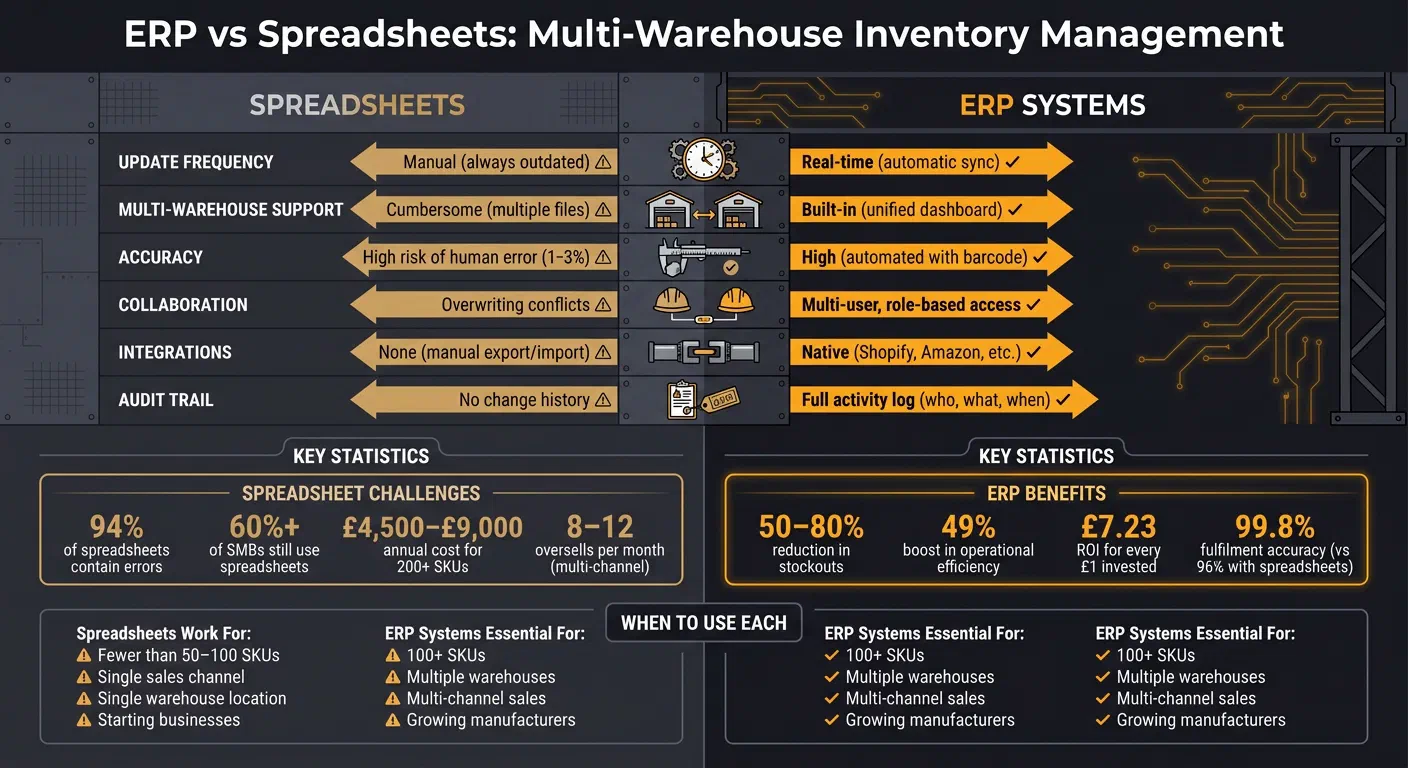
Let’s break down how ERP systems and spreadsheets stack up when it comes to managing multi-warehouse inventory. Spoiler: it’s not even close.
Real-Time Inventory Visibility
Spreadsheets rely on manual updates, which means your stock records are almost always out of date. ERP systems, by contrast, sync automatically across all warehouses and sales channels, giving you a “single source of truth” 24. Instead of juggling fragmented data, an ERP consolidates everything into one clear dashboard. Whether you’re working with third-party logistics providers, retail partners, or internal warehouses, you can see stock levels across the board - no guesswork required 122.
Then there’s the issue of accuracy. Spreadsheets are prone to human error, with mistakes cropping up in 1-3% of entries 4. For a business handling 200 SKUs and 500 transactions a month, that’s 5-15 errors every month 4. ERPs eliminate most of these headaches with automation, like barcode scanning, and they log every transaction. That means you get a complete history of changes for every SKU, across every location 4.
| Feature | Spreadsheets (Excel/Google Sheets) | ERP Systems |
|---|---|---|
| Update Frequency | Manual (always outdated) | Real-time (automatic sync) |
| Multi-Warehouse | Cumbersome (multiple files) | Built-in (unified dashboard) |
| Accuracy | High risk of human error (1-3%) | High (automated with barcode) |
| Collaboration | Overwriting conflicts | Multi-user, role-based access |
| Integrations | None (manual export/import) | Native (Shopify, Amazon, etc.) |
| Audit Trail | No change history | Full activity log (who, what, when) |
This real-time accuracy becomes non-negotiable as your business grows.
Scaling for Growth
Spreadsheets might hold up for a business with fewer than 50 SKUs and a single sales channel. But once you’re juggling 100+ SKUs or multiple locations, they crumble under the pressure 4. Despite this, over 60% of small and medium businesses still rely on spreadsheets for inventory tracking 2. Many hit a wall as they grow, with manual management of 200 SKUs costing between £4,500 and £9,000 annually 4.
ERP systems, on the other hand, are designed to handle growth. They make stock transfers and location-specific tracking straightforward, while spreadsheets require clunky workarounds like managing multiple tabs or files 410. Take a DTC apparel brand in 2025, for example. They ditched Shopify, QuickBooks, and spreadsheets in favour of an ERP. The result? Fulfilment accuracy jumped from 96% to 99.8%, and weekly data reconciliation shrank from 15 hours to under an hour 13. Businesses making the switch from Excel to ERP often see a 50-80% reduction in stockouts 2.
“The question isn’t whether Excel is a good starting point (it is). The question is: how do you know when you’ve outgrown it?” - StockPilot Editorial Team, February 2026 4
Reducing Errors and Bottlenecks
Efficiency isn’t just about seeing your inventory - it’s about cutting delays. Spreadsheets create bottlenecks with manual stock counts and reconciliations, which can eat up 5-9 hours a week 4. They also lead to phantom inventory because of update lags 4. And let’s not even get started on version control nightmares, with multiple file versions floating around 2. It’s no wonder 94% of business spreadsheets contain serious errors, and 24% of large companies have suffered financial losses because of them 5.
ERP systems solve these issues by automating tasks like reorder points, low-stock alerts, and financial reconciliation. Barcode scanning alone can slash physical stock count times by up to 80% 4. Just ask Valentte, a Cheshire-based organic skincare business. They outgrew spreadsheets and switched to Unleashed and Mintsoft. Before the move, rapid growth had left them struggling with stock control and production. After implementing the ERP, they saw a 50% jump in sales and have maintained a growth rate of 100% per year 5.
CEO Luke Bream said: “We’re growing at 100% a year, and that growth has been entirely underpinned by the performance and our interaction with Unleashed and Mintsoft” 5.
For metals manufacturers, these gains don’t just save time – they improve traceability, reduce compliance risks, lift On-Time In Full (OTIF) delivery rates, and let you scale without drowning in admin.
How GoSmarter Enhances ERP for Metals Manufacturing
ERP systems are great for handling the big-picture stuff like invoicing, procurement, and financial reconciliation. But when it comes to the nitty-gritty, real-time shop floor details that metals manufacturers rely on, they fall short. That’s where GoSmarter steps in. It doesn’t replace your ERP; instead, it works alongside it, integrating via REST Application Programming Interface (API) or Comma-Separated Values (CSV) import/export to provide the real-time shop floor insights your ERP can’t manage 14. Think of it as the missing piece that feeds actionable data back into your ERP, setting the stage for smarter, AI-powered operations. Your data is hosted on UK Azure infrastructure, never used to train shared models, and authenticates via OAuth 2.0 or Microsoft Entra (SSO).
AI Tools That Cut Down Manual Work
GoSmarter uses AI to tackle the repetitive tasks that slow you down. Take the Mill Certificate Reader, for example. It pulls out key details like grade, heat number, and mechanical properties from mill certificates and links them directly to stock items when they arrive 14. No more manual data entry from PDFs, and it keeps you compliant with standards like EN 10204 and EN 1090.
Then there’s the Commitment Management tool. It keeps “committed stock” and “free stock” separate in real time, so you’re not over-promising material 14. The result? Planners typically see a 30-40% drop in emergency procurement 15. On top of that, the Scrap Logger and Offcut Manager track remnants and binned material as live stock. This helps planners make use of offcuts before ordering fresh steel. The same heat-number record feeds the Mill Certificate Reader, Commitment Management, and the Scrap Logger – one entry, every tool benefits.
“Spreadsheets break. ERPs take months to implement and cost a fortune. GoSmarter’s inventory tool was running in a day” 14.
Built for the Tough Demands of Metals Manufacturing
Unlike generic ERPs that treat all inventory the same, GoSmarter is built with metals manufacturing in mind. It tracks materials by grade, size, condition, heat number, and certificate reference - because in this industry, items with different heat numbers are not interchangeable 14. That level of detail is essential when stock records and compliance documentation are inseparable 14.
GoSmarter also offers real-time visibility across multiple locations, down to specific racks, bays, or even corners of a yard. You can see how this plays out in practice in our Midland Steel case study 14. And here’s the kicker: most teams can go live with GoSmarter Metals Manager in just one to two days. Compare that to the 12-month grind of a typical ERP rollout. Simply upload your existing Excel stock lists as CSV files, and you’re tracking real-time movements almost immediately 14.
This rapid deployment minimises disruption and gets you on the path to efficiency faster. Better yet, the savings add up quickly. Many users recover the subscription cost – £120/month billed annually for the Starter tier – within the first quarter, thanks to reduced scrap and less time spent on admin 15. For metals manufacturers battling tight margins and strict traceability demands, GoSmarter turns what used to be a record-keeping headache into precise, actionable data. Read more in our metals operations hub.
Moving from Spreadsheets to ERP with GoSmarter
Making the leap from spreadsheets to an ERP system starts with one critical step: cleaning up your data. Before you even think about the technical side, you’ve got to sort out your datasets. That means consolidating parts lists, supplier records, and pricing data, while clearing out duplicates and ditching outdated fields. This groundwork ensures every step of the migration process builds on solid, reliable data 16.
When it comes to the actual migration, take it one step at a time. Start with the essentials - core master data like customers and suppliers. Next, move on to inventory, and finally tackle orders and production workflows. For metals manufacturers, GoSmarter simplifies this process, cutting down the time and hassle usually associated with traditional ERP rollouts. Our spreadsheet-to-system planning guide walks you through each step 16.
Once your ERP is up and running on the accounting side - handling invoicing, procurement, and financial reconciliation - GoSmarter steps in to handle the operational side. It connects your ERP to the shop floor, giving you real-time shop floor visibility and using AI to turn raw data into actionable insights. This combination doesn’t just eliminate manual errors; it helps you leave behind inefficiencies that have been slowing you down.
“Excel was designed for data analysis, not to be the operational backbone of a complex company.” - Sneha Bhardwaj, Versa Cloud ERP 17
GoSmarter’s focus on the specific needs of metals manufacturers ensures the transition is as smooth as possible. This isn’t about scrapping what already works. It’s about making your systems smarter so they work harder for you. Explore how in our metals inventory solutions. By adding AI on top of your ERP, you’re not just upgrading. You’re building a metals operation that runs on facts, not guesswork.
FAQs
When have I outgrown spreadsheets for multi-warehouse stock?
What ERP features matter most for multi-site inventory?
Managing inventory across multiple sites can feel like juggling chainsaws, but the right ERP features make it manageable. The key players? Real-time data integration, workflow automation, and solid security.
- Real-time data integration ensures you always know what’s in stock and where, avoiding nasty surprises like stockouts or overstocking.
- Workflow automation takes care of repetitive tasks like order fulfilment and stock transfers, so your team can focus on more critical work.
- Strong security keeps sensitive data safe, giving you peace of mind while handling operations across multiple warehouses.
Together, these features cut down on errors and keep your operations running smoothly, no matter how many sites you’re managing.
How can GoSmarter add shop-floor traceability to my ERP?
GoSmarter improves shop-floor traceability in your ERP by automating the tracking of production activities as they happen. GoSmarter handles cut planning and inventory tracking automatically, delivering live updates far more reliable than any spreadsheet.
When connected to your ERP, it automatically logs material movements, process steps, and quality checks. This reduces mistakes, gives you clearer visibility, and helps you stay compliant with regulations - all while equipping you to make smarter decisions.
Further Reading
1: 9 Signs You’ve Outgrown Spreadsheets (+ How to Switch)
2: Why Excel Spreadsheets Are Killing Your Inventory Management (And What to Use Instead) | Ordavia
3: The Costly Truth About Excel-Based Inventory Management
4: Inventory Management: Excel vs. Software — When It’s Time to Switch (2026)
5: https://unleashedsoftware.com/blog/limitations-spreadsheet-programs-10-reasons-change
6: Blog Not Found | SysGenPro ERP
7: Inventory Management Systems: Ultimate Buying Guide - Shopify Australia
8: (ERP vs WMS) ERP and Warehouse Management Systems Guide
9: ERP vs. Spreadsheets: Why Your Business Needs ERP Software | by Mitul Patel | Medium
10: Discover the ERP vs WMS: A Comprehensive Guide for 3PLs and Brands
11: How Fixeets Turns Google Sheets Into a Real Inventory System | Fixeets.com
12: Best ERP Systems for Inventory Management in 2026 (Compared)
13: ERP vs Inventory Software: Key Differences Explained | Xorosoft
14: Steel & Metals Inventory Management Software | GoSmarter
15: Metals Inventory Management Software | GoSmarter
16: Moving from Spreadsheets to ERP: A Practical Migration Guide
About the Author

Editor· Co-Founder & CEO
Ruth Kearney is Co-Founder and CEO of GoSmarter AI — driving commercial growth and strategic partnerships to help metals manufacturers adopt AI and digital tools that actually deliver on the shop floor.