
Give Engineers Their Time Back: Automate Mill Cert Entry
- BlogSmarter AI
- Edited by Steph Locke
- Blog
- July 1, 2026
- Updated:
Table of Contents Show Hide
Engineers lose hours every week typing data that already exists somewhere else. Giving them their brains back means you stop making them play human glue between spreadsheets, Enterprise Resource Planning (ERP) systems, PDFs and shop-floor systems.
The mess is familiar. Admin often eats 20–30% of engineering time, traceability turns into a paper chase, and one wrong heat number can jam up deliveries, audits and quality calls.
Fix it by taking the typing out of the job first. GoSmarter, built by Nightingale HQ, does that with tools built for metals manufacturers: MillCert Reader pulls data from mill cert PDFs with AI OCR, and Cutting Plans builds cutting plans from your live order mix instead of leaving engineers stuck in spreadsheet hell. Both sit on top of your existing ERP, Excel and email, so there’s no rip-and-replace. The point is simple. Let software do the dull parts so your engineers can get back to throughput, scrap and process control.
What you get is clear:
- Less rekeying across ERP, Manufacturing Execution System (MES) and quality systems
- Less time lost hunting certs, heat codes and batch history
- Faster answers when a customer or auditor asks awkward questions
- More engineer time spent fixing stoppages, cut plans and scrap
- A low-risk place to start with one bad workflow over 2–4 weeks
Your engineers were hired to sort plant problems, not babysit Excel and rename PDFs all afternoon.
Here’s how to fix it.
Practical approaches to using AI in manufacturing and fabrication
Where Engineering Time Gets Wasted Every Shift
Most of the wasted time lands in three places: reporting, rekeying and traceability. Same mess, different shift. If you want AI-powered plant software to earn its keep, start there.
| Task | The Manual Way | Impact on Engineers and Plant |
|---|---|---|
| Spreadsheet tracking | Throughput, scrap tonnes and downtime reasons typed into Excel after the shift ends, from paper logs | Decisions made on yesterday’s numbers rather than live performance[4] |
| System rekeying (ERP/MES/quality) | Order details, heat numbers, inspection results and batch status copied manually between disconnected systems | Typos and mismatches create delays, holds and delivery risk[2] |
| Certificate and lineage handling | Mill certs stored as PDFs in email threads and shared drives; lineage rebuilt by hand for every customer or audit query | 20–30 minutes rebuilding one order’s traceability; the single person who can answer the query becomes a point of failure[3] |
The Spreadsheet That Never Stops Asking for More
The biggest time sink usually starts with reporting.
A shift report spreadsheet begins life as a simple log. Then someone adds scrap grades, downtime codes and weekly roll-ups. Then a cost-per-tonne field in £/tonne. A few months later, you’ve got a bloated workbook with tabs everywhere, brittle formulas and maybe one or two engineers who know how the thing still works. Every new reporting demand means more manual entry. More chances to get it wrong.
Version control is where it starts to rot. One shift saves a local copy. Another tweaks a formula. Then production says scrap was 18 tonnes, while quality says 22 tonnes for the same week because one sheet counts quarantine stock and the other doesn’t. That’s not a one-off. It’s what happens when you run a live operation through a static file[4].
Why Engineers End Up Copying Data Between ERP, MES, and Quality Systems
When ERP, MES and quality systems don’t talk to each other, engineers become the interface. They retype order changes, holds and test results by hand. One wrong digit in a heat number can attach the wrong test results to the wrong material. That kind of mistake often sits there quietly until a customer complaint or audit drags it into daylight[2][3].
The data copied between systems is usually the stuff that matters most:
- order specs
- heat and coil IDs
- inspection results
- hold and release status
Every urgent order, late change or material swap kicks off another lap through multiple screens. Same data. Same people. Same risk of missed updates and typing errors[2].
The Daily Hunt for Certs, Heat Codes, and Production Answers
When a customer or auditor asks which heats went into a given order, what tests were done and what the results were, that answer should take minutes. In a lot of metals plants, it chews up most of a day. Engineers dig through shared drives, trawl email threads between sales, purchasing and quality, and bounce between ERP and MES screens to work out which heats actually ran after substitutions on the shop floor[3].
Mill certs arrive as PDF attachments with inconsistent file names. Heat codes get cut short or typed in wrong at intake. Production changes end up scribbled on whiteboards instead of logged in systems. In sectors like automotive, oil and gas, and construction, that weak chain doesn’t just create compliance trouble. It holds material back and slows calls that should be made in minutes, not days[3].
That time belongs on throughput, scrap and changeover calls. Not on a scavenger hunt through folders, inboxes and half-synced systems.
What Engineers Should Be Doing Instead
Freeing engineers from admin only matters if that time goes into work that moves output. The job is simple: get engineers out of record-keeping and back into process control.
From Typing Numbers to Fixing Throughput
Once engineers stop stuffing spreadsheets, the saved time needs a clear target. In a metals plant, that means line balancing, downtime reduction, cut-plan improvement, and process stability. These are the four areas where an engineer’s judgement hits £/tonne conversion cost.
Line balancing is a good example. It’s the sort of job that gets bodged or ignored when engineers are stuck doing admin. If bundling on a rebar line keeps running at 120% of upstream capacity while the cutting area limps along at 80%, that gap is bleeding throughput every shift. You don’t spot that by glancing at yesterday’s report. You need live cycle-time and queue-length data. Then you need time to act on it: redesign work content, change staffing patterns, or test a layout tweak. None of that happens if the same engineer is still busy keying in numbers.
Cut-plan improvement gets hit in the same way. For long products, the gap between a well-built cut list and a reactive one can mean several tonnes of end-cut scrap each week. Industry best-practice targets for long products sit at around 2.5% scrap rate [1]. Hitting that level takes engineers who can test cut patterns against the actual order mix and then change the rules when the data says the old setup is wasting steel.
The same logic applies to live visibility.
Why Exception Dashboards Beat End-of-Shift Guesswork
End-of-shift reports turn up after the damage is done. By then, the scrap is cut, the order is late, and the stoppage has already hammered output. Exception-based dashboards change the timing. They show problems while there’s still time in the shift to do something about them.
You don’t need another screen full of junk. You need the few exceptions that drive loss:
- scrap spikes
- late orders
- repeated short stops
- out-of-spec results
Those are the events that do most of the damage. Real-time dashboards can cut mean time to detect production issues by up to 70% and lift throughput by 5–15% by showing cycle losses and bottlenecks before they spread [6].
The design matters as much as the data. Good exception dashboards use threshold-based alerts. For example, scrap above 3% on a given section size, or any order more than 24 hours behind schedule. Then they show only events above those thresholds [5]. That means engineers start the shift knowing the small number of things that need sorting, instead of trawling through hundreds of lines of data and hoping the problem waves back.
That focus changes how the shift goes. Early in the shift, an engineer can spot a live scrap spike, trace bent bar back to a straightener setting and finishing speed, work with the shift team to change the parameters, and watch the result in real time. That cuts scrap and £/tonne cost in hours, not days.
The Tools That Actually Give Engineers Their Time Back
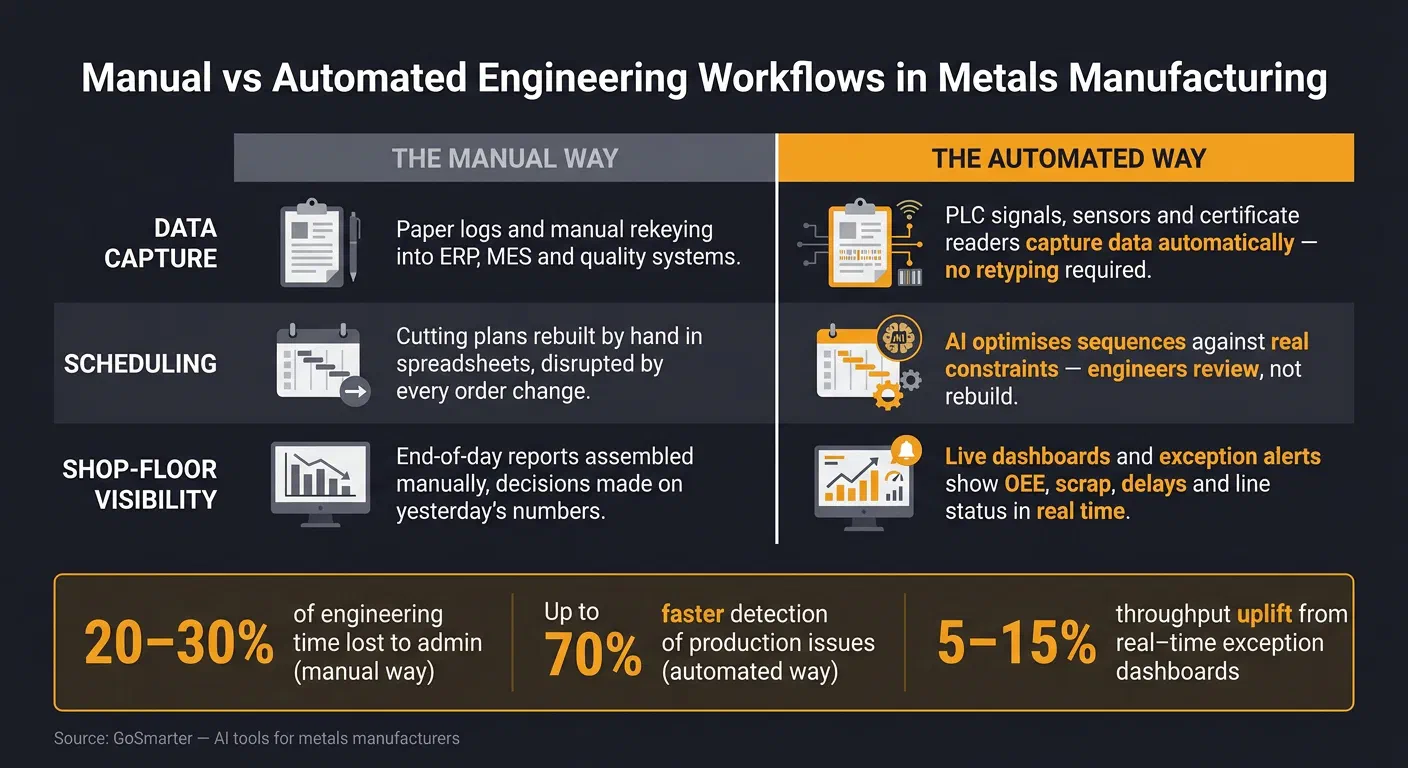
Once engineers stop chasing reports, the next step is obvious: stop creating the mess that causes the chasing in the first place. Dashboards are fine. But they only help if data capture, scheduling and reporting happen automatically at source. Otherwise, you’ve just built a prettier way to stare at late information.
| Area | The Manual Way | The Automated Way |
|---|---|---|
| Data capture | Paper logs and manual rekeying | Signals and integrated systems capture data automatically. Engineers get accurate data without retyping it. |
| Scheduling | Spreadsheets rebuilt by hand when orders change | AI optimises sequences against real constraints. Engineers review, not rebuild. |
| Shop-floor visibility | End-of-day reports assembled manually | Connected dashboards and exception alerts show live Overall Equipment Effectiveness (OEE), scrap, delays, and line status. |
Let the Plant Capture the Data Instead of Making People Type It
The fastest win in most metals plants is simple: kill the manual logging loop. Runtime and downtime can come straight from Programmable Logic Controller (PLC) signals or clip-on current sensors, which means you can connect older lines without ripping out the controls. Quantities can come from counters, weigh scales or cut-length sensors, then link to order IDs through a barcode scan or a basic Human-Machine Interface (HMI) selection at job start.
Scrap reasons should be logged at the point of defect through a touchscreen prompt, not guessed from memory at the end of the shift. Quality events, like failed tests or missing certs, can flow in from lab systems and certificate readers automatically. That means engineers see the exceptions straight away instead of digging through paperwork like it’s 2004.
Shift reports then fill themselves in. Engineers can spend their time on repeat losses and process tuning, not checking whether someone’s handwriting says “8” or “3”. Automated capture of runtime, downtime and quantities cuts out a large chunk of the manual validation work engineers do against paper logs [7][8]. GoSmarter’s MillCert Reader uses the same approach for certificate data: AI OCR reads and digitises PDF mill certs, pulling out heat numbers, chemical compositions and mechanical properties without anyone typing them into ERP or a spreadsheet. That cuts entry errors and makes certificate data usable straight away.
Once capture runs on its own, planning becomes the next choke point.
How AI Scheduling Cuts Daily Firefighting
Manual scheduling in a cutting or slitting operation is a daily headache. Engineers are stuck juggling due dates, material grades, machine changeover rules and offcut constraints in spreadsheets, while people keep interrupting them with “just one quick change”. The result is predictable: bad sequences, wasted material and constant rebuilds.
AI-assisted scheduling works through sequences and nesting patterns against all the relevant constraints at the same time. That includes machine capabilities, material grades, due dates, changeover rules and available stock. Then it re-optimises when conditions change. Engineers review the proposed plan instead of rebuilding the whole thing from scratch. So they can spend more time on throughput and scrap, and less time babysitting spreadsheets.
GoSmarter’s Cutting Plans does this for long-product cutting. It builds first-draft cutting plans optimised against the actual order mix, helping teams cut scrap and speed up planning.
Why Connected Shop-Floor Systems Beat Manual Reports
Connected dashboards and exception alerts are only as good as the data underneath them. If the feeds aren’t live and connected, the dashboard is just wall-mounted theatre. You need ERP orders, MES output, machine status and quality results feeding into one operational view [8][9][10]. Once that’s in place, the dashboard stops being decoration and starts helping you make decisions.
GoSmarter connects to those feeds through a REST API with OAuth/Microsoft Entra single sign-on, and is hosted on UK Azure infrastructure. GoSmarter uses de-identified certificates to improve its own extraction models. It never shares them with other customers or third-party AI providers. IT teams get a straightforward integration, not another security review headache.
Plants using connected shop-floor visibility report engineers spotting patterns that just didn’t show up in end-of-day summaries. One common example is short, frequent stoppages tied to specific changeover sequences. Those little losses often vanish inside aggregated reports, then quietly chew through output all week.
Midland Steel cut scrap by 50% across a 734-tonne trial after correlating quality data with live production conditions through GoSmarter [15]. When scrap data, machine state and order context sit in the same operational view, engineers can trace a spike to a specific mix of alloy, line and shift in minutes instead of days. That changes the job. You spend the shift fixing exceptions, not compiling them.
Start Small: Put GoSmarter on Your Worst Manual Job First
Once capture and dashboards are in place, don’t try to fix everything at once. Pick the manual workflow that wastes the most engineer time and causes the most rework. Then sort that one job out from end to end.
Run one GoSmarter tool on a live process for two to four weeks. Track what matters:
- hours saved
- errors avoided
- delays removed
That gives you something solid to judge, instead of another software sales pitch.
If Certs Are Eating Your Week, Start with MillCert Reader
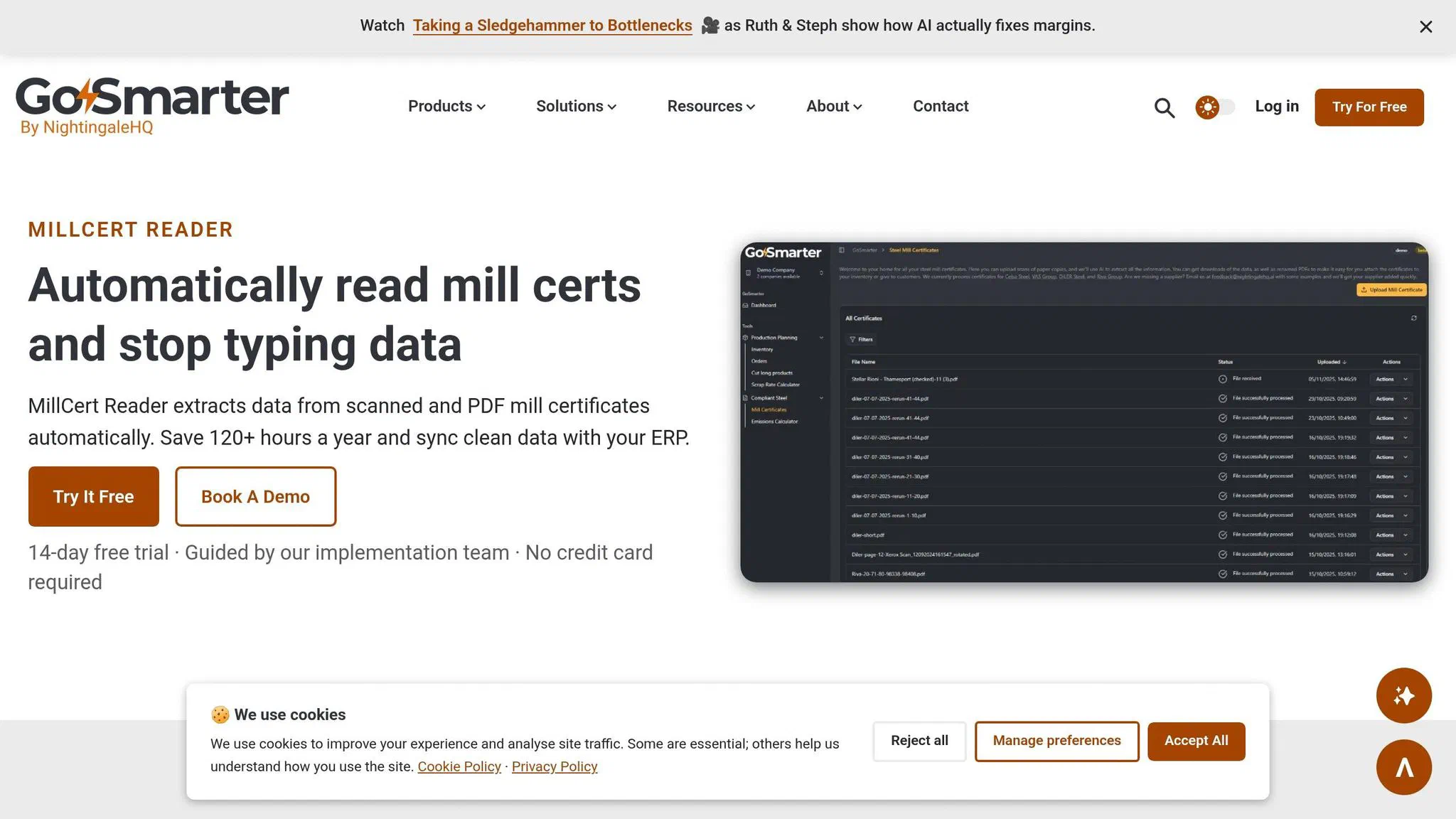
If traceability is where things jam up, start there. In certificate-heavy plants, mill cert entry is usually the plainest quick win. Engineers still spend hours typing heat numbers, chemistry and mechanical properties from PDFs into ERP systems or spreadsheets. It’s dull work, and it’s easy to get wrong.
GoSmarter’s MillCert Reader uses AI OCR to pull out heat codes, chemistry and mechanical properties from scanned or digital certificates, whatever the certificate format. It then renames and files PDFs by heat code. The data maps straight into your existing systems, so engineers review and confirm instead of typing line by line.
GoSmarter says this can save 120+ hours per year per user [11][14]. The traceability upside hits straight away. When a customer or auditor asks which heat went into which order, you run a filtered query instead of losing an afternoon to a filing cabinet.
MillCert Reader sits on the Workshop tier, at £350/month rolling, or £280/month billed annually, with a 7-day free trial [11][12][14]. Set against 120+ hours recovered a year, most plants see payback inside the first quarter. A simple way to test it is to run your next incoming batch of certs through the tool instead of typing them by hand. Time both jobs. That usually settles the argument.
The same heat-number data that MillCert Reader captures also feeds Cutting Plans and Metals Manager, so you’re building one traceable record instead of three separate ones.
If Planning Is Chaos, Trial Cutting Plans on a Real Cutting Schedule
If planning is the mess, start with the schedule. If your engineers spend half the morning rebuilding cutting plans in spreadsheets, while juggling order lengths, stock on hand, machine constraints and offcut rules, Cutting Plans is the place to start.
Don’t test it on some clean sample file that bears no relation to your shop floor. Use an actual batch of orders from the current week’s schedule.
Cutting Plans generates a first-draft cutting plan optimised against your actual order mix, stock lengths and machine constraints. Engineers then review the plan and use the time they get back to check offcuts and catch problems before they turn into scrap.
Typical manual scrap rates in long-product cutting run between 3% and 8%. Industry best practice, achievable with AI-assisted planning, is 2.5% or below [1]. Even a small improvement across one week’s cutting schedule can stop you burning cash on material. It also cuts the carbon hit.
If inventory and scrap reconciliation are the bigger pain, Metals Manager, part of the Starter tier from £180/month, gives you tighter control of stock, open orders and scrap in one view [12][13][14]. It doesn’t rip out your ERP. It connects to it.
The rule stays the same either way: one tool, one workflow, two to four weeks. Measure the time saved, the errors avoided and the engineer hours freed up.
FAQs
Where should we start automating first?
Start with one workflow that can show results fast. In metals manufacturing, mill certificate management and cutting optimisation are often the best places to begin. They eat time, invite mistakes, and you can usually get them live in under a month.
Map how information moves through your shop now. Follow it from inbox to spreadsheet to ERP to the bit where someone prints a PDF because the system still can’t cope. That’s where the bottlenecks usually sit.
Then bring in a tool aimed at the mess, not a giant system overhaul. Good first moves often include:
- order tracking that shows where work is stuck
- certificate processing that stops engineers wasting hours on admin
Starting small lets you see what works without turning the place upside down. You get quick wins, fewer errors, and more engineer time for work that needs a brain, not more typing.
Will engineers still need to check data?
Yes, but not in the same way.
AI tools automate data capture, extraction and validation, so engineers can stop retyping data and cross-checking the same paperwork for the tenth time.
Instead, they review pre-extracted, validated data, deal with exceptions, and spend more time on process improvements and sharper decisions.
How quickly can a plant see results?
Plants can start using GoSmarter on day one. No long setup. No bloated IT project that drags on for months while the shop floor waits.
Most teams start tracking live orders as soon as they log in. That means you can stop chasing updates by hand and start seeing what’s actually happening.
Early gains usually show up by week two. For a lot of teams, that starts with less manual chasing and fewer back-and-forth checks. Bigger gains, like better On-Time In Full (OTIF) delivery, are often measurable within 90 days. Some users have also reported a 2.5% scrap reduction in the first two weeks.
How does automation reduce the manual data entry errors that cause quality or delivery problems?
Manual rekeying is where most heat-number and spec errors start. A mistyped digit on a mill cert or order screen can attach the wrong test results to the wrong material, and that mistake often sits quietly until a customer complaint or audit finds it.
GoSmarter’s MillCert Reader removes the retyping step by reading heat codes, chemistry and mechanical properties straight from the PDF with AI OCR, so engineers review and confirm data instead of keying it in line by line. Cutting Plans does the same for scheduling data, working from the live order mix instead of a spreadsheet someone rebuilt by hand.
Fewer manual touches means fewer chances for a wrong digit to become a delivery hold or a failed audit.
What is an exception dashboard, and what does it show plant managers?
An exception dashboard is a live screen that only surfaces the events that need action, rather than every reading. In a metals plant, that usually means scrap spikes, late orders, repeated short stops and out-of-spec results, tracked against thresholds such as scrap above 3% on a given section size.
Plant managers get a single view of scrap, utilisation and throughput as the shift runs, not a summary the morning after. Because the feed pulls from ERP orders, MES output, machine status and quality results, real-time dashboards can cut mean time to detect production issues by up to 70% and lift throughput by 5-15% [6].
Related reading
- AI vs. Spreadsheets: Predictive Analytics for Factories
Stale spreadsheets cause downtime and scrap; this shows how predictive analytics turns live shop-floor data into decisions that cut waste.
10 min read
- Top Tools for Edge Analytics in Steel Plants
Unplanned downtime, scrap and manual certificate re-entry: edge tools that cut latency, reduce scrap and automate traceability in steel plants.
24 min read
- Digital Twins in Metals Manufacturing: A Complete Guide
Digital twins cut steel scrap from 5-8% to under 2.5%. Learn the standards, data foundations and pilot plan that make one work on your line.
24 min read
About the Author

Editor· Co-founder & Head of Product
Steph Locke is Co-founder and Head of Product at GoSmarter AI — former Microsoft Data & AI MVP building practical tools to cut paperwork and automate compliance for metals manufacturers.