Cut Scrap Rate in Half Without Spreadsheet Hell
- BlogSmarter AI
- Edited by Steph Locke
- Blog
- June 29, 2026
- Updated:
Table of Contents Show Hide
If you still track scrap in spreadsheets, you are not controlling waste. You are totting up damage after your margin has already gone.
I see the fix as pretty simple. Use live shop-floor data, better cut planning, and alerts that catch bad setups before they turn stock into skip money. For metals manufacturers, GoSmarter does that with Cutting Plans, Metals Manager, and Enterprise Resource Planning (ERP) links that feed stock, orders, remnants, and quoting from the same record.
What you get is plain enough:
- Lower scrap by using remnants before new stock
- Fewer miscuts because operators work from live cut lists, not stale files
- Better quoting from actual yield history, not guesswork
- Less arguing over stock, scrap, and which spreadsheet is “right”
- A pilot you can measure in £, line by line, over 30 days
If you want to stop burning steel, labour, and delivery time all at once, here’s how to fix it.
Why Your Scrap Rate Looks Fine Until You Price It Properly
The real problem is simple. Scrap almost always looks smaller on paper than it does in the bay.
Most scrap reports miss the mess that actually burns cash:
- yield loss buried in over-issued stock
- remnants left on the rack
- rework booked to labour instead of material
- jobs quoted on ideal material assumptions that never happen on the shop floor
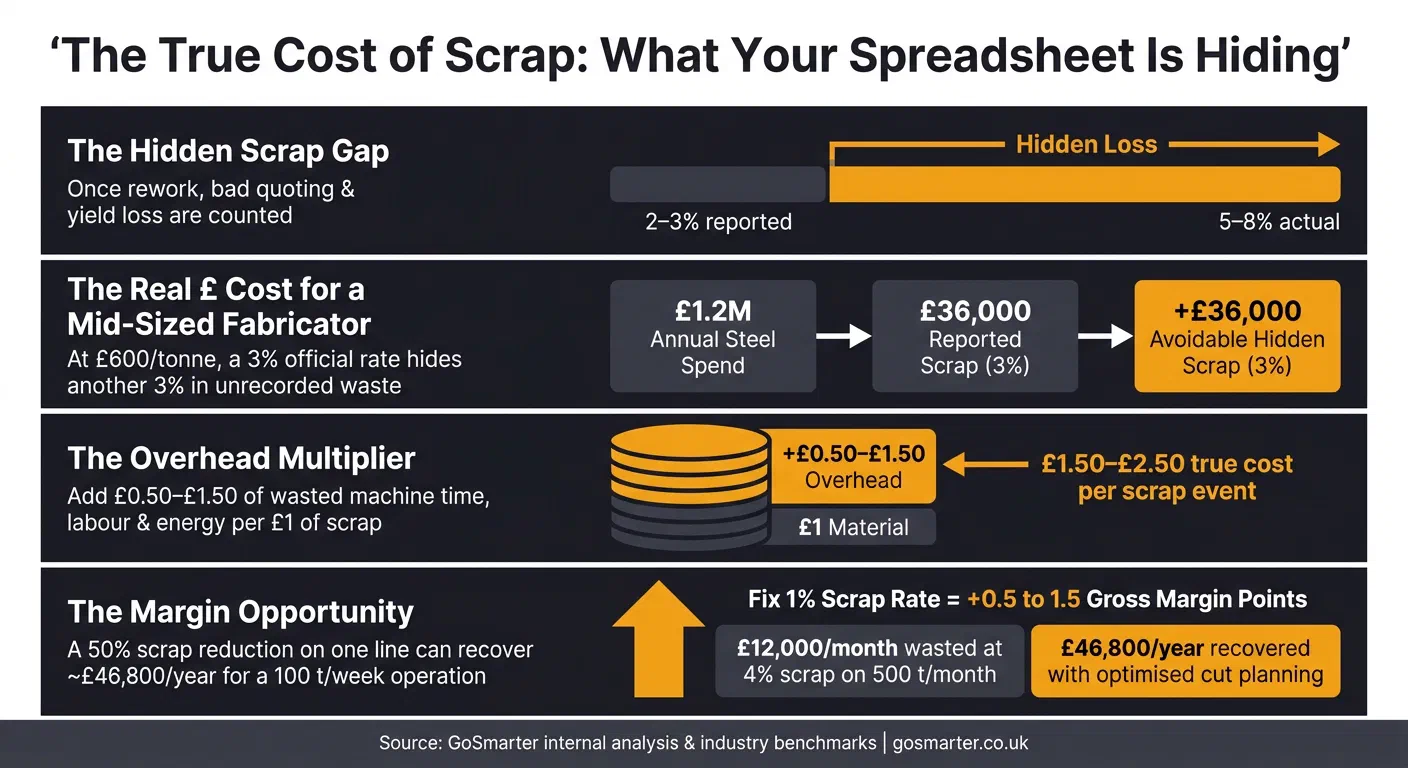
In shops that track this stuff properly, what looks like 2–3% scrap by weight can hide 5–8% true scrap once rework and bad quoting are included [1].
Take a mid-sized fabricator buying £1.2 million of steel plate, tube and rebar each year. An official scrap figure of 3% looks under control. On paper, that is £36,000 of material at about £600 per tonne [3][4]. But once you count avoidable yield loss, miscuts and remnant waste properly, many shops find another 2–4% of avoidable scrap sitting there, unrecorded. At that scale, even a 3% avoidable loss means another £36,000 a year disappearing into waste. Fix just 1% of scrap rate and you can add 0.5–1.5 percentage points to gross margin, measured by comparing pre-trial scrap-per-tonne against the trial period on the same product mix [1].
That is why live production data matters more than month-end scrap totals.
The waste is not just the metal
The metal cost is only part of it. Every miscut plate also burns machine time, operator labour and energy. Internal analyses often show that each £1 of scrap metal carries £0.50–£1.50 of wasted overhead and opportunity cost [1]. So that bent plate or bad cut is not just scrap. It is lost time, lost capacity and work you could have pushed through the line instead.
Then there is carbon reporting. Under the Carbon Border Adjustment Mechanism (CBAM) and broader carbon reporting pressure, wasted steel means higher embedded CO₂ per tonne of finished product. Scrap is not just a cost issue. It is a compliance issue too [9][11]. See the metals manufacturing glossary for CBAM and other compliance terms.
How bad data turns small cutting mistakes into large write-offs
One wrong offset setting on a busy plate line can wreck dozens of plates before anyone spots it. That turns a small mistake into £5,000+ of loss [1]. That is what stale or missing data does. If stock records get updated at the end of a shift instead of live, planners are working from numbers that no longer match what is in the bay.
A spreadsheet may show twelve 6-metre lengths of 100 × 100 SHS when only seven remain [7][8].
Remnants make it worse. An operator logs an unlabelled offcut with a rough or rounded length. The next planner cannot trust it, so they default to full stock lengths. A usable 1.4-metre piece then sits on the rack until it is too short to use and ends up in scrap. Across hundreds of lengths each month, poor remnant tracking can drive 1–3% extra material purchase that later gets wasted [1][10]. Once the stock record is wrong, every cut plan and every quote built on it is wrong too. The next job runs over on material, and the margin is gone before the invoice is even raised.
Why Spreadsheets Keep You Guessing Instead of Cutting Cleanly
Spreadsheets can’t keep up with a live shop floor. By the time someone types the numbers in, saves the file, and sends it round, the cut plan has already moved on.
By the time the sheet is updated, the damage is already done
A lot of scrap still gets logged at the end of a shift. First on paper. Then in Excel. By then, you’re not looking at the job as it happened. You’re looking at a rough summary after the fact.
Those entries are often just totals, not cut-by-cut records with a reason code. That’s where the trouble starts. Small mistakes don’t stand out. They sit there quietly until the loss is already baked in.
The expensive scrap usually comes from process drift, not one big dramatic failure. A laser head slips slightly out of calibration and starts producing marginal miscuts. Not enough to set off panic. Enough to burn cash for days. In Excel, that usually shows up as a higher month-end scrap figure. By then, the machine has had plenty of time to keep making the same mistake.
No one trusts the numbers when every tab tells a different story
Separate Excel files for quoting, stock, production, and scrap create a version-control mess that gets worse every day. One team updates one copy. Someone else works from yesterday’s file. Then the same plate gets reserved for two jobs because two people think they’re looking at the stock list.
It gets worse with remnants. A supervisor logs them in a local file, but that never makes it into the central record. So the material is still sitting on the rack, but as far as the system is concerned, it doesn’t exist. Planning then raises a purchase order for new stock instead. That isn’t a small admin slip. That’s money out of your margin.
When the files don’t match, every decision downstream starts wobbling too. You get:
- wrong cut plans
- bad purchase orders
- stock records no one trusts
- planners and supervisors arguing over which file is “right”
Scrap reason codes add another layer of chaos. If operators type free text like bad cut, material problem, or operator error, you can’t group issues in any clean way across machines and shifts. Different shifts enter job numbers differently. Operators log machines under nicknames. Material grades show up in different formats. So when scrap climbs, managers can’t quickly see where the problem sits. Is it one machine? One programme? One batch of material? One operator? The data should answer that. Instead, it starts another debate.
Once people stop trusting the numbers, the shop floor culture takes a hit as well. Operators stop logging scrap carefully because they know the figures will be questioned, changed, or ignored. Blame creeps in. Analysis disappears. Side files pop up all over the place, and the picture gets even more fragmented.
A live system changes that because operators and managers see the same figures at the same time, tied to the job and the machine. That shifts the conversation. The problem is no longer personal. It’s measurable. And if you can measure it while the shift is still running, you can fix it before the next shift repeats the same mess.
That’s why scrap control has to move out of static files and into live cut plans, dashboards, and alerts.
What Actually Cuts Scrap: Better Cut Plans, Live Dashboards and Alerts That Arrive in Time
If you want to cut scrap, focus on three things: sort the cut plan before anyone touches the stock, watch waste live during the shift, and warn operators before a bad setup turns into a pile of scrap. More reports won’t save you. Better calls before and during the cut will.
What is a live cut plan? It is a cutting sequence built from your current stock and remnant levels, not last week’s spreadsheet. It updates as stock moves, so operators always work from what is actually on the rack.
Start with cut plans that stop wasting good stock
Use AI-assisted cut planning for long products and nesting optimisation for plate and sheet. The job is simple: burn through remnant stock first, then touch prime stock only when you have to. For a stockholder cutting 100 tonnes a week, that can recover about £46,800 a year in gross margin [4]. That’s not a small tweak. That’s money you were throwing in the skip. Cutting Plans is a Production tier feature, from £950/month rolling, or £760/month billed annually, so that recovered margin pays for the subscription inside the first month and keeps paying out every month after.
GoSmarter’s Cutting Plans pulls live stock levels, open orders and remnant inventory into one planning view. From there, the system builds a first-draft cut plan that puts existing offcuts ahead of prime stock [3]. It also sends cut lists straight to operators, which cuts misreads and rekeying mistakes [8][3].
As one Operations Manager at Midland Steel put it (read the full case study):
“Turned a morning of planning into a five-minute review. We cut scrap rates in half during trials.” [4][3]
That stops waste before the first cut starts.
Put scrap on a live dashboard so problems show up mid-shift, not at month-end
A cut plan shows what you meant to do. A live dashboard shows what is actually happening. You need both.
Show scrap rate, reject reasons, yield loss, remnant status and waste value by machine, job and operator, refreshed in real time so problems show up mid-shift [1]. Track offcut recovery too. If that drops below target, usable material is slipping out of inventory [1].
Why does that matter? Because a misaligned feed can chew through £1,500 of stock in one day before anyone steps in [8]. Catch that same spike on a live dashboard and the team can act before hours of scrap pile up. If you spot a defect four hours after it happened, you’ve already banked four hours of scrap [12]. The shorter the delay, the less margin you burn.
Warn operators before one bad setup becomes a full run of scrap
Dashboards tell you what’s going wrong. Alerts tell you in time to stop it. That’s the difference.
The alerts that work best are tied to live conditions on the actual job: wrong material loaded, heat code mismatch, repeated rejects on the same line, or machine settings drifting outside accepted limits [12][14]. GoSmarter connects to live stock and order data through a REST API. If an operator picks a material that doesn’t match the job spec, the system flags it at once, before the cut starts, not after [3]. That kills off one of the easiest ways to make avoidable scrap.
When repeated rejects show up on one saw or laser line, logging them isn’t enough. The system should show whether the pattern points to setup, tool wear, material batch variation or a specific operator step, and put that context next to the alert [12]. That gives your team a faster route to the cause instead of another shift-end autopsy.
| Alert Type | Trigger | Timing |
|---|---|---|
| Material mismatch | Heat code or grade does not match job spec | Instant - pre-cut |
| Process drift | Scrap rate or machine parameter moves outside accepted limits | During the shift - in real time |
| Repeated rejects | Same reject type appears multiple times on one line | During the shift - before escalation |
These tools work best when stock, orders and quoting all pull from the same live record.
How to Make Scrap Reduction Stick Without Replacing Your ERP
Dashboards and alerts are useless if the data behind them is a mess. If machine events, scrap reasons and remnant records are late, patchy or not trusted, another report will not fix it. You need a clean link between the shop floor and the ERP.
Connect the shop floor to stock, orders and quoting
Do not rip out the ERP. Keep it. Add a light integration layer that syncs shop-floor events back into it. GoSmarter connects to the ERPs metals manufacturers already run through REST APIs or CSV imports, without a bespoke connector build for each platform. That lets machine events, scrap reasons and offcut records post straight into ERP stock and production records [3].
The ERP stays the system of record. GoSmarter deals with the messy event stream from the shop floor, checks it, then posts clean transactions against the right job and material lot. That means cut plans, alerts and quotes reflect what actually happened on the shop floor, not what someone meant to type in later. It also stops the same waste creeping into the next quote.
For IT teams: GoSmarter connects through a REST API secured with OAuth and Microsoft Entra single sign-on (SSO). It hosts your data in UK Azure. GoSmarter uses de-identified certificates to improve its own extraction models. It never shares them with other customers or third-party AI providers.
Metals Manager sorts out the quoting side. Instead of estimators slapping on one flat scrap allowance and hoping for the best, it uses past yield and scrap rates by part family, material thickness and machine to set material allowances that match reality [3]. That cuts the guesswork on jobs that keep blowing through material allowance. The same heat-number spine that tracks a remnant through Cutting Plans feeds Metals Manager’s quoting and its own schedule. One record, every tool.
The gain comes from killing manual hand-offs and replacing them with checked transactions:
| Capability | The Automated Way |
|---|---|
| Scrap logging | Shop-floor tablets and machine connectors record scrap events in real time with standardised reason codes; GoSmarter posts validated entries into ERP against the correct job and material lot [3][5] |
| Remnant tracking | Usable offcuts become searchable stock items with dimensions and heat number; nesting software recommends remnant use on future jobs before prime stock is touched [5] |
| Quoting accuracy | Actual yield history feeds quoting allowances by part family and material, with remnant availability flagged at estimate stage [3] |
Fabricators that switch from manual scrap tracking to connected, automated workflows often see a 10–20% cut in avoidable scrap on targeted lines within three to six months. Some high-scrap processes hit 30–50% after optimisation [15][16]. Measure it the same way each time: compare scrap-per-tonne in the three months before go-live against scrap-per-tonne in the trial period, on the same product mix. A sensible place to start is with CSV exports of stock and open orders to prove the case, then move to a live API feed once people can see the numbers for themselves [3][6].
Get the basics right or even the best tool will give you bad results
Once the systems are connected, data discipline decides whether you get control or just faster nonsense. Before go-live, four basics need sorting out:
- Material masters must hold the right thickness, grade and density so yield calculations mean something.
- Job and routing codes need one consistent structure that ties every cut to a specific order and operation.
- Standard scrap reason codes. Define codes for incorrect programme, wrong material loaded, operator error and material defect, then train every shift on them [13].
- Every usable offcut needs its own stock item, code, dimensions and heat number. Not a scribble on a rack label. Not a notebook entry [5].
GoSmarter works best when offcuts, heat numbers and scrap reasons are logged in a disciplined, consistent way [5]. A short data-cleansing job before deployment pays back fast with cleaner reports and scrap figures that both finance and production trust. Without clean master data, the dashboard still moves fast. It is just fast and wrong.
Next Step: Run GoSmarter on One High-Scrap Line and Measure the Pounds You Stop Throwing Away
Don’t start with a site-wide rollout. That’s how good ideas get buried in meetings and bad spreadsheets. Pick one line, one product family, or one shift where scrap costs stay stubbornly high. Get the live data in, prove the result there, then scale. A single-line pilot gives you a clean 30-day comparison and numbers finance can trust. Use one line because spreadsheets hide timing, and timing is where scrap creeps in.
Start by fixing the baseline. Before the pilot starts, lock in four metrics:
- scrap rate
- scrap value in £
- remnant reuse rate
- quote accuracy versus actual material consumed
If those numbers aren’t written down before day one, the 30-day review turns into an argument instead of a decision. For an operation processing 500 tonnes per month at a 4% scrap rate, that’s about 20 tonnes of waste. At £600 per tonne, that’s roughly £12,000 a month going in the skip [2][3]. Even a small drop on one line gives managers a number they can use straight away.
Use Cutting Plans for sequencing, stock allocation, and bar, sheet and length-based cutting.
Then run the pilot on the line where waste is worst. In a two-week trial, GoSmarter optimised 734 tonnes across 193 jobs and cut scrap by 50% [4][1][3].
Export inventory and open orders from your ERP as CSV, then upload them to GoSmarter [3]. Use that ERP export as your starting point, then compare the same records after 30 days. At the 30-day mark, check:
- scrap value
- remnant reuse rate
- quote accuracy versus actual material consumption
Put those metrics in £, and the trial stops being a nice idea and starts looking like a business case for the next line. Use the same live figures for scrap, remnant reuse and quote accuracy so finance can sign off on the next rollout.
Scrap falls at the cut, not in the report. One high-scrap line, measured properly over 30 days, shows you how much margin you’re chucking away now, and what it costs to sort it.
FAQs
How quickly can we cut scrap on one line?
You can start cutting scrap straight away. Most operations get their first optimised cut plan within two days of uploading stock, and morning planning can drop from hours to five minutes.
In trials, including at Midland Steel, this cut scrap rates by 50%. That helps shift a shop from a typical 3–8% scrap rate towards 2.5% or less.
What data do we need before starting?
Start with two core data sets: open orders and live inventory.
For orders, pull the facts you actually need: required lengths, quantities, material grades, and any certification rules. No fluff. If the job needs certs, that matters from the start, not after someone has already cut the bar.
For inventory, log what’s actually on the rack. That means exact bar lengths, grades, heat numbers, and certification status. Not what the spreadsheet says should be there. What you can put your hands on. If certification status is still a folder of PDFs, MillCert Reader reads them automatically and links heat numbers straight to stock, from £350/month.
You also need to set the shop-floor rules the system has to work with, including:
- the minimum offcut length worth keeping
- kerf loss from your cutting method
Miss this bit and the rest falls apart. Bad stock data gives you bad cut plans. Then you burn time, scrap good material, and wonder why the numbers don’t stack up.
Can we do this without replacing our ERP?
Yes. You do not need to rip out your ERP to cut scrap rates.
GoSmarter works alongside the systems you already have, including ageing ERPs and the spreadsheets people still cling to because the main system never quite did the job. It sits on top as a specialist shop-floor planning layer, pulling live data from your setup through modern connectivity. No big-bang replacement. No messy overhaul. Just a better way to plan with the data you already own.
Related reading
- How AI Turns Manufacturing Data Into Better Decisions
Stop wasting hours on messy mill certificates and scrap tracking. See how AI automates data capture, cuts scrap by up to 15%, and fixes scheduling.
15 min read
- Why PDF Mill Certificates Break Data Workflows
Re-keying PDF mill certificates breaks heat-number traceability. Learn how to validate, extract and link certificate fields to stock records.
9 min read
- How digital Kanban cuts sheet metal delays
Digital Kanban caps work in progress (WIP) at each sheet metal operation, so only ready jobs reach the laser and press brake. Start with a two-week …
13 min read
Tags:
About the Author

Editor· Co-founder & Head of Product
Steph Locke is Co-founder and Head of Product at GoSmarter AI — former Microsoft Data & AI MVP building practical tools to cut paperwork and automate compliance for metals manufacturers.