AI vs. Spreadsheets: Inventory Tracking Showdown
- BlogSmarter AI
- Edited by Ruth Kearney
- Blog
- April 27, 2026
- Updated:
Table of Contents Show Hide
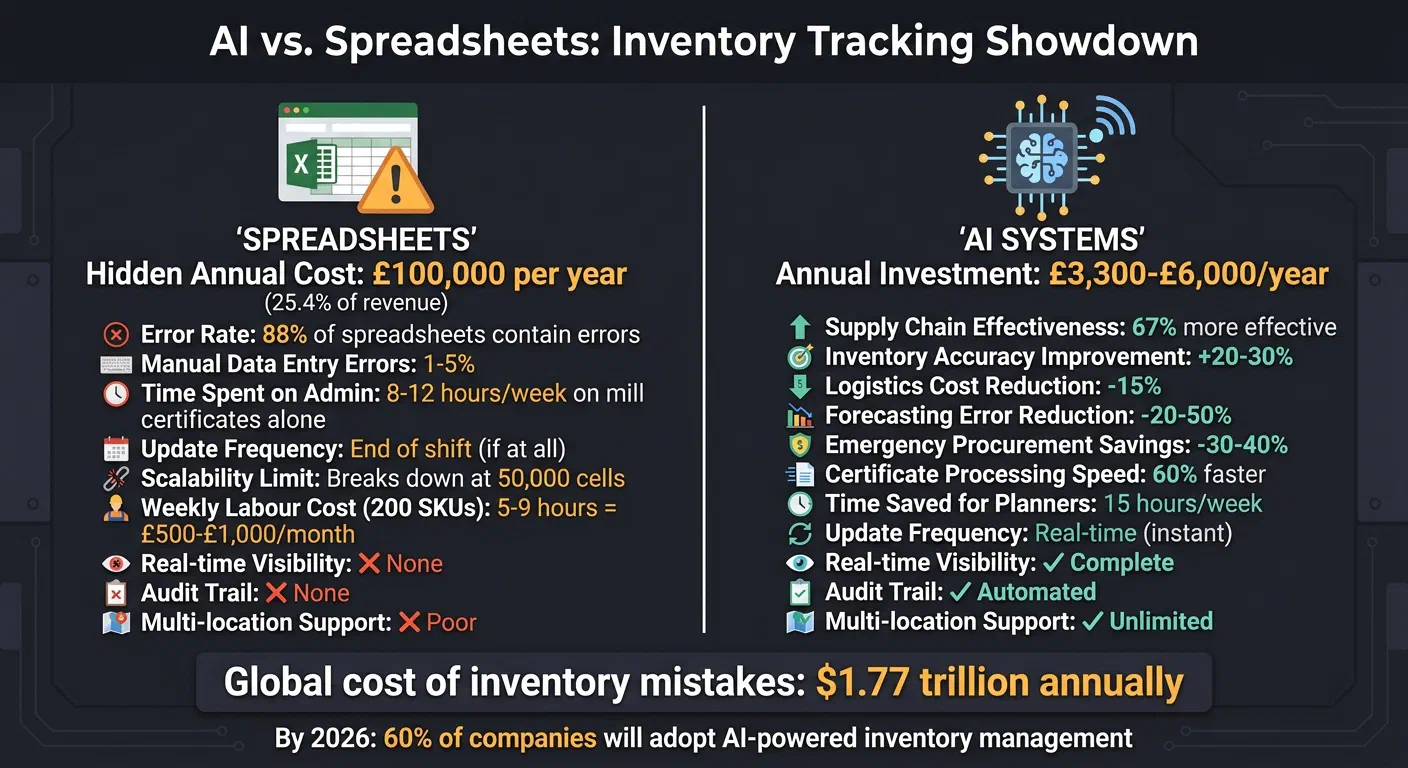
AI inventory tracking gives metals manufacturers real-time stock visibility that spreadsheets simply cannot match. Your shop floor never stands still. Materials move, orders change, and mill certificates pile up — but none of it updates automatically in Excel. That’s where the chaos starts: outdated data, manual errors, and avoidable downtime costing up to £100,000 a year.
Relying on a spreadsheet to manage stock is like driving with a fogged-up windscreen. You’re guessing, not seeing.
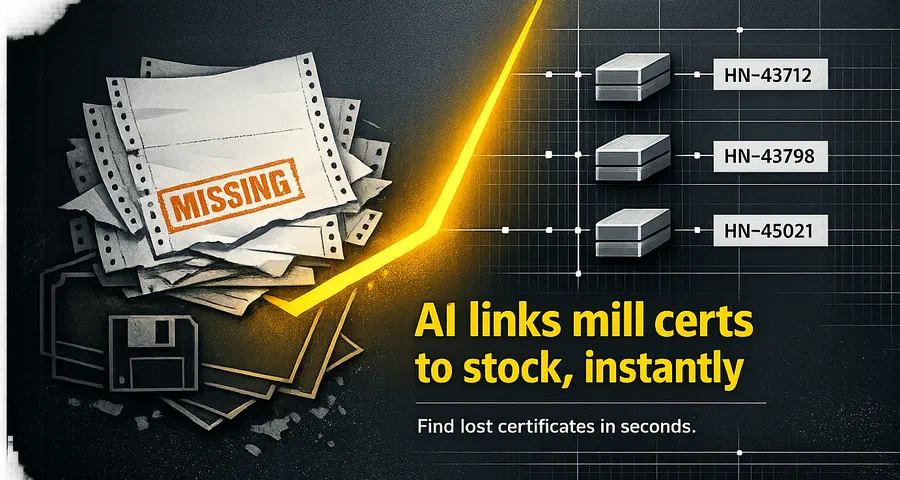
GoSmarter (built by Nightingale HQ) fixes this. It tracks stock in real time, automates mill certificate management, and stops you over-ordering. No more scrambling to figure out what’s in stock. No more chasing missing certs.
Here’s what you get:
- Real-time inventory tracking: Know exactly what’s available with no manual counts.
- Error-free data: AI pulls details straight from mill certificates — no typos, no mismatched heat numbers.
- Smarter planning: AI adjusts schedules the moment something goes wrong.
- Overlay on what you already have: GoSmarter sits on top of your existing systems. No rip-and-replace required.
What is AI inventory tracking for metals manufacturers? AI inventory tracking replaces manual spreadsheet updates with a live, automated record of every stock movement — cuts, transfers, receipts, and remnants. For metals businesses it also automates mill certificate (MTC) extraction, links heat numbers to batches, and flags non-conforming material before it reaches the production floor.
Speed and Real-Time Visibility
The Lag of Spreadsheets
Spreadsheets are static snapshots. The moment materials move, the data is outdated. Most factories only update their Excel sheets at the end of a shift - if they bother at all. This leaves production managers making big calls, like deciding the next job to schedule or accepting a rush order, based on information that’s hours or even days old 1.
“With spreadsheets, shop floor data is only as current as the last time someone typed it in - usually at the end of a shift, if at all.”
- Aiinak Team 1
The confusion doesn’t stop there. Different versions of the same file float around - one on the production manager’s desktop, another in the sales team’s shared folder. When a customer asks if 2 tonnes of Grade 316 stainless steel are in stock, which file do you trust? By the time you’ve reconciled conflicting spreadsheets, the material you thought was available might already be gone. This disconnect between actual stock movements and recorded data leads to bad decisions, missed orders, and shrinking margins.
AI’s Real-Time Edge
AI-powered platforms don’t wait for someone to update a file - they record stock movements as they happen. Using barcodes, Radio Frequency Identification (RFID) tags, or sensors, these systems track every cut, transfer, or adjustment on the shop floor instantly. No manual input. No delays. No guesswork. Tools like GoSmarter consolidate all this into a single, live view of your inventory. So, when sales quotes a customer, they’re working with real stock levels, not outdated spreadsheets.
The real magic happens with dynamic scheduling. If a machine breaks down or a delivery runs late, AI recalculates the impact across all active work orders in seconds. It adjusts schedules automatically to keep production moving. Spreadsheets? They leave you scrambling - reshuffling jobs manually, firing off emails, and making endless phone calls to figure out what’s delayed and what’s still on track 1.
In metals manufacturing, where precision is everything - tracking nested cuts, material certificates, and more - real-time visibility isn’t just helpful. It’s the line between hitting deadlines and explaining why you didn’t.
Accuracy and Error Reduction
Spreadsheet Pitfalls: Manual Errors and Inconsistencies
Spreadsheets are a minefield of potential mistakes. A single typo in a heat number or a swapped digit on a mill certificate can break your traceability chain in an instant. Spreadsheets rely on flawless manual input, and let’s face it - humans make mistakes. Even giants like JPMorgan Chase aren’t immune; they lost around £4.8 billion (US$6 billion) due to spreadsheet errors caused by a simple copy-and-paste mishap and a dodgy formula2. If a global bank can’t keep Excel tidy, what hope does a busy metals shop have?
As spreadsheets grow, the risks multiply. Once you’re working with over 50,000 cells, errors become almost inevitable2. Delete a key reference cell in a nested formula, and you’ll trigger a cascade of #REF! errors3. Then there’s the issue of inconsistency: one person logs “SS316L”, while another enters “Stainless 316L.” Suddenly, your inventory splits across phantom SKUs, and you’re left wondering which number to trust.
“Manual tracking methods - such as spreadsheets, physical logs, or even verbal reporting - were once the norm for managing inventory. However, these outdated systems have become significant roadblocks for modern businesses.”
Spreadsheets also lack an audit trail. Lose a mill certificate or mismatch a heat code with a delivery note, and there’s no way to track what went wrong2. You’re left flipping through paper records, hoping someone remembers what happened weeks ago. For metals manufacturing - where compliance hinges on linking every material to its certificate - this isn’t just a hassle; it’s a serious liability. These cracks in the system make it clear: it’s time to ditch the spreadsheets.
AI Precision: Automating Accuracy
AI takes the guesswork - and the risk - out of data management by automating processes and enforcing consistency. Imagine never having to type in a heat number again. AI-powered tools like GoSmarter use Optical Character Recognition (OCR) technology to pull details straight from PDF mill certificates, grabbing heat numbers, material grades, and compliance data in seconds. Typos? Gone[3]. Forget to scan an item? It won’t show as moved, eliminating the phantom inventory issues that plague manual systems.
Russell Smallridge, Supply Chain Manager at MEON, knows this all too well. After 25 years of juggling spreadsheets, he switched to the AI-enabled Slim4 platform. His take?
“Considering factors like volatility, product lifecycle and seasonality, we achieved visibility impossible with spreadsheets."2
AI systems enforce standardised data entry, so you won’t have to deal with creative abbreviations or mismatched formats. The result? A single, trustworthy inventory count.
But it doesn’t stop there. AI spots anomalies too. If your stock levels suddenly drop or a heat code pops up in two places at once, pattern recognition flags the issue before it spirals out of control4. And with everything securely stored in the cloud and backed up automatically, you won’t lose months of work to a corrupted file. Back in April 2026, Nightingale HQ wrapped up the Driving Sustainability in Manufacturing (DSM) project with CTAG, using GoSmarter.ai tools to cut production waste and prove AI’s value in actual factories[3]. The outcome? Reliable data, consistent traceability, and the kind of operational efficiency only real-time, error-free information can deliver.
Scalability and Operational Efficiency
The Breaking Point of Spreadsheets
Spreadsheets might seem fine for small operations, but they quickly crumble when your business grows beyond basic stock tracking. Once you’re juggling over 100 Stock Keeping Units (SKUs), selling across multiple channels, or managing inventory in different locations - like warehouses, retail stockrooms, and fulfilment centres - the cracks start to show. Flat spreadsheets just can’t handle the complexity of managing bills of materials, nested cuts, or raw material requirements without turning into a labyrinth of tabs and cross-references.
Handling hundreds of SKUs across multiple stock locations becomes a logistical nightmare. Manual updates, version conflicts, and endless data entry slow everything down. For example, managing 200+ SKUs manually can eat up 5–9 hours a week, costing you between £500 and £1,000 a month in hidden labour costs 5.
“The question isn’t whether spreadsheets work - they do, up to a point. The real question is whether they’re costing you more than a proper manufacturing ERP would.”
- Aiinak Team 1
At some point, the inefficiencies outweigh the convenience, making it clear that a more advanced, automated system is needed.
AI for Scaling Success
AI platforms don’t just fix errors and speed up processes - they make scaling your operation possible. These systems handle hundreds of SKUs, multiple sales channels, and complex supplier networks with ease. Unlike spreadsheets, which become error-prone when you hit 50,000 cells 2, AI systems use powerful backend engines to manage large datasets without relying on fragile manual formulas. This means you get real-time visibility across warehouses and sales channels, with SKU-specific planning customised for each location 6.
AI also takes over repetitive tasks like generating purchase orders, factoring in supplier lead times, and calculating optimal reorder quantities. What used to take a planner 15 hours a week now runs in the background 7. AI-enabled supply chains are proven to be 67% more effective than those without AI 2. They can boost inventory accuracy by 20–30% and cut logistics costs by up to 15% 6.
For metals manufacturers, platforms like GoSmarter go even further. They handle industry-specific challenges like mill certifications, reducing scrap, and managing nested cuts - tasks that spreadsheets simply can’t automate. By 2026, it’s expected that 60% of companies will adopt AI-powered inventory management 6. Why? Because AI scales without adding to your headcount, letting your operation grow without the growing pains. See how metals manufacturers are making this switch in our case studies.
Cost-Benefit Analysis
The Hidden Costs of Spreadsheets
Spreadsheets might look free, but they come with a hefty price tag when you dig deeper. For a mid-market business managing inventory this way, hidden costs can hit £100,000 annually, eating up as much as 25.4% of total revenue 8. The real issue isn’t just about avoiding software licences - it’s about cutting down on wasted labour, material losses, and bad decisions caused by outdated or inaccurate data.
Manual labour is the biggest drain. Tasks like data entry, reconciling across systems, and fixing errors can chew up hours every week. In metals manufacturing, this often means 8–12 hours a week just processing mill certificates. Compliance becomes a nightmare too - teams spend days tracking down certificates and cross-referencing heat numbers because spreadsheets don’t offer automated audit trails [11]. And then there’s the risk of costly mistakes: mix-ups like using S355J2 instead of S275 can drive up scrap rates and rework costs 1[11]. These knock-on effects hit On-Time In Full (OTIF) delivery performance hard. When your inventory data is wrong, your production schedule is wrong — and your customers feel it.
“Spreadsheets are a tool for analysis and planning. They are not an inventory management system. Using them as one is not saving money: it is spending $127,000/year to avoid spending $4,000.”
- David Vance, Nventory 8
The numbers back it up. Manual data entry errors range from 1% to 5% 8, and globally, inventory mistakes - like stockouts, overstocking, and misallocations - cost industries a staggering $1.77 trillion annually 6. So, if your “free” spreadsheet is quietly draining cash through wasted materials, missed reorders, and staff hours lost to version chaos, it’s time to do the maths. While these hidden costs chip away at profits, AI tools offer a way to stop the bleeding and deliver measurable results.
AI Investment and ROI
Investing in AI isn’t just about fancy tech - it’s about getting quick returns and plugging those hidden leaks in your budget. For mid-sized businesses, order management systems usually cost between £3,000 and £5,000 per year, with setup and migration fees ranging from £400 to £1,600 8. GoSmarter, for example, offers plans starting at £280/month billed annually for compliance and traceability tools, with full inventory and order management on the Production tier at £760/month billed annually.
The payback is fast. AI-driven demand forecasting can slash forecasting errors by 20% to 50% and boost inventory accuracy by 20% to 30% 6. Logistics costs can drop by up to 15% 6, and manufacturers using live inventory tracking often cut emergency procurement costs by 30% to 40% [1]. Even handling mill certificates becomes 60% faster with automation [11], freeing up hours that were previously lost to repetitive tasks.
GoSmarter customers typically see the annual subscription pay for itself within the first quarter, thanks to reduced scrap and saved admin time [1]. Considering inventory carrying costs - covering warehousing, insurance, and depreciation - can run between 20% and 30% of the total inventory value each year 3, even small improvements in stock management can lead to big savings. By 2026, it’s estimated that 60% of businesses will be using AI-powered inventory systems 6. The real question isn’t whether you can afford AI - it’s whether you can afford to stick with spreadsheets.
When to Choose Spreadsheets vs. AI
Spreadsheets for Simplicity
Spreadsheets can handle the basics. If you’re managing fewer than 50 SKUs, selling through a single channel, and one person can comfortably track stock levels, then tools like Excel or Google Sheets might do the job 5. Small-scale manufacturers running just one or two products with a handful of components can also get by with manual, periodic stock checks. In these cases, there’s no pressing need to switch to something more sophisticated 5.
But let’s be honest - spreadsheets aren’t perfect. If stock counts and updates take more than two hours a week, you’re already paying for it in hidden labour costs. And here’s the kicker: 88% of spreadsheets have errors 9. For a business managing 200 SKUs and 500 monthly transactions, that could mean 5 to 15 mistakes every month 5. Those errors aren’t just numbers - they lead to stockouts, overselling, and costly last-minute orders.
“The question isn’t whether Excel is a good starting point (it is). The question is: how do you know when you’ve outgrown it?”
- StockPilot Editorial Team 5
The simplicity of spreadsheets doesn’t hold up as your operation grows.
AI for Advanced Needs
When things get more complicated, spreadsheets start to crack under the pressure. Add a second sales channel, and you’ll see the limitations almost immediately. Real-time synchronisation isn’t just nice to have - it’s critical for avoiding overselling and keeping your customers happy 59. Expand to a second warehouse, start tracking lot numbers and expiry dates, or allow multiple users to update data at the same time, and spreadsheets quickly become a liability 57.
Modern manufacturing moves fast, and manual tracking just can’t keep up. For metals manufacturers, in particular, this inefficiency becomes glaring. Take GoSmarter’s MillCert Reader, for example. From £280/month billed annually, it automates certificate scanning and links inventory to heat codes instantly, saving hours of work. Compare that to the hidden labour and error-related costs of sticking with spreadsheets - anywhere from £700 to £1,800 per month 5. The maths speaks for itself.
AI isn’t here to replace your team. It’s here to give them their time back, letting them focus on what matters instead of drowning in admin. When your operations demand more, it’s time to upgrade. Simple tools can’t solve complex problems.
AI in Action: How AI Transforms Inventory Management
See how smart warehousing solutions use AI to optimise stock levels and cut manual errors.
The Bottom Line: Your Spreadsheet Has Had Its Day
Spreadsheets might scrape by for simple tasks, but they crumble under the weight of modern inventory demands. Managing dozens (or hundreds) of SKUs, juggling live production schedules, or ensuring materials meet traceability requirements? That’s where spreadsheets stop being tools and start being liabilities. And those liabilities? They lead to costly mistakes.
AI-powered systems tackle these issues at the root. With real-time visibility, your data isn’t a stale snapshot from yesterday’s manual count. Automation wipes out transcription errors and formula disasters. For metals manufacturers, tools like GoSmarter turn hours of certificate scanning into seconds of automated processing. GoSmarter is a metals AI toolkit — designed to modernise your operations without the cost and disruption of a full Enterprise Resource Planning (ERP) project.
The benefits are hard to ignore. AI-enabled supply chains outperform non-AI ones by 67% 2, and planners save roughly 15 hours a week by ditching spreadsheets 7. GoSmarter users see those time savings add up fast - many recover their yearly subscription cost within the first quarter thanks to less scrap and streamlined processes [13].
This isn’t about replacing your team with machines. It’s about giving them tools that let them focus on the work that matters. GoSmarter is built specifically for metals manufacturing. It tackles mill certificates, heat codes, and remnant tracking without the manual slog. It sits on top of your existing ERP system — no rip-and-replace, no six-month IT project. Most teams are live within a day.
The same heat-number data feeds the MillCert Reader, the Scrap Calculator, and Cutting Plans — one record shared across every tool.
If you’re still clinging to spreadsheets, you’re bleeding time and money in ways you might not even realise. See how GoSmarter can simplify your operations, cut waste, and deliver consistent results.
FAQs
What's the quickest way to tell if we've outgrown Excel for stock tracking?
If you’re still using Excel for stock tracking, watch for these tell-tale signs:
- Picking errors are increasing and you can’t trace the root cause.
- Stock levels live in more than one file — and nobody trusts either.
- Mill certificate matching eats more than two hours a week.
- You can’t give a customer an accurate live stock figure without checking first.
- Adding a new product, location, or sales channel breaks your spreadsheet logic.
If any of these ring true, a proper inventory management system will pay for itself quickly.
How does AI keep heat numbers and mill certificates matched to the right material?
What data is needed to start using GoSmarter without disrupting production?
Can GoSmarter work alongside our existing spreadsheets or ERP without replacing everything?
Yes. GoSmarter is built as an AI overlay, not a replacement for your existing systems. It imports data from CSV, email, and most ERP platforms including Infor, Epicor, Dynamics, and Sage. You can start with just mill certificate automation, then add inventory tracking and cutting plans when you’re ready. Most teams run their first live workflow within a day of signing up — no IT project required.
For IT teams: GoSmarter connects via REST API with OAuth 2.0 / Microsoft Entra authentication. Your data is hosted on UK Azure infrastructure. GoSmarter does not train its models on your production or certificate data.
Further Reading
1: Manufacturing ERP vs Spreadsheets: Time to Switch | Aiinak Blog
2: AI vs. Spreadsheets – The Future of Supply Chain
3: https://www.aidocmaker.com/blog/the-ai-spreadsheet-playbook-for-inventory-management
4: What is AI Inventory Management? | IBM
5: Inventory Management: Excel vs. Software — When It’s Time to Switch (2026)
6: AI Inventory Planning 2026: Why Spreadsheets Cost You
7: Evolving Beyond Spreadsheets for Inventory Tracking | insights
8: Spreadsheet Inventory Costs $127K/Year | The Math
9: Procurement Software vs Spreadsheets: 2025 Comparison | Aiinak Blog
Tags:
About the Author

Editor· Co-Founder & CEO
Ruth Kearney is Co-Founder and CEO of GoSmarter AI — driving commercial growth and strategic partnerships to help metals manufacturers adopt AI and digital tools that actually deliver on the shop floor.