How AI Turns Manufacturing Data Into Better Decisions
- BlogSmarter AI
- Edited by Steph Locke
- Blog
- May 4, 2026
- Updated:
Table of Contents Show Hide
UK metals manufacturers waste hundreds of hours a month on missing data. Teams decipher unreadable mill certificates, fight outdated spreadsheets, and chase handwritten scrap logs. One missed cert can cost a service centre five figures in rework, customer credits, and audit failures. It’s almost always a paperwork problem, not a steel problem.
This is where AI steps in. Tools like GoSmarter, built by Nightingale HQ, sit on top of your existing Enterprise Resource Planning (ERP), Excel and email. No rip-and-replace. They take over the dull, time-sapping tasks: reading messy PDFs, tracking scrap, and fixing scheduling chaos. You get clean, reliable data and real-time insights. That means decisions that save time, cut waste, and protect your margins.
Quick wins:
- Stop losing hours to manual data entry with AI-powered mill cert readers.
- Cut scrap waste by 5–15% in the first 30 days with smarter tracking and cutting plans.
- Fix scheduling messes in minutes, not days, with dynamic AI tools.
Here’s how to sort out the mess and start fixing the biggest headaches on your shop floor.
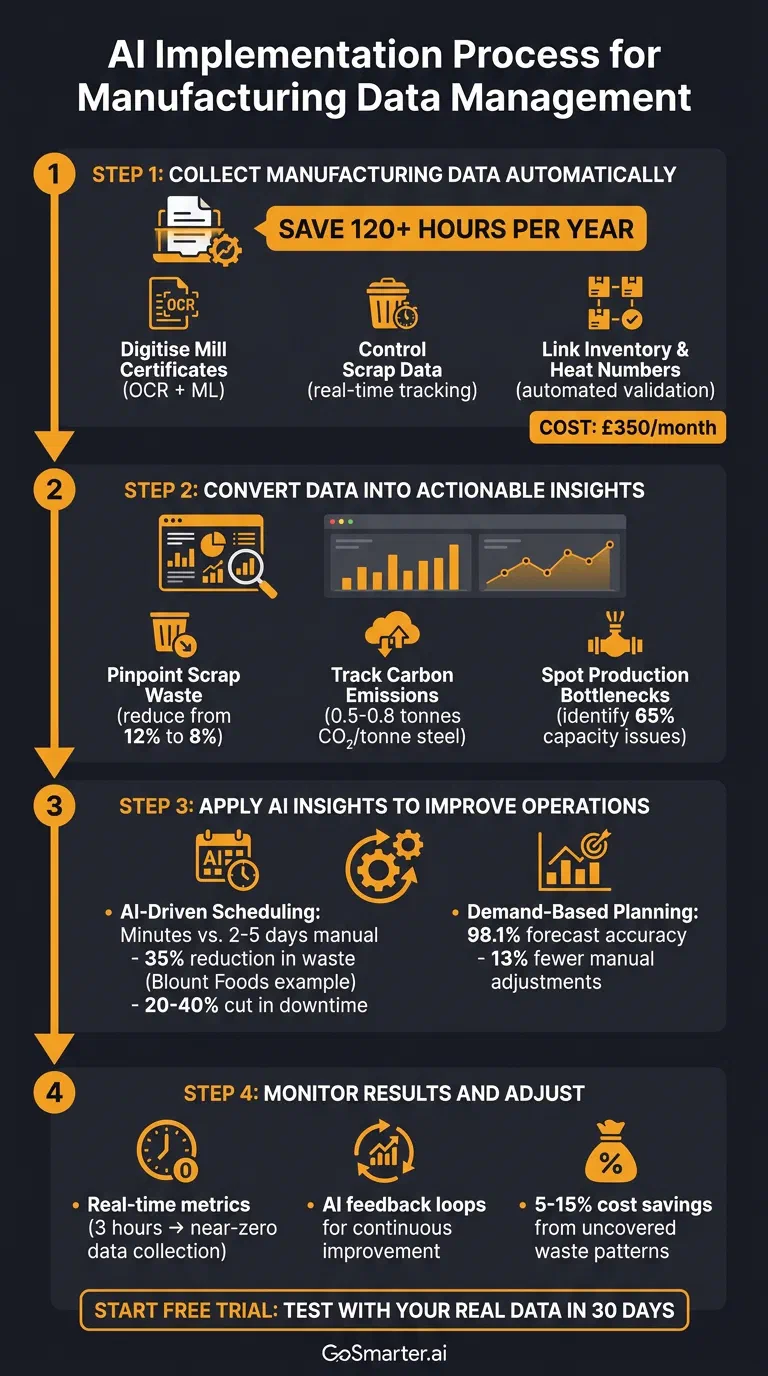
The AI overlay for metals operations: from raw data to better decisions
Step 1: Collect Manufacturing Data Automatically
Smarter decisions start with usable, audit-ready data. Many UK metals plants still rely on manual processes. Those processes are slow and error-prone. They waste time that could be spent solving real production problems.
AI-powered tools like GoSmarter automate data collection at the source. A production manager no longer pulls heat numbers or chemical compositions by hand. The system processes PDFs, checks the data, and links it directly to inventory records in seconds. You get a searchable, audit-ready archive. No more last-minute panic when inspectors show up.
Here’s how AI can handle mill certificates, scrap tracking, and inventory linkage for you.
Digitise Mill Certificates Before Inspectors Show Up
What is a mill certificate? A mill certificate (also called a Material Test Certificate or MTC) is a document issued by a steel mill recording the chemical composition, mechanical properties, and heat number of a batch of metal. It is the primary proof of traceability used in audits.
Material Test Certificates are essential for traceability. Yet most teams still shove them into folders or email threads where they’re impossible to find. GoSmarter’s MillCert Reader changes that. It uses Optical Character Recognition (OCR) and machine learning to pull structured data from even the messiest PDFs. That includes heat numbers, chemical compositions, and mechanical properties. We trained it on real mill certificate layouts, not generic samples. It handles inconsistent formats and lower-quality scans from international suppliers.
The system doesn’t just extract data. It validates it. If there’s a mismatch, like the wrong grade, it flags it for review. Connect your email inbox to the tool and GoSmarter processes mill certificates automatically as soon as they arrive.
“Our tool automatically extracts key data from mill certificates, saving over 120 hours per year.”
The MillCert Reader saves a production manager more than 120 hours a year. Most teams are up and running in under a week[3].
Recover 120 hours of production manager time and payback lands inside the first quarter on labour alone. That’s before counting reduced traceability fines.
Get Scrap Data Under Control
Bad scrap tracking leads to inflated orders and unnecessary waste. AI fixes this. It links heat numbers and material grades directly to your inventory records. No more manual cross-referencing. Feed this verified data into AI-generated cutting plans and 1D stock optimisation and you get accurate cut lists. That reduces overproduction and waste. GoSmarter flags missing test results or out-of-spec values in real time, so you can quarantine affected materials immediately. Start this process at the goods-in stage and your production schedules reflect what’s actually in stock[4].
Link Inventory and Heat Numbers Without the Fuss
When all your data is connected, traceability gets a whole lot easier. GoSmarter pulls heat numbers, material grades, and chemical properties from Material Test Certificates (MTCs). It links them to inventory records automatically. It validates the data against order specs as soon as you enter it. It flags any non-conforming heat numbers or grades before they hit the production floor. The system even renames files based on heat codes, so you can find them during audits.
GoSmarter is an AI overlay, not another system to migrate to. It reads from your existing ERP, Quality Management System (QMS) or shared drive via CSV or REST API with OAuth 2.0. Data is hosted on UK Azure and is never used to train shared models. Heat number data flows into your current stock records without IT projects or downtime. Sample payloads and webhook events sit in the developer docs. You get a searchable archive where you pull up mill certificates in seconds, for an audit or a customer query.
| Feature | Manual Traceability | AI-Automated Traceability |
|---|---|---|
| Retrieval | Manual search by folder or file name | Searchable by heat number or order |
| Data Entry | Typed into an ERP by hand, prone to errors | Data extracted and validated by AI in seconds |
| Audit Prep | Time-consuming reconstruction of audit trails | Continuous, up-to-date, and searchable audit trail |
| Validation | Discrepancies found after material movement | Mismatches flagged immediately at goods-in |
The same heat-number spine then feeds the Scrap Calculator, Cutting Plans and the carbon dashboard. One record, every tool. Once you’ve automated data collection, you can turn those clean records into actionable insights.
Step 2: Convert Data into Actionable Insights
When your data is clean and searchable, AI does what humans can’t. It spots wasteful inefficiencies and turns raw records into real-time insights you can actually use.
AI dives into production logs, material specs, and operational records to uncover patterns that manual analysis would miss. For example, it might link specific cutting patterns to scrap rates across alloys. Or it connects scheduling choices to energy consumption in kilowatt-hours (kWh). Dashboards surface these insights, highlighting anomalies, trends, and areas for improvement. You make decisions based on facts, not hunches [1].
Here’s how AI converts your manufacturing data into results. Real examples below show how to cut waste, lower emissions, and eliminate production slowdowns.
Pinpoint Scrap Waste Instantly
Scrap waste eats into profits. GoSmarter’s optimiser makes your metal go further. It predicts scrap levels before you finalise a layout, so you adjust material usage upfront instead of scrambling to fix problems later.
Track Carbon Emissions with Precision
AI calculates carbon emissions by pairing production data with standard conversion factors. It processes energy use (like kWh or cubic metres of gas), material inputs (tonnes of raw material, alloy types), and process details (furnace temperatures, processing times). The output: scope 1 (direct) and scope 2 (indirect) emissions for each production run.
This is especially useful for metals manufacturers. Energy-heavy processes like melting and heat treatment dominate emissions. For example, GoSmarter’s platform automatically calculates that producing one tonne of reinforcement steel generates roughly 0.5–0.8 tonnes of CO₂ equivalent. The exact figure depends on energy sources and efficiency. With this data, you pinpoint which products, processes, or shifts are the biggest carbon culprits.
Exporting goods? The EU’s Carbon Border Adjustment Mechanism (CBAM) requires reporting embedded carbon (see the metals manufacturing glossary). AI’s precise emissions tracking provides the data you need. It also helps you avoid CBAM tariffs by identifying and optimising high-emission production runs.
Spot and Solve Production Bottlenecks
Bottlenecks slow everything down. They lower throughput, drag out lead times, and pile on costs. The problem? They’re often buried in the details, not obvious from surface-level metrics. Think machines sitting idle because of upstream delays. Or long changeover times. Or inventory stacking up at specific workstations.
AI brings these issues to light. Time-series analysis tracks where production flow slows. Heat maps show inventory build-up. Correlation analysis links delays to upstream events. For example, your finishing line might run at just 65% capacity. The upstream cutting operation produces batches that don’t match the finishing line’s needs, leaving it idle.
AI also uncovers intermittent bottlenecks. These issues only crop up under certain conditions, like material from a specific supplier or during particular shifts. They’re nearly impossible to catch manually. Visual tools like Gantt charts or flow diagrams show the inefficiency. You adjust schedules to fix it. Tackling these bottlenecks boosts throughput and backs up your improvement strategy with measurable results.
Armed with these insights, you can take action and make your operations run smoother.
Step 3: Apply AI Insights to Improve Operations
You’ve pinpointed waste, bottlenecks, and inefficiencies. Now put AI to work in your production operations. The goal? Build schedules that actually work, reduce overproduction, and align resources with real demand. Not gut feelings or outdated forecasts.
The big shift here is speed and precision. Traditional scheduling methods are slow and brittle. Think spreadsheets, Gantt charts, or Material Requirements Planning (MRP) systems that assume infinite capacity. They take days to create. The moment something changes, and it always does, the whole plan falls apart 1. AI tools factor in real-world constraints like machine availability, labour shifts, and tooling limits. They also adapt dynamically as conditions change 1.
Ditch Manual Schedules for AI-Driven Plans
Manual scheduling is a chore. A planner might spend two to five days piecing together a schedule in Excel. Then it crumbles when a supplier is late or a machine breaks down 1. AI tools like GoSmarter’s Cutting Plans cut that to minutes. Feed it your order book and it returns a cut plan sequenced for the lowest scrap on long products. No spreadsheet wrangling. No planner sat in a corner for two days 1.
Take Midland Steel, for example. By switching from spreadsheet scheduling to GoSmarter’s Cutting Plans, they cut planner time from two days to under an hour and recovered the hours that previously went into rebuilding broken plans every Monday morning.
What-if scenarios and rush-job replanning
When a rush order lands, Cutting Plans regenerates a feasible plan in under 60 seconds. It compares scrap, throughput, and on-time-in-full (OTIF) for each option, so you pick the one that protects margin without melting the rest of the week’s plan.
AI scheduling also tackles unplanned downtime. Predictive maintenance and real-time adjustments cut downtime by 20% to 40% 1. If a machine fails, the system reroutes production automatically.
Tackle Overproduction with Demand-Based Planning
You’ve nailed the scheduling. Next, focus on overproduction. Producing too much ties up cash, creates unnecessary scrap, and racks up storage costs. Traditional “push” planning systems prioritise available materials over actual demand. That often leads to bloated inventories 2. AI flips this on its head. Production responds directly to real-time demand 2.
For metals manufacturers, this means producing what your customers need, when they need it. No more speculative stockpiles. The equivalent of “balancing the bird” in metals is yielding every nest of a coil or every drop of a heat. That means using offcuts, identifying remnant stock by heat number, and matching short orders to existing inventory before opening new material.
Constraint-aware AI scheduling lifts throughput wherever yield varies across plants and product types. For service centres and stockholders, that means matching short orders to remnant stock before opening new material. The same AI backbone enforces this automatically 2.
AI fine-tunes your schedules and syncs production to demand. Next, keep an eye on the results and tweak your strategies as needed. There’s always room to improve.
Step 4: Monitor Results and Adjust
You’ve made changes with the help of AI. Now the real work begins. Keep an eye on how those changes play out and make sure they stick. Monitoring isn’t just about spotting problems. It’s about creating a system that keeps improving every single shift. AI tools don’t just help plan and automate. They also make sure the improvements deliver results on the shop floor.
Implementing change is step one. The real value comes when AI monitoring tools track how those changes perform in real time. Data feeds straight back into your operations. You get a continuous feedback loop. No more waiting for monthly or quarterly reviews to spot issues.
Real-Time Metrics: Stop Guessing, Start Acting
Traditionally, monitoring has been slow and reactive. You collect data manually, plug it into a spreadsheet, and lose valuable time before you spot a problem. By then you’ve already racked up unnecessary waste. AI-driven monitoring flips this script. These systems pull data straight from the shop floor and flag problems as they happen.
Take ATI Forge Products, for example. In March 2026, Senior Manager Norman Goco rolled out real-time machine monitoring with Guidewheel. The results were immediate. Daily data collection time dropped from three hours to almost nothing. Operators could now report issues as they occurred, instead of waiting 24 hours for manual reporting to catch up3.
This kind of instant visibility changes everything. Operators get live feedback and act on it immediately. They address a temperature spike, track scrap rates by shift, or keep an eye on energy use. You get faster decisions, less downtime, and a team that takes ownership of the process.
AI Feedback Loops: The Key to Continuous Improvement
Real-time data is only part of the equation. The real value comes when that data feeds back into your operations. AI doesn’t just highlight what went wrong. It suggests what to tweak next. Tools like the ‘6M Change Log’ help document these adjustments and put AI recommendations into context. The catch? Leaders need to stay hands-on. They observe the shop floor and check that AI suggestions align with actual conditions3.
Once you have that balance, AI feedback loops keep learning, adapting, and improving without you micromanaging. The system spots problems, helps you fix them, and gets sharper with every shift.
How AI learns from your historical production data
GoSmarter’s Cutting Plans trains on a rolling 90-day window of your scrap, throughput, and changeover data to refine each new schedule. It does not need a multi-month rebuild project. The model improves quietly in the background. Every time a planner accepts or overrides a suggestion, the next plan reflects what actually worked on your floor.
Try AI Tools on Your Shop Floor
Ready to see what AI can actually do for your shop floor? The quickest way to find out is simple. Test it with your real data. See if it can handle your messy mill certificates, tangled scrap records, or scheduling chaos.
GoSmarter’s freemium model lets you start without budget approval hoops or drawn-out implementation projects. Basic tools for managing scrap and running straightforward calculations are free. Upload your inventory spreadsheets (Excel or CSV) and you’re off.
Start small. Pick one area where AI can make the biggest difference. If your team spends hours every week typing up certificate data, tackle that first. If scrap tracking is a chaotic mess of spreadsheets and guesswork, focus there. Run a parallel trial for two to four weeks. Compare the results to your current process.
Track these five success metrics during the trial:
- Time saved on manual mill cert entry (hours per week)
- Scrap reduction as a percentage of pre-trial baseline (same product mix)
- On-time-in-full (OTIF) for the trial period vs the previous month
- Mill cert processing time from inbox to inventory record
- Scheduling cycle time from order book to confirmed plan
Most teams see a 5–15% drop in scrap cost in the first 30 days. The headline number is measured by comparing pre-trial scrap-per-tonne against the trial period using the same product mix. We share the calculation sheet.
Cutting Plans finds the lowest-scrap sequence for your order book. It runs inside your Microsoft 365 setup and connects to your ERP via REST API. Start with core scheduling. Then add inventory tracking or carbon emissions as your team builds confidence. Begin your trial at GoSmarter.
This short trial phase shows you how AI turns raw data into actionable insights that cut costs and streamline your production. It’s the first step in a cycle of continuous improvement driven by AI.
FAQs
What data should we automate first to get quick wins?
How does AI validate mill certificate data for traceability?
How do we prove the ROI of AI in a 30-day shop-floor trial?
Can GoSmarter use our existing historical metals production data?
Can GoSmarter run what-if scenarios for rush jobs?
Further Reading
1: 5 Best AI-Driven Production Scheduling Tools for Manufacturing
2: The executive guide to AI-driven production planning & scheduling | RELEX Solutions
3: Guidewheel | How ATI Materials Rolls Out New Technology That Sticks: Change Management, Real-Time Data, and Frontline Empowerment
Tags:
About the Author

Editor· Co-founder & Head of Product
Steph Locke is Co-founder and Head of Product at GoSmarter AI — former Microsoft Data & AI MVP building practical tools to cut paperwork and automate compliance for metals manufacturers.