AI Resource Allocation: Lessons from the Shop Floor
- BlogSmarter AI
- Edited by Ruth Kearney
- Blog
- April 24, 2026
- Updated:
Table of Contents Show Hide
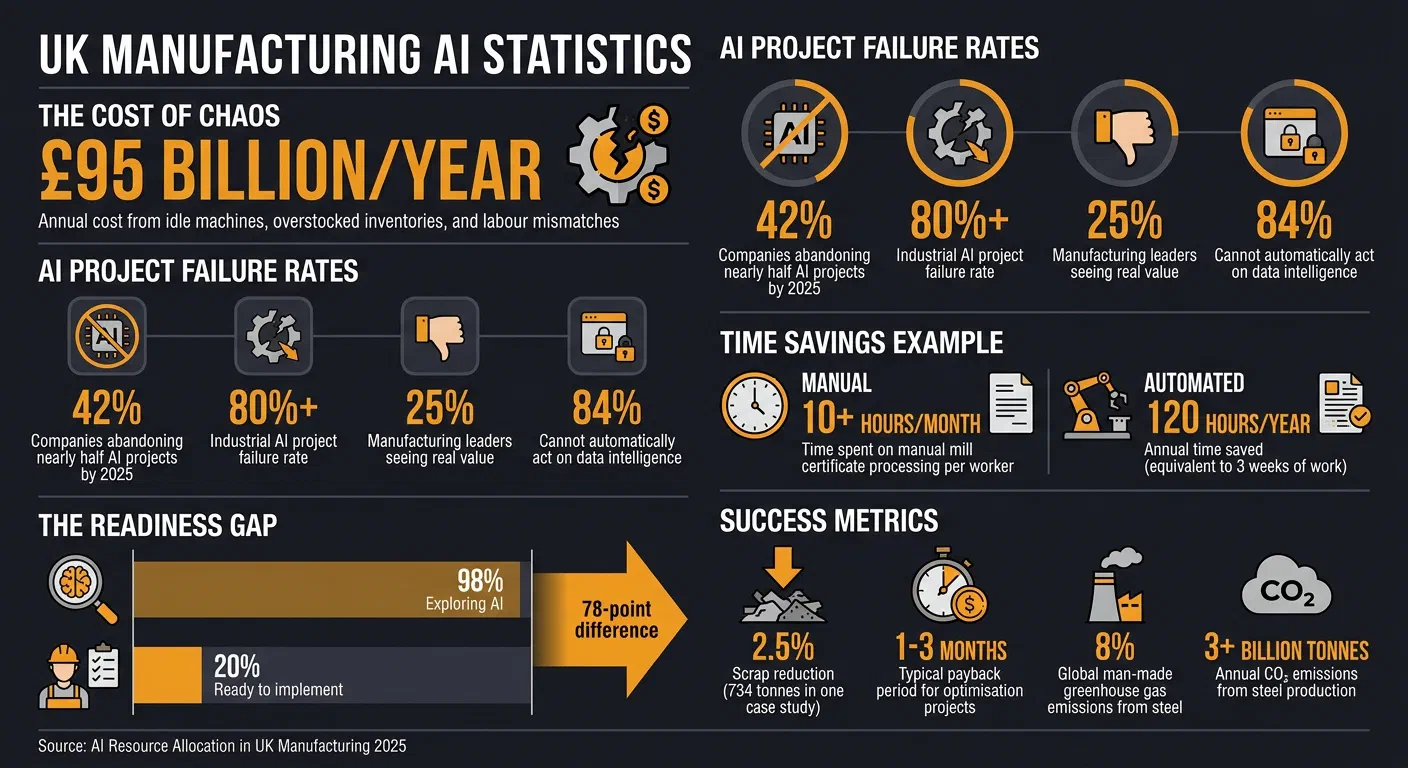
Industry research puts the annual cost of idle machines, overstocked inventories, and labour mismatches at over £95 billion for UK manufacturers. Outdated tools like spreadsheets crumble under pressure. Skilled operators stand idle while production planners scramble.
AI resource allocation determines whether your AI investment delivers or collects dust. Studies suggest that approaching half of all enterprise AI initiatives are abandoned before they deliver value. Not because the technology fails. Because businesses treat AI as an IT upgrade rather than the operational shift it actually demands.
The metals manufacturers who get it right focus on three things:
- Start small: Pick high-impact, low-risk tasks using toolkits for smart manufacturing like automating mill certificate processing.
- Focus on the basics: Clean data, operator buy-in, and integration with existing systems.
- Choose tools that fit: AI tailored for metals manufacturing, like GoSmarter (built by Nightingale HQ), avoids the common pitfalls.
Here’s how to do each one properly.
What is AI resource allocation? AI resource allocation is the practice of deciding where and how to deploy artificial intelligence within your operations — choosing which tasks to automate, which data to feed the system, and how to integrate AI with your existing teams and tools. Done well, it cuts waste and speeds up decisions. Done poorly, it produces expensive tools that nobody uses.
AI Scheduling for Manufacturing: Stop Reacting, Start Optimising
AI scheduling tools read patterns that take a planner hours to spot. They match live machine capacity against open orders, flag bottlenecks before they bite, and help you build production plans you can actually stick to. The result: fewer emergency changeovers, less idle time, and more jobs shipped on time.
Common Mistakes in AI Resource Allocation
When AI projects fail in manufacturing, it’s rarely because the technology doesn’t work. The real culprit? Misallocated resources. Manufacturers often treat data preparation as an afterthought, skip involving operators, and assume their outdated systems will magically sync with AI. The result? Over 80% of industrial AI projects fail, and only 25% of manufacturing leaders see any real value from their AI efforts 1. These failures highlight the importance of getting resource allocation right.
Not Allowing Enough Time for Data Preparation
Factories often underestimate how much work goes into preparing data for AI. Just because sensors are collecting machine data or Enterprise Resource Planning (ERP) systems are logging orders doesn’t mean the data is ready to use. AI needs data that’s clean, consistent, and structured. Not scattered across spreadsheets, maintenance logs, or handwritten notes. Without this groundwork, AI models are prone to errors in areas like inventory management, safety, or audits 2.
And even if you manage to train a model with clean data, the real world doesn’t sit still. Machines wear out, materials vary, and processes evolve, leading to model drift: a slow, steady decline in AI accuracy as conditions change 2. Many manufacturers treat AI as a “set it and forget it” tool, failing to budget for ongoing monitoring and retraining. As one expert put it:
“Structured workflows like data cleaning and onboarding, that’s where agent value is very real today” 2.
Ignoring this reality is like building a race car and forgetting to maintain it. Break the maintenance cycle and performance declines steadily.
Skipping Staff Training and Operator Buy-In
Even the smartest AI is useless if the people on the shop floor don’t trust it. Operators, with years of experience under their belts, are unlikely to follow AI recommendations they don’t understand. If the system feels like a “black box”, they’ll override it. Or worse, ignore it entirely. 3.
Here’s the kicker: while 98% of manufacturers are exploring AI, only 20% feel ready to implement it. That gap isn’t about the tech. It’s about the people 3. Standard training programmes don’t prepare operators to interpret AI outputs in real-world scenarios. The Skillia team sums it up perfectly:
“Every dollar spent on AI tooling without validating human competency is a bet. Maybe people figure it out on their own. Or you end up with a 97.3% accurate system that nobody trusts” 3.
Simon Clark, CEO of Julius & Clark, cuts to the heart of the issue:
“The best AI programmes begin with a problem the workforce cares about - because as in all things, you need to bring the human element with you” 4.
Skipping this step doesn’t just slow progress; it can turn a promising AI system into an expensive piece of unused tech.
Overlooking Legacy System Integration
Integration is where many AI projects hit the wall. Most factories still rely on ERP systems built for planning, not for the real-time demands of AI. Manufacturers often assume these systems will “just work” with AI, only to find out months later that integration is a massive roadblock.
The numbers don’t lie: 84% of manufacturers can’t automatically act on data intelligence, even though they know how critical it is 1. Without proper integration, AI becomes just another isolated tool, requiring manual workarounds that defeat the point of automation.
The fix? Allocate resources upfront for integration. This means building connectors, standardising data formats, and ensuring real-time data flows freely between systems 1. Skipping this step is like buying a state-of-the-art machine and forgetting to plug it in. It’s a costly oversight that can stall the entire project. GoSmarter is browser-based and hosted on UK Azure infrastructure. It connects via REST API with Microsoft Entra and SSO support, or by CSV upload. Your data is never used to train AI models outside of GoSmarter, there is no lock-in, and audit logs remain yours at all times.
Getting these basics right — data preparation, operator buy-in, and integration — makes the difference between AI that delivers and AI that collects dust.
How to Allocate Resources for AI Projects
Tackling the common mistakes in resource allocation means taking a clear, phased approach. The goal? Reduce risk and secure early wins. Factories that thrive with AI in manufacturing don’t blow their budgets on massive, flashy projects. Instead, they start small, allocate wisely, and pick tools that actually get the job done. Let’s break this down.
Start Small with High-Impact Projects
Trying to overhaul the whole factory floor in one go is a recipe for overspending and delays. A smarter move is to begin with a manageable, high-value target like back-office tasks. For example, automating mill certificate processing is a great first step. This task, often done manually, eats up over 10 hours a month per worker and is prone to errors that can compromise traceability. By using AI-powered Optical Character Recognition (OCR), you can eliminate manual entry, cut down on mistakes, and free up engineers to focus on the real challenges [5]. Teams using GoSmarter report fewer production firefights and stronger On-Time In Full (OTIF) performance as a direct result.
Balancing Budget, Time, and People
Once you’ve identified a solid starting point, the next step is to allocate resources carefully. Focus on projects that scale well and keep risks low 2. A good strategy is to start with advisory AI tools, those that make recommendations for human review, rather than jumping straight to fully autonomous systems. This approach not only reduces risk but also builds trust among staff, as they can see and understand how AI makes its decisions. As Ashtad Engineer from AWS explains:
“Industrial AI is about applying AI in controlled, constrained environments, with guardrails and predictability” 2.
Another smart move is to use digital twins and simulations to test AI before rolling it out on the shop floor. Financially, aim for quick payback. The GoSmarter MillCert Reader is in the Workshop tier: £350/month rolling, or £280/month billed annually. Teams recovering over 120 hours of admin each year typically find the whole subscription paid back inside the first quarter [6]. And the same heat-number data feeds Cutting Plans — one record, every tool.
Choose Tools Designed for Metals Manufacturing
When it comes to selecting AI tools, one size does not fit all. GoSmarter is a metals operations platform that sits on top of your existing ERP, Excel, and email workflows. No rip-and-replace required. It combines mill certificate automation, cutting plan optimisation, inventory tracking, and production planning in one toolkit. You don’t need to stitch together four different vendors. Generic shop floor software often falls short in meeting the specific needs of metals manufacturing. You need tools tailored to handle challenges like mill certificate traceability, long product cutting, and scrap tracking [5]. That’s where GoSmarter shines. It’s built for metals manufacturers drowning in manual work. By automating tasks like reading mill certificates, calculating scrap rates, and scheduling production runs, GoSmarter lets engineers focus on what they do best: building. Plus, it integrates with existing ERP systems, so there’s no need for a costly infrastructure overhaul. As the GoSmarter team puts it:
“The production planner works for all long products… It turns a tedious morning job into a five-minute review” [6].
The Return on Investment from Better Resource Allocation
Allocating resources effectively isn’t just a productivity boost. It produces real financial results. AI tools can transform shop floor efficiency, leading to shorter payback periods, reduced scrap rates, and progress towards sustainability goals. But what does that look like in real terms?
Case Study: Cutting Scrap with AI
In August 2025, Midland Steel (operating in the UK and Ireland) tested the GoSmarter Rebar Optimiser in a two-week production trial. The AI system handled 734 tonnes of steel across 193 jobs, achieving an impressive 50% reduction in scrap [7]. For high-volume operations, even a small reduction like this translates into significant material savings and cost cuts. Tony Woods, Managing Director at Midland Steel, summed it up well:
“Smart technology can directly contribute to reducing carbon emissions in steel manufacturing. By integrating AI and digital tracking tools, we have significantly improved efficiency while aligning with our sustainability goals.” [7]
The financial case is clear. For Midland Steel, a two-week trial on 734 tonnes delivered measurable scrap savings. Most cutting optimisation projects pay for themselves within the first quarter [7]. Read the full Midland Steel case study for the numbers. The impact goes further than cost savings — these improvements open the door to broader environmental benefits too.
Aligning Sustainability Goals with AI
Smarter resource allocation does more than save money. It helps manufacturers tackle environmental challenges head-on. Steel production is responsible for around 8% of global man-made greenhouse gas emissions, amounting to over 3 billion tonnes of CO₂ each year. With the EU’s Carbon Border Adjustment Mechanism (CBAM) now in effect, reducing emissions has become a necessity, not a choice.
AI tools like GoSmarter simplify this process by automating carbon footprint tracking and optimising material usage. Cutting scrap, even by a few percentage points, means less energy and fewer emissions tied to wasted steel. And with real-time tracking, sustainability reporting becomes a forward-looking strategy rather than a reactive chore. For manufacturers under pressure from tight margins and stricter regulations, cutting waste while cutting emissions is a genuine competitive advantage. By linking financial efficiency with environmental responsibility, businesses build a more resilient, future-ready operation.
Getting Started with GoSmarter
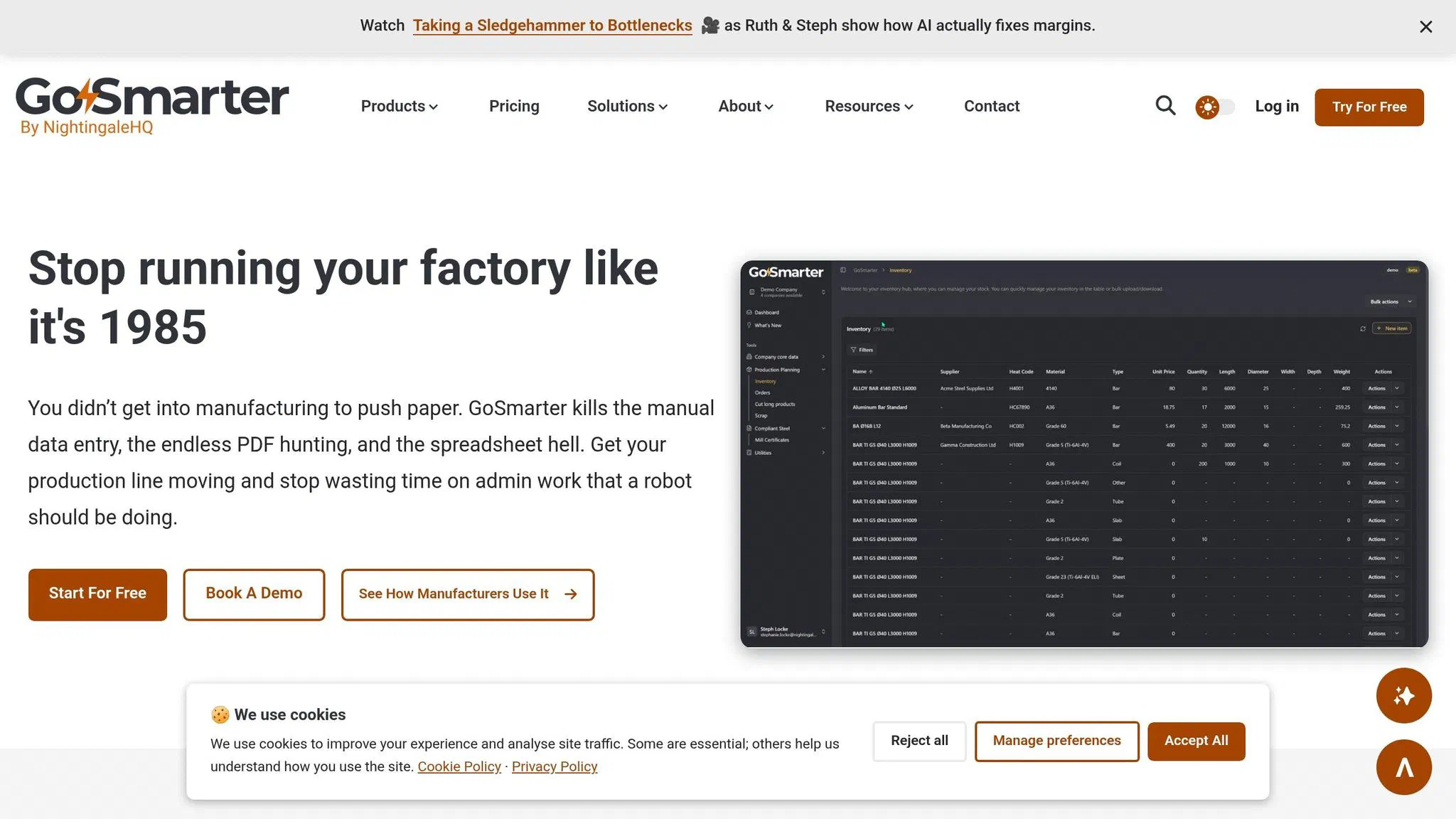
If you’re ready to stop wasting time and money on clunky processes, GoSmarter is designed to get you moving fast. No endless setup, no need to hire a data scientist, and no tearing apart your ERP system. Most users are up and running in hours, not weeks [10]. Let’s break it down.
Try the MillCert Reader on Your Next Batch
The quickest way to claw back lost hours is by automating your document handling. Start with the MillCert Reader. Upload a PDF or scanned mill certificate, and it pulls out all the key details: chemical composition, mechanical properties, and heat codes, without you typing a single word [8].
A production manager at Midland Steel summed it up best:
“I logged in for the first time and was up and running in minutes. What used to take hours every week is done in seconds.” [9]
That’s over 120 hours saved each year, roughly three weeks of time you can spend on something that actually matters [8]. You get a 7-day free trial, and MillCert Reader’s Workshop tier runs £280/month billed annually [8].
Book a Demo
Once you’ve seen the time savings from the MillCert Reader, why stop there? Dive into everything GoSmarter can do. Whether you’re looking to streamline production planning, cut down on scrap, or keep your compliance tracking airtight, we’ve got you covered. Book a demo to see it all in action, or try the five-minute interactive walkthrough on our site. No login needed [10].
From automating mill certs to optimising cutting plans or building an ISO 9001 audit trail, GoSmarter slots right into your current setup without a fuss. Visit GoSmarter to get started.
FAQs
What data do we need before using AI on the shop floor?
Before bringing AI into your production environment, start by collecting accurate, real-time data about your operations. Think machine performance metrics, maintenance schedules, scrap rates, and inventory levels. These details give you a clear picture of what’s happening on the shop floor.
Make sure the data is clean, consistent, and current. Without this, AI can’t deliver reliable insights or help you streamline workflows. Solid data is the backbone for things like predictive maintenance and cutting down on waste.
How can we get operators to trust and use AI recommendations?
Winning over operators when introducing AI means tackling scepticism head-on and showing how it genuinely helps. Get them involved from the start - don’t just drop a new system on their laps. Explain how it makes their work smoother, not harder, and offer training to address any worries they might have.
One way to break the ice is by showing quick, tangible results. For example, automating repetitive tasks like reading mill certificates can immediately free up time and reduce frustration. When operators see these kinds of benefits early on, they’re far more likely to give the system a chance.
The key is to make AI fit naturally into their daily routines. If it delivers real, measurable improvements without adding complexity, operators will start to view it as a reliable tool they can trust - not some flashy gimmick or a threat to their job.
How can AI integrate with our existing ERP and legacy systems?
Integrating AI with Enterprise Resource Planning (ERP) and older systems isn’t without its hurdles. One practical solution is a lightweight integration layer — a bridge between your new AI tools and your existing software so they can share data without changing your core setup. It organises scattered data into a standard format and avoids disruptive overhauls.
Security and AI governance are non-negotiable. GoSmarter connects via REST API with Microsoft Entra and SSO authentication, or by CSV upload. Data is hosted on UK Azure infrastructure and is never used to train models. Automating tasks like capacity planning then makes your existing systems work harder without any lock-in risk.
Further Reading
1: The Context Gap: Why Manufacturing AI Fails Without Human… | Tulip
2: AI Agents on the Manufacturing Shop Floor: Three Expert… | Tulip
3: The AI Readiness Gap in Manufacturing Isn’t Where You Think - Skillia.AI Blog
4: AI in Manufacturing: Why Leaders Hesitate – and How to Move from Paralysis to Progress | by Simon Clark | Medium
About the Author

Editor· Co-Founder & CEO
Ruth Kearney is Co-Founder and CEO of GoSmarter AI — driving commercial growth and strategic partnerships to help metals manufacturers adopt AI and digital tools that actually deliver on the shop floor.