
AI Production Scheduling for Metal Fabricators: Where to Start
- BlogSmarter AI
- Edited by Steph Locke
- Blog
- October 21, 2026
- Updated:
Table of Contents Show Hide
Start AI production scheduling with one bottleneck, not an Enterprise Resource Planning (ERP) replacement. Your planner needs fewer spreadsheet repairs, not another screen full of guesses.
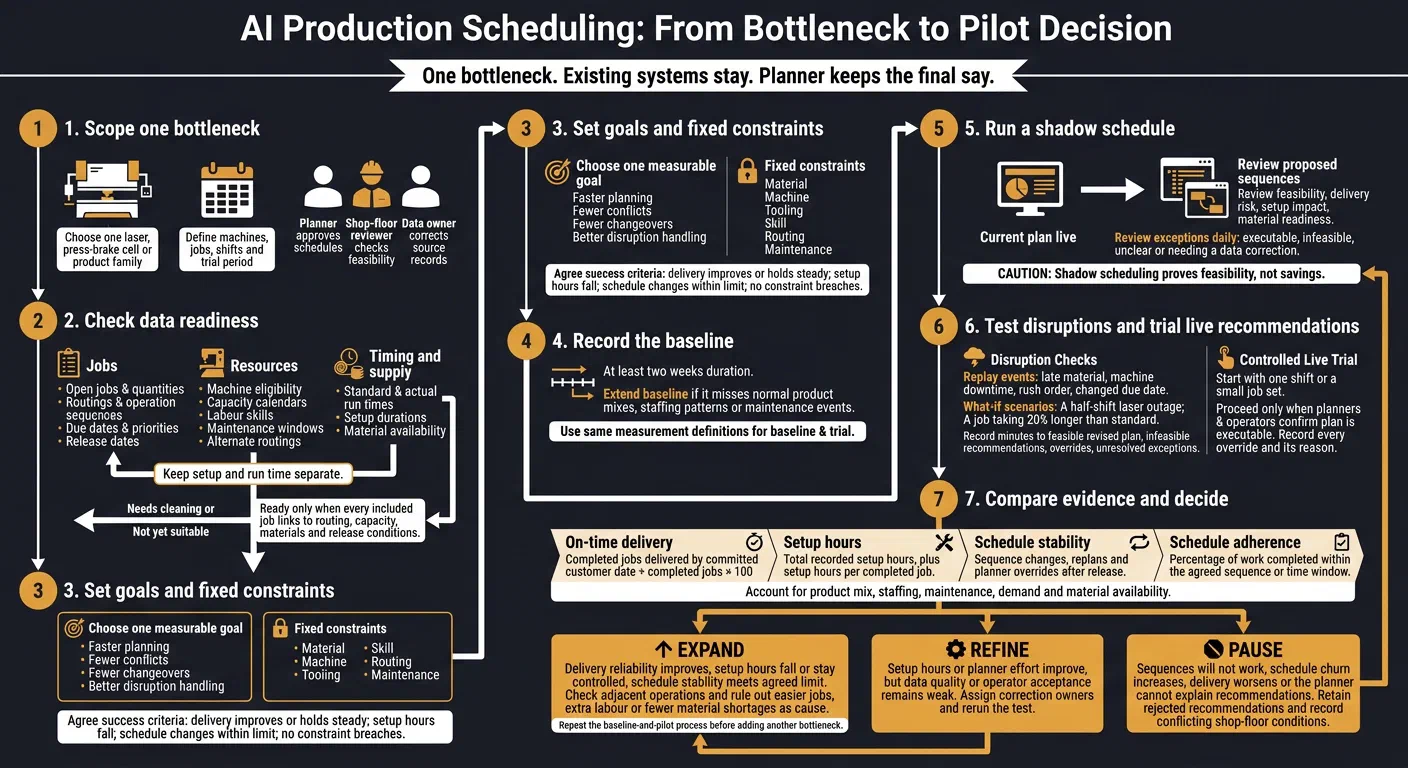
This is a how-to for your first four to six weeks. Other posts in this series compare named scheduling tools or explain AI inside an ERP. Here, we cover how to run a fair trial on one queue.
GoSmarter, built by Nightingale HQ, sits on top of your existing ERP and spreadsheets, with no rip-and-replace. Judge any trial on finished orders, setup hours and schedule stability, not a busy-looking machine.
Here’s what we’ll cover:
- Check whether your job, material and capacity records can support a workable plan.
- Record at least two weeks of baseline results before testing live recommendations.
- Test disruptions, including a job taking 20% longer than planned.
- Decide whether to expand, fix the gaps or pause.
Your planner keeps the final say. Let’s start with the queue that keeps wrecking your week.
What is AI production scheduling?
AI production scheduling uses software to propose a job sequence from due dates, machine capacity, material, routings and setup times. Your planner reviews, locks or rejects each proposal. The software does the sorting. You make the call.
Check Whether Your Scheduling Data Is Ready
Audit only your chosen bottleneck. List its tooling, material, labour and maintenance constraints.[1] Scheduling software exposes every error in routings, calendars and setup data, so find them first.[3]
Gather the Data Your Schedule Needs
Use this table to audit the jobs in your trial. Give each job and operation a consistent identifier (ID) so you can compare planned work with actual production.
| Data field | Source | Common quality issue | Minimum acceptable standard |
|---|---|---|---|
| Open jobs and quantities | ERP or production-control system | Cancelled, duplicate or completed orders still appear as open | Each job has one ID, quantity and status |
| Routings and operation sequences | ERP, Manufacturing Execution System (MES) or routing master | Old steps, skipped operations or inconsistent names | Every job has an approved routing in order |
| Machine eligibility | ERP work centres or engineering records | Machines look interchangeable despite different tooling or size limits | Each operation has at least one machine that can do the work |
| Capacity calendars | ERP, workforce system and maintenance plan | Calendars omit breaks, holidays, overtime or maintenance | Calendars show shifts, breaks and planned downtime |
| Standard and actual run times | ERP standards and MES or shop-floor records | One standard time covers different gauges or materials | Durations reflect recent production |
| Setup durations | ERP, operator records or MES | Every changeover uses one generic setup time | Setup time is set per material, thickness, tool or product family |
| Due dates and priorities | ERP, customer-order system and planners | Dates conflict, have passed or are missing | Each job has an agreed due date and a priority rule |
| Material availability | Material Requirements Planning (MRP), inventory and purchasing records | Stock looks free despite allocations or late delivery | Records confirm availability, allocation or a receipt date |
| Release dates | ERP, engineering and quality systems | Jobs release before drawings, programmes or materials are ready | Each job has a clear earliest start date |
| Labour skills | Skills matrix or training records | Qualifications have expired, or every operator appears able to do every job | Records name the certifications each job needs |
| Maintenance windows | Maintenance-management system | The schedule omits planned maintenance | Fixed downtime is in the schedule before planning starts |
| Alternate routings | Engineering and work-centre master data | Teams use alternatives that the system doesn’t record | Each alternative names the machine, constraints and time standard |
Keep setup and run time separate. Setup usually happens once per job. Run time applies per piece or batch.[2]
Check standards against recent actuals. Measure complete changeovers, from tooling retrieval to first-off approval. Plan against the capacity your shop really has, not the capacity on a brochure.[4]
Correct Data Errors and Assign Owners
Fix audit issues before you import data. Give each issue a named owner and log anything unresolved.
- Missing due dates: customer service or production control. Agree one date. Label it as the promise, dispatch or on-site date.
- Duplicate jobs: production control. Reconcile IDs and remaining quantities. Keep genuine split orders and rework.
- Obsolete routings: manufacturing engineering. Check operation order, eligible machines and tooling against current practice.
- Inconsistent units: ERP administrator. Standardise times in minutes or hours, dimensions in millimetres, and weights in kilograms or tonnes.
- Inaccurate calendars: operations and maintenance. Confirm shifts, subtract breaks, and block bank holidays and planned maintenance.
- Overridden setup times: area supervisor and engineering. Log the reasons and measure complete changeovers. Correct the standard or add the missing constraint.
Mark the area ready only when every included job links to routing, capacity, materials and release conditions. Otherwise, mark it needs cleaning or not yet suitable.[1]
Set Clear Goals for AI Scheduling
Set one measurable trial goal: faster planning, fewer conflicts, fewer changeovers or better disruption handling.
Set Priorities and Non-Negotiable Constraints
- Protect feasible customer due dates, especially contracted or urgent work.
- Cut avoidable setup hours, including repeated material swaps and tooling changes.
- Improve bottleneck utilisation and keep the plan stable. Don’t chase maximum utilisation on every machine.
Treat material, machine, tooling, skill, routing and maintenance limits as fixed.
Track on-time delivery, weekly setup hours, bottleneck utilisation, schedule adherence and the number of changes after release.
Test What Any Scheduler Claims
Judge each function in this table during the trial. Don’t assume it works.
| Activity | The manual way | What to test |
|---|---|---|
| Sequencing | You sequence jobs in a spreadsheet. | Does the proposed sequence respect due dates, capacity, materials, routing and setups? |
| Constraint checks | You check constraints across separate records. | Does the tool show why a job is at risk? Can your planner verify the reason? |
| Disruption handling | You reshuffle jobs by hand. | How long does a revised plan take? Does it show affected jobs and trade-offs? |
Keep human approval and a change record for every plan you release.
Check How GoSmarter Fits Your Shop
GoSmarter works alongside your ERP. Its Cutting Plans cover one-dimensional material such as bar, tube and structural sections. The plan explains each decision. You can lock bars, exclude unavailable stock, override cuts and replan in seconds. Metals Manager holds the stock record, and both tools share one heat-number record.
Test any wider sequencing, such as laser or press-brake queues, against the table above. Mark each item verified only when you have proved it works. Otherwise, mark it unconfirmed.
- Constraints and explanations: Check material, machine, routing, tooling, labour, capacity and downtime rules. Require a reason for every at-risk job.
- What-if tests: Check the effect on due dates and setup hours in this scenario: a half-shift laser outage plus a job taking 20% longer than standard.
- Human control: Test job locking, priority changes and rejecting proposals. Check that the audit trail records override reasons.
- Data integration: Confirm field sources, owners, formats and update frequency. Check whether you can see stale or missing data.
- IT checks: Ask IT to test export and import through the Application Programming Interface (API) or CSV files. GoSmarter stores your data on Microsoft Azure in UK data centres. GoSmarter uses de-identified certificates to improve its own extraction models. It never shares them with other customers or third-party AI providers.
- Replanning after disruption: Confirm how breakdowns, late material and new orders enter the plan. Check what triggers recalculation and who approves release.
AI-assisted scheduling tools typically overlay your ERP and MES, so you keep both.[9] For the wider picture, see the shop floor planning software guide.
Trial AI Scheduling in One Production Area
Once your data and constraints are ready, test in one live area before you expand.
Limit the trial to one laser, press-brake cell, product family or bottleneck. Keep existing systems in place. Define the machines, jobs, shifts and trial period.
Give three people clear roles. One planner approves schedules. One shop-floor reviewer checks feasibility. One data owner corrects source records.
Get manager approval on the success criteria before you start. Delivery must hold or improve while setup hours fall. Schedule changes must stay within the agreed limit. No released plan may breach a safety, quality, material or machine limit.
Record a Baseline and Run a Shadow Schedule
Check the inputs against shop-floor records: jobs, routings, times, calendars, tooling, skills, material and due dates.
Record at least two weeks of baseline results. Extend this if those weeks miss normal product mixes, staffing patterns or maintenance events.[5] Start with only the data that the decision needs.[10]
Keep your current plan live while you run a shadow schedule. Check each proposed sequence for feasibility, delivery risk, setup impact and material readiness. Have the planner and shop-floor reviewer review exceptions daily. Classify each recommendation as executable, infeasible, unclear or needing a data correction.
Release live recommendations for one shift or a small job set first. Proceed only when planners and operators confirm they can run the plan. Record every override and its reason.
Shadow scheduling proves feasibility, not savings. Measure operating results during the live trial.[5]
Test Common Scheduling Disruptions
Once the shadow schedule is stable, replay four events using real jobs: late material, machine downtime, a rush order and a changed due date.
Check that unavailable material blocks the affected work. Confirm replacement machines have the right capability. Check that urgent work shows which jobs it displaces and which extra setups it creates.
For each test, record:
- Minutes needed to produce a feasible revised plan.
- Infeasible recommendations.
- Overrides and unresolved exceptions.
The planner checks the sequence. The supervisor explains which orders face delays. Operators confirm they can run the plan.
Measure Delivery, Setup Time and Schedule Stability
Use the same definitions throughout the baseline and the live trial. Agree the adherence tolerance before you collect results. Do not loosen it once the trial starts.
| Measure | Definition |
|---|---|
| On-time delivery | Jobs delivered by the committed customer date ÷ completed jobs × 100. Keep customer promises separate from internal operation dates.[6] |
| Setup hours | Total recorded setup hours, plus setup hours per completed job. |
| Schedule stability | Sequence changes, replans and planner overrides after release. Record the reasons. |
| Schedule adherence (supporting) | Percentage of work completed within the agreed sequence or time window.[7] |
Compare results with the baseline. Allow for product mix, staffing, maintenance, demand and material availability.
Report results in UK format and never estimate savings. Count only what you measured. Lower setup hours mean nothing if deliveries slip, good output falls or scrap rises.
Prepare for a GoSmarter Trial Review
After the shadow trial, use a review to decide whether the test is ready to grow.
Prepare a short brief naming one recurring bottleneck and one named planner. Attach the records the review needs:
- Sample job records, routings, quantities, promised dates, actual finish dates and current work in progress (WIP).
- Machine and labour calendars, planned maintenance, holidays, shifts and downtime.
- Setup times, tooling rules, material status and sequence constraints.
Flag missing records. Don’t hide them.
Include the bottleneck supervisor and a manager who can approve the scope. Ask the planner to explain the current schedule, manual workarounds, priority rules and missing constraints. Agree what the data supports, what needs correcting and how you’ll check recommendations. Set responsibilities and a review date.
A 7-day free trial, then 50% off your first month: £90 on Starter.If the trial covers cutting, the Cutting Plans annual fee pays back in about 2.3 months on the stated inputs in our payback model.
Decide Whether to Expand, Refine or Pause
- Expand when delivery reliability improves, setup hours fall or stay controlled, and schedule stability meets the agreed limit. Rule out easier jobs, extra labour or fewer material shortages as the cause.[5]
- Refine when setup hours or planner effort improve, but data quality or operator acceptance stays weak. Give each correction an owner and rerun the test.
- Pause when sequences won’t work, schedule churn rises, delivery worsens or the planner cannot explain recommendations. Keep rejected recommendations. If planners keep rejecting the same type, look for a missing constraint or bad source data.[8]
Record the decision and next actions. Before you add another bottleneck, confirm its data, capacity, setup, training and ownership needs. Reuse the same baseline and measurement process so you can compare the evidence.
FAQs
How do I choose between competing bottlenecks?
Start with the bottleneck causing the most daily disruption and spreadsheet work. Don’t try to fix everything at once.
Run a four-to-six-week trial in that one area. Track setup hours, schedule stability and on-time delivery. Use those measures to judge results and build trust before you expand.
Can I trial AI scheduling with incomplete run-time data?
No. Reliable schedules need accurate, complete run-time data. Missing durations or lead times steer decisions wrong.
Before the trial, check your bills of materials, routings and work centre definitions. Bring them up to date. Run the system alongside your existing process for one or two weeks to spot and fix gaps.
How do I separate scheduling gains from normal production variation?
Before the trial, set a baseline for four measures: on-time delivery, weekly setup hours, schedule changes after release and planner overrides.
Compare the baseline weeks with the live trial weeks. Use the same job definitions and a similar product mix. Note any change in staffing, maintenance or material availability that could explain the result.
A gain only counts if it holds once you account for those changes.
References
1: Guide to making the production plan, Cleverence
2: Setting up routings, work centers and standard times, Carbon
3: Finite capacity scheduling, GeoBusinessIQ
4: Finite capacity scheduling for metal fabrication, EZIIL
5: Production planning and scheduling for AI in manufacturing, AI for Manufacturing
6: Schedule adherence vs on-time delivery, User Solutions
8: AI in production planning and scheduling, Intuz
9: How to compare AI production scheduling software, Humble Operations
Drill deeper
- AI Tools for Production Scheduling in Metals
Go here to compare named scheduling tools once your trial data is clean.
32 min read
- AI Capacity Planning for Metals Factories
Go here for capacity planning and measured results after the first trial.
13 min read
About the Author

Editor· Co-founder & Head of Product
Steph Locke is Co-founder and Head of Product at GoSmarter AI — former Microsoft Data & AI MVP building practical tools to cut paperwork and automate compliance for metals manufacturers.